NETGEAR is aware of a growing number of phone and online scams. To learn how to stay safe click here.
Forum Discussion

tomiaurednik
Mar 29, 2017Tutor
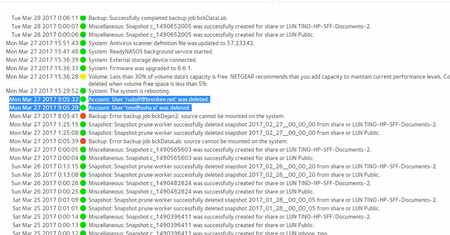
User has been Auto deleted - all data lost
Netgear RN10400 , fw: 6.6.0, 2 x 1TB, RAID 1. User has been Auto deleted - all data lost. Can not acces local user home dir?!? Can someone check this? Or tell me, in which log can I check th...
- Apr 11, 2017
Please if you haven't already. Have a read of Having ReadyCLOUD problems since 3/30/17?
This announcement has been updated over time.
I'm going to mark this as the solution to make sure those visiting this thread see this post.


britrb
Apr 03, 2017Guide
"Having toggled ReadyCLOUD back ON, you may want to browse to https://readycloud.netgear.com/client/en/welcome.html, sign in, and see if you can discover and manage the NAS there."
Done that, no joy.

douglas_cheung
Apr 03, 2017NETGEAR Expert
Britrb,
"Having toggled ReadyCLOUD back ON, you may want to browse to https://readycloud.netgear.com/client/en/welcome.h
Done that, no joy."
At what stage above did you fail? Following is the whole list of things I imagine you went through...
1. go to //readycloud.netgear.com
2. sign in
3. discover
4. see ReadyNAS on the list
5. select "manage" to get to the admin UI
6. Get into admin page, go to Cloud, turn on ReadyCLOUD
7. Exit everything and try to log in to the device again from //readycloud.netgear.com, and use your ReadyCLOUD credential
While in your Admin account, take a look to see your ReadyCLOUD user account is still there.
Doug
- britrbApr 03, 2017Guide
Bingo! Discovered my name was my email addy, so changed it to my name because you cant have the name the same as the email! Remoted to the office and now down/up-ing all the things!
Thanks for making me think a bit harder Doug :)
- douglas_cheungApr 03, 2017NETGEAR Expert
Glad to be helpful, and even more glad that you are back in action.
- britrbApr 03, 2017Guide
Also I'm now stuck with [admin] as my admin user name, is there any way I can change that?
- douglas_cheungApr 03, 2017NETGEAR Expert
britrb,
I actually don't recommend that. It is against my design philosophy. ReadyNAS GUI does not give user the ability to change the admin name to anything else.
If you were able to do it before, you must have accessed ReadyNAS through shell or some other back door. Once you are in Linux, of course you change the admin name. But that is a "violation" of standard use. NETGEAR tech support would have reasons to decline support. Unless you are really comfortable with Linux and have a legitimate reason, don't change "admin" to anything else. You will have all kinds of troubles/conflicts later on in using the system.
My 2 cents...
Doug
 1793Apr 03, 2017Tutor
Yes, If i understand the directions every time I'm asked for Admin or log in info I CANNOT log in. I CANNOT get into Admin page
- britrbApr 03, 2017Guide
Try the user name admin and the password erm password
- britrbApr 03, 2017Guide
or your own password if you changed the Admin password.
- 1793Apr 03, 2017Tutor
Is the default admin, password is the password, if so then yes I have tried this many times
- britrbApr 03, 2017Guide
Username admin
Password [your own password]
Related Content
NETGEAR Academy

Boost your skills with the Netgear Academy - Get trained, certified and stay ahead with the latest Netgear technology!
Join Us!
