NETGEAR is aware of a growing number of phone and online scams. To learn how to stay safe click here.
Forum Discussion

tomiaurednik
Mar 29, 2017Tutor
User has been Auto deleted - all data lost
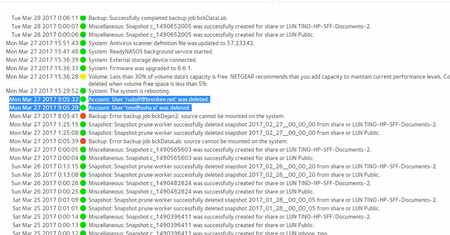
Netgear RN10400 , fw: 6.6.0, 2 x 1TB, RAID 1. User has been Auto deleted - all data lost. Can not acces local user home dir?!? Can someone check this? Or tell me, in which log can I check th...
- Apr 11, 2017
Please if you haven't already. Have a read of Having ReadyCLOUD problems since 3/30/17?
This announcement has been updated over time.
I'm going to mark this as the solution to make sure those visiting this thread see this post.


Sokudoningyou
Apr 03, 2017Star
So, I'm guessing I got hit by that ReadyCloud bug, since I couldn't get in to my share (which I had mapped to my laptop). Did an OS reinstall to reset the password, and finally managed to get in to the web admin, and then found out my share had disappeared, along with the snapshots that should have been there to restore such a thing. I had three 4TB disks and one 6TB disk, and I need to obviously try to recover the files. There's about 4TB of files that got deleted (so not a ton, thankfully), but since I had it in X Raid, I'm assuming any sort of attempt to recover means I'll need to connect all of the drives at once to my laptop, correct? Or is there another way to do this disk by disk? I'm aware I need a specific program for recovery (and I'm looking in to which one to use), all I need to know is how I'm connecting the drive (or drives) to do it.
- mdgm-ntgrApr 04, 2017NETGEAR Employee Retired
Sokudoningyou wrote:
So, I'm guessing I got hit by that ReadyCloud bug, since I couldn't get in to my share (which I had mapped to my laptop). Did an OS reinstall to reset the password, and finally managed to get in to the web admin, and then found out my share had disappeared, along with the snapshots that should have been there to restore such a thing.
The home folder for the deleted ReadyCLOUD user would have been deleted. You should see as much in the status log. When a share is deleted all the snapshots on the share are deleted as well.
Sokudoningyou wrote:
and I need to obviously try to recover the files.
O.K.
Sokudoningyou wrote:
There's about 4TB of files that got deleted (so not a ton, thankfully)
Well your definition of "a ton" is interesting. That is a lot of data.
Sokudoningyou wrote:
I'm assuming any sort of attempt to recover means I'll need to connect all of the drives at once to my laptop, correct? I'm aware I need a specific program for recovery (and I'm looking in to which one to use), all I need to know is how I'm connecting the drive (or drives) to do it.
Yes with RAID-5 you need at least n-1 disks where n is the number of disks and that's assuming that the RAID array is redundant.
Well your definition of "a ton" is interesting. That is a lot of data.
Sokudoningyou wrote:
I'm aware I need a specific program for recovery (and I'm looking in to which one to use), all I need to know is how I'm connecting the drive (or drives) to do it.
There are multiple different software packages out there. Also did you get our email? If not you may wish to send an email in to [email protected] (from a valid MyNETGEAR email account) with your logs zip attached.
For now you should boot to volume read-only mode. You don't want any further writes to be made to your volume as they would reduce the chances of data recovery.
- SokudoningyouApr 04, 2017Star
If it's in read only mode, can I still retrieve logs?
- JennCApr 20, 2017NETGEAR Employee Retired
Hello Sokudoningyou,
We’d greatly appreciate hearing your feedback letting us know if the information we provided has helped resolve your issue or if you need further assistance.
If your issue is now resolved, we encourage you to mark the appropriate reply as the “Accept as Solution” or post what resolved it and mark it as solution so others can be confident in benefiting from the solution.
The Netgear community looks forward to hearing from you and being a helpful resource in the future!
Regards,

Related Content
NETGEAR Academy

Boost your skills with the Netgear Academy - Get trained, certified and stay ahead with the latest Netgear technology!
Join Us!
