NETGEAR is aware of a growing number of phone and online scams. To learn how to stay safe click here.
Forum Discussion

tomiaurednik
Mar 29, 2017Tutor
User has been Auto deleted - all data lost
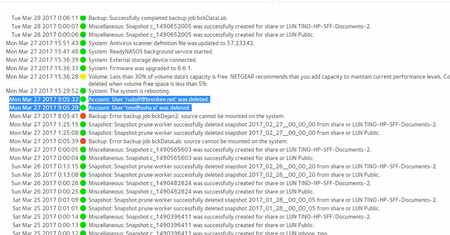
Netgear RN10400 , fw: 6.6.0, 2 x 1TB, RAID 1. User has been Auto deleted - all data lost. Can not acces local user home dir?!? Can someone check this? Or tell me, in which log can I check th...
- Apr 11, 2017
Please if you haven't already. Have a read of Having ReadyCLOUD problems since 3/30/17?
This announcement has been updated over time.
I'm going to mark this as the solution to make sure those visiting this thread see this post.


_shaw
May 02, 2017Aspirant
Dear all. I have followed the current posts regarding this issue. Placed my ReadyNas in Technical Support mode, sent the required details to readycloud support from my MyNetgear registered email.
Has anyone who has done this received an acknowledgement? I have not, I'm a bit anxious.
Has anyone who has done this received an acknowledgement? I have not, I'm a bit anxious.
 sassinemichelMay 02, 2017Star
Yes, I also know there are others who have been contacted by Netgear's engineers to try and recover the data, but most of it is not recoverable
I asked on this forum a few days ago now if there's an answer to how Netgear is going to bear the liability for the data lost but I'm not receiving any answers
- mdgm-ntgrMay 02, 2017NETGEAR Employee Retired
_shaw is that using the same user you use to post on the community or a different one?
If you PM me I can lookup the user to see where your case is at.
- sassinemichelMay 02, 2017Star
mdgm are you purposefully not answering my question?
- mdgm-ntgrMay 02, 2017NETGEAR Employee Retired
sassinemichel you're already in contact with support and customer service so best to continue your discussions with them.
Support is still working to attempt to recover more of your data than they've been able to so far. They may be unsuccessful in this but that's the next step.
Data recovery attempts can be quite time consuming when it's not straightforward, as we've found in your case. They can even be completely unsuccessful sometimes. That's one of the reasons why you need to have a backup of important data available to restore from.
We put so much time into the backup features we have because no important data should be stored on the one device, no matter what that device is. If the primary copy of data is on your PC then the copy on your NAS is a backup.
We'd much rather have discussions about what level of backups is appropriate for your use case before problems are run into, than to have the discussion afterwards.
Related Content
NETGEAR Academy

Boost your skills with the Netgear Academy - Get trained, certified and stay ahead with the latest Netgear technology!
Join Us!
