NETGEAR is aware of a growing number of phone and online scams. To learn how to stay safe click here.
Forum Discussion

NAStools
Mar 23, 2016Luminary
Apps by NAStools
Hi, everyone!
I've made some updates to a few already available apps, and released some new ones.
See below for download links (click the Version link). amd64 for Intel units, armel for M...


o0Ravi0o
Feb 01, 2017Aspirant
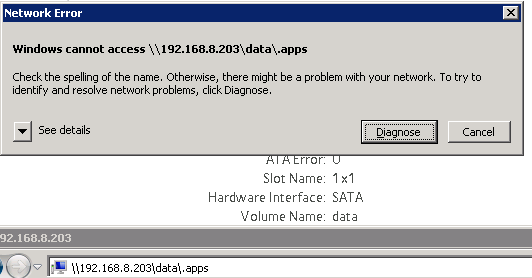
kohdee, tried that too "\\192.168.8.203\data\.apps", however, I still get the same message. :smileysad:
My NAS IP: 192.168.8.203
Volume name: data

kohdee
Feb 01, 2017NETGEAR Expert
If your volume name is data, then this works.
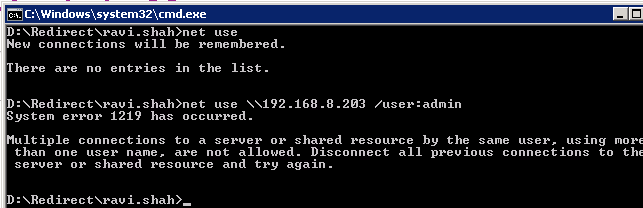
You'll need to use a combination of net use /delete and net use /user:admin to ensure you're authing as admin. The data share (or whatever you named your volume) does not show up unless you are authing as admin. Close all explorer windows and reconnect. It will show up if you are correctly auth.
My previous screen shot shows the explorer path working. This screen shot shows mapping rive
- o0Ravi0oFeb 01, 2017Aspirant
kohdee, thanks for directing me to "net use" its the first time I tried to use it. On trying the steps you mentioned, which seems to be the standard approach (did it after understanding the proper syntax), it didn't seem to do it for me. On reading up a few articles on Microsoft and Superuser's websites I realise a plethora of people are facing issues with just using "net use" commands. They suggest restarting the server/machine as a fix.
I have a few things that I am working on and can't afford to restart it. I shall try that later and post back. I wish there was a method which didn't involve shutting down/logging off my machine.
Links that I read:
Have to try the method outlined here too:
http://www.petenetlive.com/KB/Article/0000556
- SandsharkFeb 01, 2017Sensei
Go into the Windows credentials manager and see if there are any stored credentials for the NAS. If there are, delete them, log off Windows and back on (or reboot), and try again.
You can get to the credentials manager by typing "cred" in the search box, and one of the autocomplete options will be credentials manager.
- o0Ravi0oFeb 01, 2017Aspirant
Sandshark, I had checked the Windows credential manager too. It was surprisingly all empty for me. It didn't have any saved credentials.
- bedlam1Feb 02, 2017Prodigy
I have installed Transmission NT but cannot get Sickrage or Couchpotato to connect to it, can someone help me out on what i should be entering for Hostname and Port data
- JBDragon1Feb 19, 2017Virtuoso
Home Name is the computer or NAS you have the software installed on and the PORT number is the port it's using. Your Web brwoser for example uses PORT 80.
So take my software running on my ReadyNAS 516. I have a manually assigned IP to that NAS as 10.0.0.100. So it never changes. Do do this with your Router. You SHOULD do it!!! So I'm running PLEX on my NAS, the port it's using, that I have it is 32400. So if I enter in my Web browser (10.0.0.100:32400) and hit enter, PLEX pops up. I'm using NZBGet for grab files, not Transmisstion. It's port number is 6789. So I can access it by enter (10.0.0.100:6789) and it pops up and asks for my login name and password. Anything wanting outside access to the Internet is going to need a port. Sometimes you can use 0.0.0.0 or Localhost. Better to stick with the IP address for the device you're trying to access.
These ports that are being used like 32400 and 6789 also also be Port forward, which you also do in your router. You would forward those ports to the device running the software, which is why it's also important to lock each device to a IP address that will never change on you.
Anything else?


Related Content
NETGEAR Academy

Boost your skills with the Netgear Academy - Get trained, certified and stay ahead with the latest Netgear technology!
Join Us!

