NETGEAR is aware of a growing number of phone and online scams. To learn how to stay safe click here.
Forum Discussion

Retired_Member
Aug 02, 2016ReadyNAS 316 - Failed Joomla Install
I was trying to install joomla, but failed at the install page for the SQL type, localhost username/password, etc. - https://192.168.0.250/apps/joomla/installation/index.php# (http://192.168.0.250:70...
- Aug 08, 2016
There was a symlink pointing to a directory that didn't exist and mysql couldn't handle that.
I just fixed that problem, created a new default mysql database and started the service.Can you confirm that's working and also see if you can install any apps via the UI now?


JennC
Aug 04, 2016NETGEAR Employee Retired
Hello J_s1,
From the apps page there is an option to remove on each app icon, that is the only way to remove an app. If this does not work, it can be fixed from the backend. I checked your profile and found that you have not registered your RN316 with its serial number, please get to support portal to have your NAS registered and active its support options so you the issue can be escalated to a higher tier.
Regards,
Retired_Member
Aug 06, 2016It magically re-installed but still having the same issue at this page :(
(password was set as 8+ chars, Table Prefix set as 4 characters ending with _, both tested with Mysql and Myslqi)
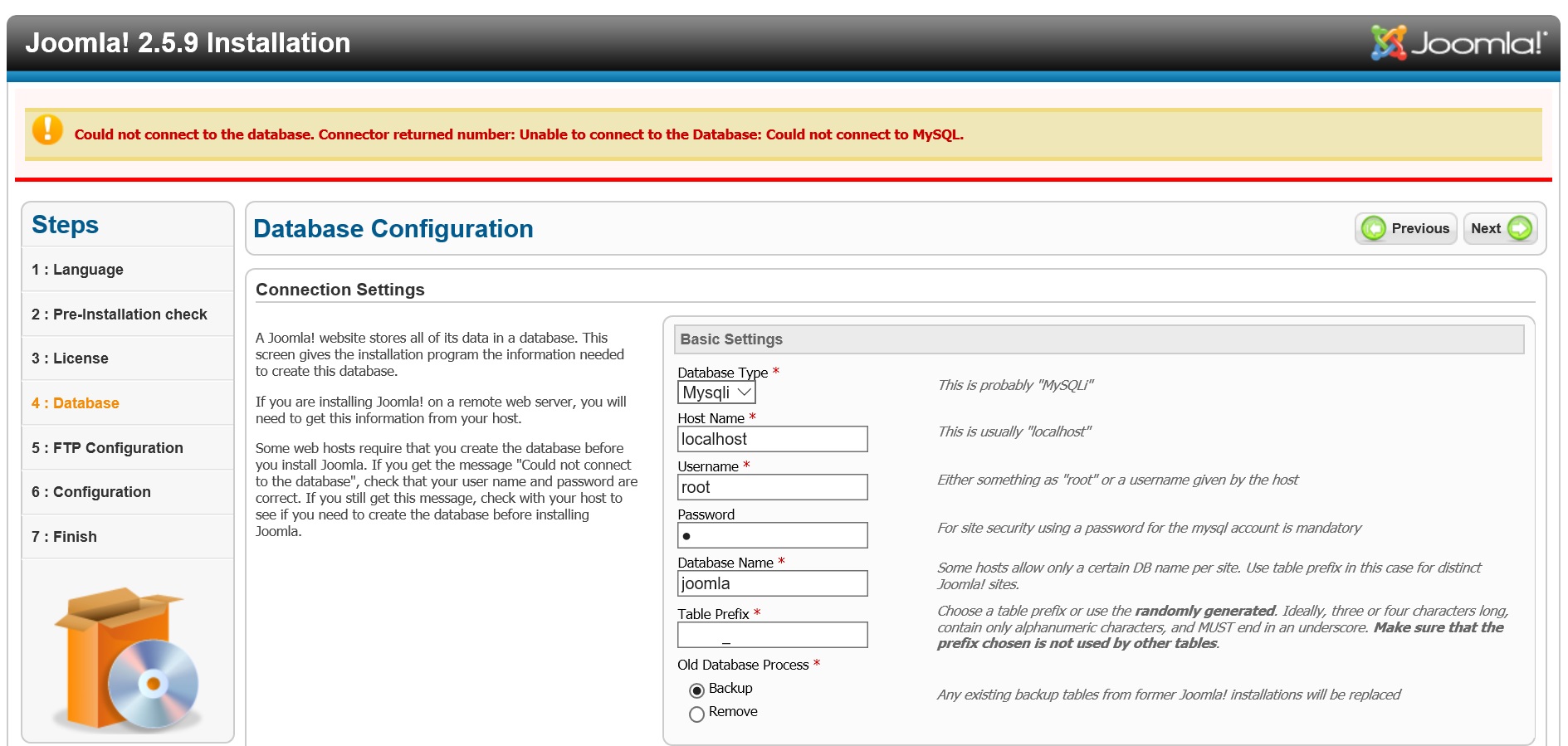
Not sure why its not configuring ...
- JennCAug 06, 2016NETGEAR Employee Retired
Hello J_s1,
How did you get to this window? Is that after launching the app from the admin page? If so, then it is Joomla or the author of the app that you need to contact.
Regards,
- Retired_MemberAug 06, 2016
yes, that is part of the joomla installation steps (Step 4 of 6: Database setup).
I already tried to contact super_poussin as suggested, no response :(
- Retired_MemberAug 06, 2016
I suspect the RN316 OS 6.5.1 does not create sufficient space for app installs (some apps use gig's of space). This would be the 2nd time the partition has gotten full for me....I have a 18TB NAS and I get partion is too full error? lol
root@NAS:/# mysql -V
mysql Ver 14.14 Distrib 5.5.49, for debian-linux-gnu (x86_64) using readline 6.2root@NAS:/# mysql -T
ERROR 2002 (HY000): Can't connect to local MySQL server through socket '/var/run/mysqld/mysqld.sock' (2)
User time 0.00, System time 0.00
Maximum resident set size 4012, Integral resident set size 0
Non-physical pagefaults 254, Physical pagefaults 1, Swaps 0
Blocks in 80 out 0, Messages in 0 out 0, Signals 0
Voluntary context switches 3, Involuntary context switches 4root@NAS:/# service mysqld status
mysqld: unrecognized serviceroot@NAS:/# mysqld start
160807 3:47:32 [Warning] Using unique option prefix key_buffer instead of key_buffer_size is deprecated and will be removed in a future release. Please use the full name instead.
160807 3:47:32 [Note] mysqld (mysqld 5.5.49-0+deb7u1) starting as process 16218 ...
160807 3:47:33 [Warning] Can't create test file /var/lib/mysql/NAS.lower-test
160807 3:47:33 [Warning] Can't create test file /var/lib/mysql/NAS.lower-test
mysqld: Can't change dir to '/var/lib/mysql/' (Errcode: 2)
160807 3:47:33 [ERROR] Aborting
160807 3:47:33 [Note] mysqld: Shutdown completeroot@NAS:/# service mysql status
mysql.service - LSB: Start and stop the mysql database server daemon
Loaded: loaded (/etc/init.d/mysql)
Active: failed (Result: exit-code) since Sun, 07 Aug 2016 02:43:32 +0930; 1h 6min ago
CGroup: name=systemd:/system/mysql.service
Aug 07 02:43:32 NAS mysql[12546]: df: `/var/lib/mysql/.': No such file or directory
Aug 07 02:43:32 NAS mysql[12546]: df: no file systems processed
Aug 07 02:43:32 NAS mysql[12546]: /etc/init.d/mysql: ERROR: The partition with /var/lib/mysql is too full! ... failed!
Related Content
NETGEAR Academy

Boost your skills with the Netgear Academy - Get trained, certified and stay ahead with the latest Netgear technology!
Join Us!
