NETGEAR is aware of a growing number of phone and online scams. To learn how to stay safe click here.
Forum Discussion

tmm1
Nov 30, 2016Aspirant
Writing my own Add-On: .deb installs and service running, but won't show in GUI
I've written a very simple add-on based on the samples in the SDK. The .deb file installs successfully onto the device, and the service is running (after invoking `rn_nml -S` in postinst. But it does not show up as an installed app on the GUI. Has anyone seen something like this before?
I've extracted my generated .deb and compared it to others published by the community, and can't spot any differences which would cause this behavior.
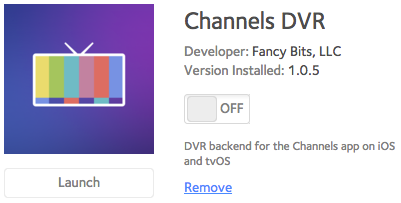
Alright, I tested out channels-dvr_1.0.5_all.deb on a fresh 6.6.0 VM. Looks good from a quick glance:
If you enable System > Settings > Support > Secure Diagnostic Mode and give me the port I can poke around on your system and see what's going on.

10 Replies
Replies have been turned off for this discussion
- mdgm-ntgrNETGEAR Employee Retired
Have you tried clearing your web browser cache, closing your web browser and reopening the web admin interface?
Have you reviewed the logs for any clues?- tmm1Aspirant
Yes, refreshed cache and tried other browsers. No difference.
Also reviewed all the logs, it shows the debian package being installed successfully with no errors.
- siignaNETGEAR Employee Retired
The app not showing under Installed Apps is usually an issue with the config.xml file. Can you post an example of yours?
- tmm1Aspirant
Interesting, I guess that makes sense. I ran xmllint on it to confirm it was valid. Have tried adding and removing various properties but it didn't seem to help. Here's the latest version:
<Application resource-id="channels-dvr">
  <MinFirmwareVer>6.5.0</MinFirmwareVer>
  <Name>Channels DVR</Name>
  <Author>Fancy Bits, LLC</Author>
  <Version>1.0.5</Version>
  <Category>APP_CAT_MEDIA</Category>
  <LaunchURL>http://localhost:8089/</LaunchURL>
  <ConfigURL/>
  <RequireReboot>0</RequireReboot>
  <ReservePort>8089</ReservePort>
  <DebianPackage>channels-dvr</DebianPackage>
  <ServiceName>fvapp-channels-dvr.service</ServiceName>
  <Description lang="en-us">DVR backend for the Channels app on iOS and tvOS</Description>
</Application>
- siignaNETGEAR Employee Retired
That config looks good to me.
Are you installing from the UI or via apt? If from apt you might need to touch /apps/your_app/.localapp before it'll show up in the UI.
- tmm1Aspirant
From the UI. I verified that the .localapp file is in place.
- tmm1Aspirant
Here's the .deb if you want to try installing or extracting it: http://channels-dvr.s3.amazonaws.com/netgear/channels-dvr_1.0.5_all.deb

Related Content
NETGEAR Academy

Boost your skills with the Netgear Academy - Get trained, certified and stay ahead with the latest Netgear technology!
Join Us!
