NETGEAR is aware of a growing number of phone and online scams. To learn how to stay safe click here.
Forum Discussion

darrens
Oct 08, 2011Aspirant
Additions to FAQ
I recently had a nightmarish experience updating the hard disks in my ReadyNAS (partly described here http://www.readynas.com/forum/viewtopic.php?f=64&t=57565). A lot of the problems I had was finding the information I needed. To help anyone else who has problems finding the answers to the problems I had, here are some suggestions for additions to the FAQ:
Opening stuck disk tray
Dozens of people have had this problem. The FAQ (http://www.readynas.com/kb/faq/hardware/how_can_i_release_a_stuck_disk_tray) links to another post, but that post is missing a critical image, and some of the information is incorrect.
I have drawn an image to show where to put the paper clip to release the lock, but I don't seem to be able to upload it.
In the Netgear ReadyNAS Duo Installation Guide which came with my ReadyNAS, it shows a "Locking Mechanism", but neglects to say what this does or how to release it. I thought this was the cause of my problem and wasted hours trying to find out how to release it. Information on this would be good (it might also make it easier to find when searching).
How to get files off a ReadyNAS disk
When things go really bad (like they did for me), you may need to read the files directly off a hard disk. The process is described in the link from http://www.readynas.com/kb/faq/pre-sales/what_file_system_does_readynas_use but a more obvious FAQ topic title would be good.
Disk Upgrade
The FAQ topic on upgrading the hard disks (http://www.readynas.com/kb/faq/boot/how_do_i_expand_an_existing_x-raid_volume_with_larger_disks) should really recommend backing up the data first in case it goes wrong.
Sparc and x86 units
There any many places where references are made like "for a Sparc unit do this..." but it is not easy to find whether your unit is a Sparc or x86. A list of the models and their type would be very useful as an FAQ topic, and should be linked from other topics where these references are made.
Memory DIMM
In the FAQ topic about corrupted root (http://www.readynas.com/kb/faq/boot/raidar_status_said_corrupted_root_during_factory_reset_or_installation._what_should_i_do) it says to check the memory DIMM, but with no indication of how to do this. An FAQ topic on this (linked from above topic) would be good. I had a link to the description of this, but can't find it now. It isn't actually very hard, but removing the side panel requires a lot of force and it is worth describing exactly how to do it.
Flashing LEDs
The ReadyNAS has a series of LED flash sequences described here http://home.bott.ca/webserver/?p=324 and these should be added to the FAQ topic http://www.readynas.com/kb/faq/hardware/what_does_this_light_pattern_mean
Memory Test
The memory test topic http://www.readynas.com/kb/faq/hardware/is_there_a_way_i_can_verify_if_my_memory_is_good describes what you will see on a ReadyNAS with 4 disk LEDs. Need to add what you will see on a ReadyNAS Duo (2 disk LEDs). It would also be a good idea to give an idea of how long this takes. I expected it to take a few seconds but it took around 10 minutes).
I hope that someone takes the time to update the FAQ. I am sure that a lot of ReadyNAS users will be very grateful if it is done.
Opening stuck disk tray
Dozens of people have had this problem. The FAQ (http://www.readynas.com/kb/faq/hardware/how_can_i_release_a_stuck_disk_tray) links to another post, but that post is missing a critical image, and some of the information is incorrect.
I have drawn an image to show where to put the paper clip to release the lock, but I don't seem to be able to upload it.
In the Netgear ReadyNAS Duo Installation Guide which came with my ReadyNAS, it shows a "Locking Mechanism", but neglects to say what this does or how to release it. I thought this was the cause of my problem and wasted hours trying to find out how to release it. Information on this would be good (it might also make it easier to find when searching).
How to get files off a ReadyNAS disk
When things go really bad (like they did for me), you may need to read the files directly off a hard disk. The process is described in the link from http://www.readynas.com/kb/faq/pre-sales/what_file_system_does_readynas_use but a more obvious FAQ topic title would be good.
Disk Upgrade
The FAQ topic on upgrading the hard disks (http://www.readynas.com/kb/faq/boot/how_do_i_expand_an_existing_x-raid_volume_with_larger_disks) should really recommend backing up the data first in case it goes wrong.
Sparc and x86 units
There any many places where references are made like "for a Sparc unit do this..." but it is not easy to find whether your unit is a Sparc or x86. A list of the models and their type would be very useful as an FAQ topic, and should be linked from other topics where these references are made.
Memory DIMM
In the FAQ topic about corrupted root (http://www.readynas.com/kb/faq/boot/raidar_status_said_corrupted_root_during_factory_reset_or_installation._what_should_i_do) it says to check the memory DIMM, but with no indication of how to do this. An FAQ topic on this (linked from above topic) would be good. I had a link to the description of this, but can't find it now. It isn't actually very hard, but removing the side panel requires a lot of force and it is worth describing exactly how to do it.
Flashing LEDs
The ReadyNAS has a series of LED flash sequences described here http://home.bott.ca/webserver/?p=324 and these should be added to the FAQ topic http://www.readynas.com/kb/faq/hardware/what_does_this_light_pattern_mean
Memory Test
The memory test topic http://www.readynas.com/kb/faq/hardware/is_there_a_way_i_can_verify_if_my_memory_is_good describes what you will see on a ReadyNAS with 4 disk LEDs. Need to add what you will see on a ReadyNAS Duo (2 disk LEDs). It would also be a good idea to give an idea of how long this takes. I expected it to take a few seconds but it took around 10 minutes).
I hope that someone takes the time to update the FAQ. I am sure that a lot of ReadyNAS users will be very grateful if it is done.
2 Replies
Replies have been turned off for this discussion
 StephenBGuru - Experienced UserI agree the FAQs could use some updating.
I've seen "corrupt boot partition" when inserting a used (but not erased) disk into the NAS. So that is another thing that could be added to that section - it is not necessarily memory.
Also, if you have add-ons, either you need to customize the config backup, or you need to re-install them before doing the config restore. If you do neither, you will need to go back to factory defaults (or mess with shell commands I guess) to put things right.
At least some of the material from sphardy's site would also be nice to have in the FAQs (with his permission of course).- mdgm-ntgrNETGEAR Employee Retired
darrens wrote:
Opening stuck disk tray
Dozens of people have had this problem. The FAQ (http://www.readynas.com/kb/faq/hardware ... _disk_tray) links to another post, but that post is missing a critical image
It appears that after the recent server migration infrant.com links no longer work. If you change the infrant.com to readynas.com you get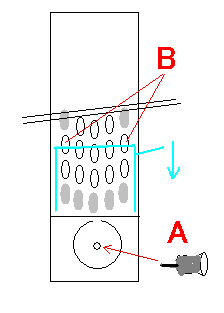
darrens wrote:
In the Netgear ReadyNAS Duo Installation Guide which came with my ReadyNAS, it shows a "Locking Mechanism", but neglects to say what this does or how to release it. I thought this was the cause of my problem and wasted hours trying to find out how to release it. Information on this would be good (it might also make it easier to find when searching).
The locking mechanism is explained in the NV+ installation guide. It is only found on the old tray design (the one affected by the stuck tray issue).darrens wrote:
How to get files off a ReadyNAS disk
When things go really bad (like they did for me), you may need to read the files directly off a hard disk. The process is described in the link from http://www.readynas.com/kb/faq/pre-sale ... adynas_use but a more obvious FAQ topic title would be good.
You may also wish to see this: Mounting Sparc-based ReadyNAS Drives in x86-based Linuxdarrens wrote:
Disk Upgrade
The FAQ topic on upgrading the hard disks (http://www.readynas.com/kb/faq/boot/how ... rger_disks) should really recommend backing up the data first in case it goes wrong.
Agreed. Of course you should backup important data primarily stored on the ReadyNAS regularly anyway as RAID is not a backup. See Preventing Catastrophic Data Lossdarrens wrote:
Sparc and x86 units
There any many places where references are made like "for a Sparc unit do this..." but it is not easy to find whether your unit is a Sparc or x86. A list of the models and their type would be very useful as an FAQ topic, and should be linked from other topics where these references are made.
I agree.
All Infrant and OEM re-branded ReadyNAS (as far as I am aware) are Sparc ReadyNAS. The NetGear ReadyNAS Duo, NV+ and 1100 are also Sparc ReadyNAS.
x86 ReadyNAS include the NVX, Ultra, Ultra Plus and Pro desktop models. The 1500, 2100, 3200, 3100 and 4200 are rackmount x86 ReadyNAS.darrens wrote:
Memory DIMM
In the FAQ topic about corrupted root (http://www.readynas.com/kb/faq/boot/rai ... hould_i_do) it says to check the memory DIMM, but with no indication of how to do this. An FAQ topic on this (linked from above topic) would be good. I had a link to the description of this, but can't find it now. It isn't actually very hard, but removing the side panel requires a lot of force and it is worth describing exactly how to do it.
Instructions vary from model to model. Best to contact tech support and work with them on an issue like this (as suggested in the FAQ). I reckon this FAQ entry still needs updating though.darrens wrote:
Flashing LEDs
The ReadyNAS has a series of LED flash sequences described here http://home.bott.ca/webserver/?p=324 and these should be added to the FAQ topic http://www.readynas.com/kb/faq/hardware ... ttern_mean
I agree.darrens wrote:
Memory Test
The memory test topic http://www.readynas.com/kb/faq/hardware ... ry_is_good describes what you will see on a ReadyNAS with 4 disk LEDs. Need to add what you will see on a ReadyNAS Duo (2 disk LEDs). It would also be a good idea to give an idea of how long this takes. I expected it to take a few seconds but it took around 10 minutes).
Again this varies from model to model and best to contact NetGear tech support for an explanation of the memory test (FAQ should be updated to reflect this and this is FAQ entry has been tagged to need updating). There is a good explanation of the Duo Memory Test here: http://www.readynas.com/forum/viewtopic.php?f=11&t=26993darrens wrote:
I hope that someone takes the time to update the FAQ. I am sure that a lot of ReadyNAS users will be very grateful if it is done.
It's a big job maintaining the FAQ and I'm sure chirpa (maintainer of FAQ) will appreciate your feedback. He updates it as he has time. He's already done a lot of work on it, not least of which migrating it to its current format which allows you to look at FAQ entries relevant to the model you have.StephenB wrote:
I've seen "corrupt boot partition" when inserting a used (but not erased) disk into the NAS. So that is another thing that could be added to that section - it is not necessarily memory.
The FAQ entry mentioned is referring to initial setup or when doing a factory default. Used disks still could cause problems perhaps like this when doing that so it would be a good thing to mention.StephenB wrote:
Also, if you have add-ons, either you need to customize the config backup, or you need to re-install them before doing the config restore. If you do neither, you will need to go back to factory defaults (or mess with shell commands I guess) to put things right.
You could extract the contents of the config backup and delete the references to the add-on e.g. in /etc/default/services (use a text editor that won't muck up the formatting. So use something like Notepad++. Then highlight the contents of the extracted zip file e.g. "etc" folder that you wish to restore and zip them up.StephenB wrote:
At least some of the material from sphardy's site would also be nice to have in the FAQs (with his permission of course).
I agree that would be nice. Links to some of his pages (or perhaps even duplicating them on readynas.com) would be quite helpful, particularly the direct-connection page.

Related Content
NETGEAR Academy

Boost your skills with the Netgear Academy - Get trained, certified and stay ahead with the latest Netgear technology!
Join Us!
