NETGEAR is aware of a growing number of phone and online scams. To learn how to stay safe click here.
Forum Discussion

chrisqn
May 18, 2016Tutor
Cannot access share on ReadyNAS Duo
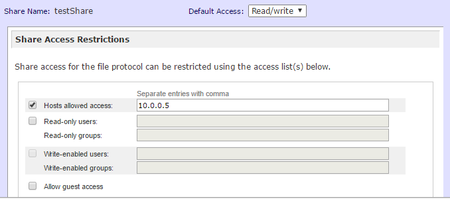
Hi, I have a ReadyNAS Duo which has a few shares that run with "Allow guest access". Now i want to have a share that is protected and only accessable by my PC (Windows 10) but i cannot access the...
- May 18, 2016
Hi chrisqn,
Try the steps below:
1. Create a specific user login under 'Security tab'.
2. Change the default access of the said share from Read/Write to 'Disabled'.
3. Tick write-enabled users and enter your user login then hit apply.
Hope this helps!
Kind regards,
BrianL
NETGEAR Community Team

BrianL2
May 18, 2016NETGEAR Employee Retired
Hi chrisqn,
Try the steps below:
1. Create a specific user login under 'Security tab'.
2. Change the default access of the said share from Read/Write to 'Disabled'.
3. Tick write-enabled users and enter your user login then hit apply.
Hope this helps!
Kind regards,
BrianL
NETGEAR Community Team
Related Content
NETGEAR Academy

Boost your skills with the Netgear Academy - Get trained, certified and stay ahead with the latest Netgear technology!
Join Us!
