NETGEAR is aware of a growing number of phone and online scams. To learn how to stay safe click here.
Forum Discussion

pksparks
Jan 06, 2010Aspirant
connecting apc cs-650 to readynas duo
hi,
after finbding my house in the dark, because of a powerdown, and also a nas down, i want to buy a apc ups. but while i am looking at the site of apc, there are a lot of cables optional for conncting both via usb. is there anybody who can give me som tips??
and i understand it is just plug the cable to both units, make some changes in the settings of the nas, and all will work?
rgds
Patrick
after finbding my house in the dark, because of a powerdown, and also a nas down, i want to buy a apc ups. but while i am looking at the site of apc, there are a lot of cables optional for conncting both via usb. is there anybody who can give me som tips??
and i understand it is just plug the cable to both units, make some changes in the settings of the nas, and all will work?
rgds
Patrick
18 Replies
Replies have been turned off for this discussion
- It's rather simple:
1. N.B. Read the User Manual first at this url: http://www.apcmedia.com/salestools/ASTE-6Z7V5V_R1_EN.pdf
2. Make sure to turn off your ReadyNas Duo.
3. Connect the RJ-45/USB cable at the top right-hand corner of the APC (i.e. the Data Port interface). See pictures below. .
.
N.B. The RJ-45/USB cable will look similar to this one here. It has a phone jack on one end and a USB head on the other.
4. Connect the IEC C13 to IEC C14 to one of the three sockets on the right-hand side. The male-to-female cable.See image below:
N.B. Do not put this cable it into the Surge socket.
Rather, this cable should then go into the power socket of your ReadyNas Duo.
5. Turn on your APC.
6. Turn on your ReadyNas Duo.
7. Go into your Duo's Frontview
8. Go to System-->Power. In the UPS Configuration area, select when the ReadyNas should shutdown based on
the UPS reserver power supply. It is usually set at Auto.
This should do it.  pksparksAspirant@spiderman
thanks for your extended reply. i am sure it will work. ordered the apc earlier, hope to have it by friday.
thanks again
Patrick- Great! By the way, I updated my original post with a picture of a RJ45-USB cable to clarify any misunderstanding.
- pksparksAspirantwell it works great. no trouble at all, but also thanks to the tips mentioned above.
thanks again
Patrick - Nice that some of us could help you.
 ard1AspirantI've got a negative experience with this type. After initial complaints by its predecessor, the RS500, that the battery should be replaced, that replacement did not help. The RS 500 unit was out of warranty and a new CS 650 unit was bought.
Here too, the battery error occurred. Also draining the battery to total shutdown, as suggested by APS tech support, did only alleviate the problems for a week or two. Now the status LED in FrontView is yellow blinking again. Hovering the LED shows (translated to English) UPS1: APC Back-UPS CS 650, Battery charging: 100%, 27 minutes
The other day, early in the morning, we had an unexpected unattended shutdown. After power up, Raid Sync to fully redundant, an error message "UPS battery error. Please replace the battery." was displayed in the log. That is on a brand new unit.
It looks as if this is not the 'perfect' solution to UPS. Siege1AspirantHi,
I don't get it or maybe im just really blond.
The back of my readynas duo doesnt have a 3 pin power socket, its got one of those small round jacks that would connect to its own power supply?
I have a 650 CS and all the leads shown in your pictures.
Do i have the wrong ReadyNas ?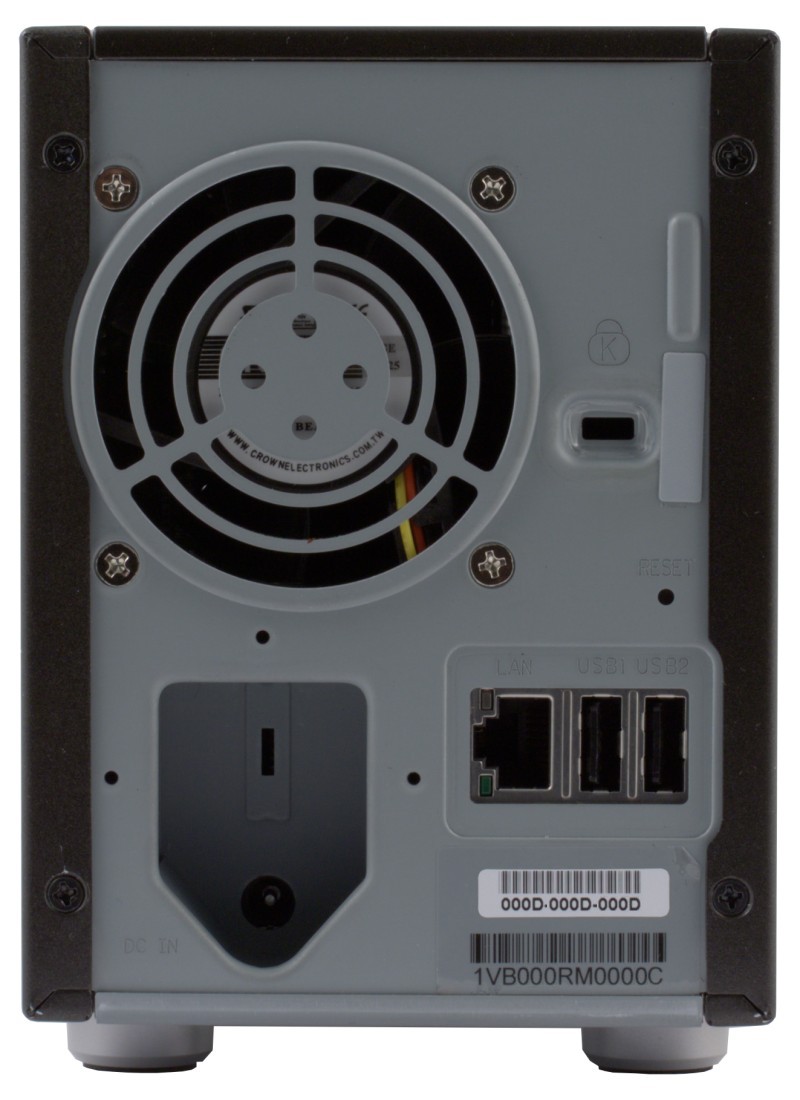
- mdgm-ntgrNETGEAR Employee RetiredYou either need an adapter or to replace the cable from the external power supply to the wall socket with one with the appropriate connection on the end.
- Siege1AspirantWell the power supply just goes directly into the ReadyNas (one lead)
So I guess I need to find a 12v round DC-IN to RC adapter?!
I cant find one....
Annoying, why did they change the power sockets.....
Does that little slit above the power socket do anything on the ready nas?


Related Content
NETGEAR Academy

Boost your skills with the Netgear Academy - Get trained, certified and stay ahead with the latest Netgear technology!
Join Us!
