NETGEAR is aware of a growing number of phone and online scams. To learn how to stay safe click here.
Forum Discussion

BtrieveBill
May 03, 2024Aspirant
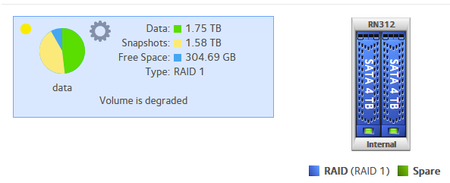
Failed Drive Replaced, Recync Complete, But Volume Is Still Degraded
My RN312 has been working fine for many years. Just recently, one of the 4TB WD Black drives indicated a failure. I removed the failed drive and replaced it with a newer 4TB WD Black drive with the...
 May 07, 2024
BtrieveBill wrote:
I hesitate to do that because I'm not sure where the RN312 keeps its brain.
Everything is on the disks - config files are stored in the OS partition, any apps are installed to a hidden folder on the data volume.
BtrieveBill wrote:
The SMART data shows that the last failure on that drive was in 2022, but that it is showing 53 pending sectors
Personally I would have replaced that disk. Generally I consider replacement when the bad sectors move into the 20s.
BtrieveBill wrote:
I copied all of the data off of the volume to my new Synology NAS, so I have no fear of losing anything.
Good.
One option is to save the config files, do a clean install on new disks, and then restore the config. Personally I'd use Seagate Ironwolf or WD Red Plus. If you use desktop class drives, make sure they are not SMR. Most desktop drives in the 2-6 TB range are now SMR.
A second option is to try cloning the disk to a replacement drive. Then power up the NAS with that drive installed. Delete all the files and snapshots, and restore the files from the Synology. After that hot-insert a second drive (ideally new) and wait for it to sync. That would preserve your configuration and the OS partition (assuming they are not damaged).
BtrieveBill
May 07, 2024Aspirant
Thanks for the continued attempts, but there is still no joy in Mudville.
The original failed drive was attached to a Windows system, and while I could remove the partitions, I could not create a new one and do a low-level format, as it stalled out after 9%. This is good news, as it confirms that the original drive was indeed bad.
I then attached the replacement drive to Windows and removed the three partitions with no issue. After inserting the presumably-blank drive back into the RN312, it synchronized as before -- and still reported the RAID state as degraded when done.
The MDSTAT log looks the same:
Personalities : [raid0] [raid1] [raid10] [raid6] [raid5] [raid4]
md1 : active raid1 sdb2[1] sda2[0]
523264 blocks super 1.2 [2/2] [UU]
md127 : active raid1 sdb3[2](S) sda3[0]
3902166656 blocks super 1.2 [2/1] [U_]
md0 : active raid1 sdb1[2] sda1[0]
4192192 blocks super 1.2 [2/2] [UU]
unused devices: <none>
/dev/md/0:
Version : 1.2
Creation Time : Thu Aug 14 17:38:12 2014
Raid Level : raid1
Array Size : 4192192 (4.00 GiB 4.29 GB)
Used Dev Size : 4192192 (4.00 GiB 4.29 GB)
Raid Devices : 2
Total Devices : 2
Persistence : Superblock is persistent
Update Time : Tue May 7 06:39:47 2024
State : clean
Active Devices : 2
Working Devices : 2
Failed Devices : 0
Spare Devices : 0
Consistency Policy : unknown
Name : 7c6eb546:0 (local to host 7c6eb546)
UUID : 50442d9b:0f704f29:e37cb92c:dd62d058
Events : 4407620
Number Major Minor RaidDevice State
0 8 1 0 active sync /dev/sda1
2 8 17 1 active sync /dev/sdb1
/dev/md/data-0:
Version : 1.2
Creation Time : Thu Aug 14 17:38:12 2014
Raid Level : raid1
Array Size : 3902166656 (3721.40 GiB 3995.82 GB)
Used Dev Size : 3902166656 (3721.40 GiB 3995.82 GB)
Raid Devices : 2
Total Devices : 2
Persistence : Superblock is persistent
Update Time : Tue May 7 00:01:16 2024
State : clean, degraded
Active Devices : 1
Working Devices : 2
Failed Devices : 0
Spare Devices : 1
Consistency Policy : unknown
Name : 7c6eb546:data-0 (local to host 7c6eb546)
UUID : 7766d2a3:da14ec25:7560e15c:9ca8dff8
Events : 4394
Number Major Minor RaidDevice State
0 8 3 0 active sync /dev/sda3
- 0 0 1 removed
2 8 19 - spare /dev/sdb3
All drives are WD4003FZEX. The original (failed) drive was MFG in 2013. The one in THIS log was MFG in 2015. I have a total of 6 of these drives that were removed from my RN516, so I took the drive I tried previously (Re-Mfg in 2018), blanked it, and have started another resync.
Is there some other log that might indicate what is going on? Is there some way to change it so that the "spare" device actually gets used in the array after synchronization? Why does the SWAP partition get synchronized in RAID1 but my DATA partition still shows as "spare"? Do I need to delete the volume and recreate it? Do I need to replace BOTH drives and just restore from backup? (This last one worries me the most, of course.)
BTW, I did find a log file that might shed some light -- DMESG.LOG. Here is the transcript of the last resync:
[Mon May 6 11:59:22 2024] scsi 1:0:0:0: Direct-Access ATA WDC WD4003FZEX-0 1A01 PQ: 0 ANSI: 5
[Mon May 6 11:59:22 2024] sd 1:0:0:0: [sdb] 7814037168 512-byte logical blocks: (4.00 TB/3.64 TiB)
[Mon May 6 11:59:22 2024] sd 1:0:0:0: [sdb] 4096-byte physical blocks
[Mon May 6 11:59:22 2024] sd 1:0:0:0: [sdb] Write Protect is off
[Mon May 6 11:59:22 2024] sd 1:0:0:0: Attached scsi generic sg1 type 0
[Mon May 6 11:59:22 2024] sd 1:0:0:0: [sdb] Mode Sense: 00 3a 00 00
[Mon May 6 11:59:22 2024] sd 1:0:0:0: [sdb] Write cache: enabled, read cache: enabled, doesn't support DPO or FUA
[Mon May 6 11:59:22 2024] sdb:
[Mon May 6 11:59:22 2024] sd 1:0:0:0: [sdb] Attached SCSI disk
[Mon May 6 11:59:22 2024] md: unbind<sdc1>
[Mon May 6 11:59:22 2024] md: export_rdev(sdc1)
[Mon May 6 11:59:22 2024] md: unbind<sdc3>
[Mon May 6 11:59:22 2024] md: export_rdev(sdc3)
[Mon May 6 11:59:22 2024] sdb:
[Mon May 6 11:59:22 2024] sdb: sdb1
[Mon May 6 11:59:22 2024] md: bind<sdb1>
[Mon May 6 11:59:22 2024] RAID1 conf printout:
[Mon May 6 11:59:22 2024] --- wd:1 rd:2
[Mon May 6 11:59:22 2024] disk 0, wo:0, o:1, dev:sda1
[Mon May 6 11:59:22 2024] disk 1, wo:1, o:1, dev:sdb1
[Mon May 6 11:59:22 2024] md: recovery of RAID array md0
[Mon May 6 11:59:22 2024] md: minimum _guaranteed_ speed: 30000 KB/sec/disk.
[Mon May 6 11:59:22 2024] md: using maximum available idle IO bandwidth (but not more than 200000 KB/sec) for recovery.
[Mon May 6 11:59:22 2024] md: using 128k window, over a total of 4192192k.
[Mon May 6 11:59:24 2024] md: bind<sdb3>
[Mon May 6 11:59:24 2024] RAID1 conf printout:
[Mon May 6 11:59:24 2024] --- wd:1 rd:2
[Mon May 6 11:59:24 2024] disk 0, wo:0, o:1, dev:sda3
[Mon May 6 11:59:24 2024] disk 1, wo:1, o:1, dev:sdb3
[Mon May 6 11:59:24 2024] md1: detected capacity change from 535822336 to 0
[Mon May 6 11:59:24 2024] md: md1 stopped.
[Mon May 6 11:59:24 2024] md: unbind<sda2>
[Mon May 6 11:59:24 2024] md: export_rdev(sda2)
[Mon May 6 11:59:24 2024] md: bind<sda2>
[Mon May 6 11:59:24 2024] md: bind<sdb2>
[Mon May 6 11:59:24 2024] md/raid1:md1: not clean -- starting background reconstruction
[Mon May 6 11:59:24 2024] md/raid1:md1: active with 2 out of 2 mirrors
[Mon May 6 11:59:24 2024] md1: detected capacity change from 0 to 535822336
[Mon May 6 11:59:24 2024] md: resync of RAID array md1
[Mon May 6 11:59:24 2024] md: minimum _guaranteed_ speed: 1000 KB/sec/disk.
[Mon May 6 11:59:24 2024] md: using maximum available idle IO bandwidth (but not more than 1000 KB/sec) for resync.
[Mon May 6 11:59:24 2024] md: using 128k window, over a total of 523264k.
[Mon May 6 11:59:24 2024] Adding 523260k swap on /dev/md1. Priority:-1 extents:1 across:523260k
[Mon May 6 11:59:39 2024] md: md1: resync done.
[Mon May 6 11:59:40 2024] RAID1 conf printout:
[Mon May 6 11:59:40 2024] --- wd:2 rd:2
[Mon May 6 11:59:40 2024] disk 0, wo:0, o:1, dev:sda2
[Mon May 6 11:59:40 2024] disk 1, wo:0, o:1, dev:sdb2
[Mon May 6 12:00:21 2024] md: md0: recovery done.
[Mon May 6 12:00:21 2024] md: recovery of RAID array md127
[Mon May 6 12:00:21 2024] md: minimum _guaranteed_ speed: 30000 KB/sec/disk.
[Mon May 6 12:00:21 2024] md: using maximum available idle IO bandwidth (but not more than 200000 KB/sec) for recovery.
[Mon May 6 12:00:21 2024] md: using 128k window, over a total of 3902166656k.
[Mon May 6 12:00:22 2024] RAID1 conf printout:
[Mon May 6 12:00:22 2024] --- wd:2 rd:2
[Mon May 6 12:00:22 2024] disk 0, wo:0, o:1, dev:sda1
[Mon May 6 12:00:22 2024] disk 1, wo:0, o:1, dev:sdb1
[Mon May 6 23:35:45 2024] do_marvell_9170_recover: ignoring PCI device (8086:3a22) at PCI#0
[Mon May 6 23:35:45 2024] ata1.00: exception Emask 0x0 SAct 0x800000 SErr 0x0 action 0x0
[Mon May 6 23:35:45 2024] ata1.00: irq_stat 0x40000008
[Mon May 6 23:35:45 2024] ata1.00: failed command: READ FPDMA QUEUED
[Mon May 6 23:35:45 2024] ata1.00: cmd 60/80:b8:c0:99:2a/00:00:4f:01:00/40 tag 23 ncq 65536 in
res 41/40:00:d0:99:2a/00:00:4f:01:00/40 Emask 0x409 (media error) <F>
[Mon May 6 23:35:45 2024] ata1.00: status: { DRDY ERR }
[Mon May 6 23:35:45 2024] ata1.00: error: { UNC }
[Mon May 6 23:35:45 2024] ata1.00: configured for UDMA/133
[Mon May 6 23:35:45 2024] sd 0:0:0:0: [sda] tag#23 FAILED Result: hostbyte=DID_OK driverbyte=DRIVER_SENSE
[Mon May 6 23:35:45 2024] sd 0:0:0:0: [sda] tag#23 Sense Key : Medium Error [current] [descriptor]
[Mon May 6 23:35:45 2024] sd 0:0:0:0: [sda] tag#23 Add. Sense: Unrecovered read error - auto reallocate failed
[Mon May 6 23:35:45 2024] sd 0:0:0:0: [sda] tag#23 CDB: Read(16) 88 00 00 00 00 01 4f 2a 99 c0 00 00 00 80 00 00
[Mon May 6 23:35:45 2024] blk_update_request: I/O error, dev sda, sector 5623159248
[Mon May 6 23:35:45 2024] ata1: EH complete
[Mon May 6 23:35:47 2024] do_marvell_9170_recover: ignoring PCI device (8086:3a22) at PCI#0
[Mon May 6 23:35:47 2024] ata1.00: exception Emask 0x0 SAct 0x40 SErr 0x0 action 0x0
[Mon May 6 23:35:47 2024] ata1.00: irq_stat 0x40000008
[Mon May 6 23:35:47 2024] ata1.00: failed command: READ FPDMA QUEUED
[Mon May 6 23:35:47 2024] ata1.00: cmd 60/08:30:d0:99:2a/00:00:4f:01:00/40 tag 6 ncq 4096 in
res 41/40:00:d0:99:2a/00:00:4f:01:00/40 Emask 0x409 (media error) <F>
[Mon May 6 23:35:47 2024] ata1.00: status: { DRDY ERR }
[Mon May 6 23:35:47 2024] ata1.00: error: { UNC }
[Mon May 6 23:35:47 2024] ata1.00: configured for UDMA/133
[Mon May 6 23:35:47 2024] sd 0:0:0:0: [sda] tag#6 FAILED Result: hostbyte=DID_OK driverbyte=DRIVER_SENSE
[Mon May 6 23:35:47 2024] sd 0:0:0:0: [sda] tag#6 Sense Key : Medium Error [current] [descriptor]
[Mon May 6 23:35:47 2024] sd 0:0:0:0: [sda] tag#6 Add. Sense: Unrecovered read error - auto reallocate failed
[Mon May 6 23:35:47 2024] sd 0:0:0:0: [sda] tag#6 CDB: Read(16) 88 00 00 00 00 01 4f 2a 99 d0 00 00 00 08 00 00
[Mon May 6 23:35:47 2024] blk_update_request: I/O error, dev sda, sector 5623159248
[Mon May 6 23:35:47 2024] ata1: EH complete
[Mon May 6 23:35:47 2024] md/raid1:md127: sda: unrecoverable I/O read error for block 5613459840
[Mon May 6 23:35:47 2024] md: md127: recovery interrupted.
[Mon May 6 23:35:47 2024] RAID1 conf printout:
[Mon May 6 23:35:47 2024] --- wd:1 rd:2
[Mon May 6 23:35:47 2024] disk 0, wo:0, o:1, dev:sda3
[Mon May 6 23:35:47 2024] disk 1, wo:1, o:1, dev:sdb3
[Mon May 6 23:35:47 2024] RAID1 conf printout:
[Mon May 6 23:35:47 2024] --- wd:1 rd:2
[Mon May 6 23:35:47 2024] disk 0, wo:0, o:1, dev:sda3
If I am reading this correctly, there is a Read Error on the "good" drive. Does this mean that the "good" drive needs to be replaced as well? (It should also be a 2013.) Can I JUST replace that drive now that MOST of the data is resynced, or am I going to need to replace both drives with empty drives and start a new DATA volume?
StephenB
May 07, 2024Guru - Experienced User
This helps. You are getting UNCs (uncorrectable errors) during the resync.
[Mon May 6 23:35:47 2024] ata1.00: failed command: READ FPDMA QUEUED
[Mon May 6 23:35:47 2024] ata1.00: cmd 60/08:30:d0:99:2a/00:00:4f:01:00/40 tag 6 ncq 4096 in
res 41/40:00:d0:99:2a/00:00:4f:01:00/40 Emask 0x409 (media error) <F>
[Mon May 6 23:35:47 2024] ata1.00: status: { DRDY ERR }
[Mon May 6 23:35:47 2024] ata1.00: error: { UNC }That is why the sync isn't finishing properly.
The first step is to back up the data - these are read errors, so there might be some issues doing that.
Then test the drives in a PC using WD's dashboard software (running the long diagnostic). If you can't do that, try running the disk test from the volume settings wheel in the NAS. I don't believe that will test disk 2, but it will test disk 1.
BtrieveBill wrote:
If I am reading this correctly, there is a Read Error on the "good" drive. Does this mean that the "good" drive needs to be replaced as well? (It should also be a 2013.)
I think you are reading it correctly. This would be the only copy of the data. Do you have a backup somewhere?
BtrieveBill wrote:
Can I JUST replace that drive now that MOST of the data is resynced,
No. That is why I am suggesting copying as much as you can to another device.
BTW, you have a lot of snapshot space on this volume. After everything is functional again, I suggest switching to custom snapshots - setting the retention to help keep the space usage more reasonable.
- BtrieveBillMay 07, 2024Aspirant
A majority of the data on this volume is a backup of other data from other devices that is refreshed on an automated schedule via Beyond Compare. As such, just about everything does exist elsewhere. I've learned my lessons over the years -- before I did ANYTHING with this system, I copied all of the data off of the volume to my new Synology NAS, so I have no fear of losing anything.
It is possible that a file has been mangled with the lost block, but that is always a risk. Beyond Compare can also perform a byte-wise comparison if I want, which can identify and fix a damaged file if it is truly a backup in the first place, and fix that up, too.
I will try the disk tests to see if that buys me anything. The SMART data shows that the last failure on that drive was in 2022, but that it is showing 53 pending sectors
2022-05-06 00:45:58 WDC WD4003FZEX-00Z4S WD-WCC5D0015414 0 0 0 -1 -1 53 53 0
Conversely, the "failed" drive was showing 548 pending sectors before it choked to death on 03/17/2024.
To that end, do you recommend simply replacing BOTH drives at the same time, and reinitializing the RAID? I hesitate to do that because I'm not sure where the RN312 keeps its brain. I don't want to have to reset the OS itself, and I have some special security rights set up for a few of the shares to allow its use as backup and as a FTP upload target while preventing abuse. Is there a step-by-step guide to replacing both drives at once to help limit the potential issues?
- StephenBMay 07, 2024Guru - Experienced User
BtrieveBill wrote:
I hesitate to do that because I'm not sure where the RN312 keeps its brain.
Everything is on the disks - config files are stored in the OS partition, any apps are installed to a hidden folder on the data volume.
BtrieveBill wrote:
The SMART data shows that the last failure on that drive was in 2022, but that it is showing 53 pending sectors
Personally I would have replaced that disk. Generally I consider replacement when the bad sectors move into the 20s.
BtrieveBill wrote:
I copied all of the data off of the volume to my new Synology NAS, so I have no fear of losing anything.
Good.
One option is to save the config files, do a clean install on new disks, and then restore the config. Personally I'd use Seagate Ironwolf or WD Red Plus. If you use desktop class drives, make sure they are not SMR. Most desktop drives in the 2-6 TB range are now SMR.
A second option is to try cloning the disk to a replacement drive. Then power up the NAS with that drive installed. Delete all the files and snapshots, and restore the files from the Synology. After that hot-insert a second drive (ideally new) and wait for it to sync. That would preserve your configuration and the OS partition (assuming they are not damaged).
- BtrieveBillMay 20, 2024Aspirant
Well, the excitement is now over. After agonizing over it for a while, I really didn't want to start all over, since the Plex software wouldn't be able to reinstall with the new firmware. (stupid me for patching.) So, I opted to pull the "good" drive and replace it with the failed-sync "bad" drive, just to see what would happen. Since the system partition was good, it started up and maintained all of my settings, as you foretold, but the volume was unusable. No worry -- I had a backup! So I purged the "bad" volume, recreated a new one (adding a second replacement drive in the process), and created a new RAID array. Am now in the process of copying my data back and resyncing the volume. Will know more in 20-30 hours!
Thanks again for your time, efforts, and suggestions. You are greatly appreciated!
Related Content
NETGEAR Academy

Boost your skills with the Netgear Academy - Get trained, certified and stay ahead with the latest Netgear technology!
Join Us!
