NETGEAR is aware of a growing number of phone and online scams. To learn how to stay safe click here.
Forum Discussion

MMarbleSLHA
Oct 25, 2017Aspirant
Failed to retrieve directory listing
I'm having some trouble with internal-only FTP. Filezilla authenticates, but I'm unable to browse to the folder. I get the following (minus the hashtags). Status: Resolving address of ###.###.#...

StephenB
Oct 25, 2017Guru - Experienced User
MMarbleSLHA wrote:
I'm not sure why Filezilla is showing the Unix permissions.
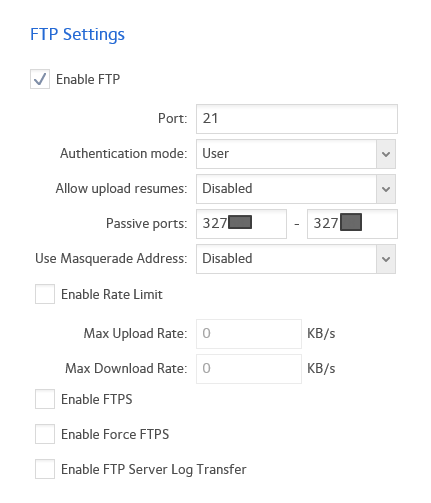
Me either, and it isn't doing that for me. One small difference is that my system is set up to use FTPS. You could try that (setting Filezilla to "use explicit FTP over TLS if available" and enabling FTPS on the NAS).
My FileZilla trace looks like this:
Status: Connection established, waiting for welcome message...
Status: Initializing TLS...
Status: Verifying certificate...
Status: TLS connection established.
Status: Logged in
Status: Retrieving directory listing...
Status: Server sent passive reply with unroutable address. Using server address instead.
Status: Directory listing of "/" successful
Status: Retrieving directory listing of "/Test"...
Status: Server sent passive reply with unroutable address. Using server address instead.
Status: Directory listing of "/Test" successful
The unroutable address is because I connected over the internet. Masquerading is disabled on the NAS, but FileZilla figures that out and does the right thing.

MMarbleSLHA
Oct 27, 2017Aspirant
P. S. Thanks so much for all your input.
Related Content
NETGEAR Academy

Boost your skills with the Netgear Academy - Get trained, certified and stay ahead with the latest Netgear technology!
Join Us!