NETGEAR is aware of a growing number of phone and online scams. To learn how to stay safe click here.
Forum Discussion

chrismac1
Feb 01, 2012Aspirant
Help for a Newbie please - Am I doing the right thing?
Hi All I'm just about to to go for the the readynas ultra 2 or 4 unit but I have some questions first and would really appreciate some advice. Apologies in advance as the questions will be pretty ...

PapaBear1
Feb 03, 2012Apprentice
chrismac wrote:
My main priority is to be able to share access to my work files so that both my PA and myself can access them at any time. I guess I'm just struggling to see how that would work in reality. From what you have said, as long as I keep the files on my laptop updated on the NAS then they can be accessed via the other pc.
If you keep the original on your laptop and a copy on the NAS and your PA accesses the file on the NAS and updates it, and you update the one on your laptop and copy it up to the NAS, you would get a message saying the file already exists. Then you could copy over the file on the NAS, and wipe out all the changes your PA made. This is why it is best to leave the original file on the NAS, you access the file to make some changes, and if any other person attempts to access the file they will get an error message. Such as the one below.
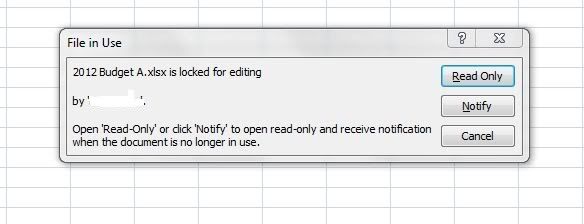
Note that it will tell the individual who is attempting to open the file who already has it open (this is important in an office with many people) and there are three choices, notify, open the files as read only or cancel (the file open request). There were many times in my working career when I needed the info in a file, that I would walk down the hall and ask an individual to close a file they had left open. On the rare occasion if they were going to need it for a while longer, and I was only going in for the info, I would open it as a read-only. You can make changes, just not save it without renaming it.
chrismac wrote:
That leads me on to another question, does the NAS appear as another drive on the laptop or is it just accessed via its own software (on my laptop).
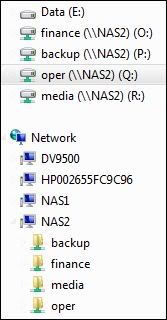
It will if you map the shares as a drive on a Windows machine, with each share you map showing up as a separate drive. Such as the older map of my shares below. If you are not going to use a default share (media or backup) then there would be no need to map it. (Note: the term share in this context is the same as the first level folders on a Windows machine such a Program Files, Program Data, Users and Windows, not the act of sharing folders on a Windows machine across a network).
BTW - the only stupid question is the one you think of and don't ask. You are seeking information to make an informed choice and that is one of the reason many of us are on the forum, to share information. I'm still learning my self about some feature of these very flexible devices.
Related Content
NETGEAR Academy

Boost your skills with the Netgear Academy - Get trained, certified and stay ahead with the latest Netgear technology!
Join Us!
