NETGEAR is aware of a growing number of phone and online scams. To learn how to stay safe click here.
Forum Discussion

2startrk
Mar 13, 2019Follower
Help with Running Backups
Hello All,
I am new to the ReadyNAS world. I purchased the system primarily for a stable backup system however I am having a real issue trying to setup backups directly from my PC to the NAS 212. ...

Marc_V
Mar 14, 2019NETGEAR Employee Retired
Hi 2startrk
Welcome to the Community!
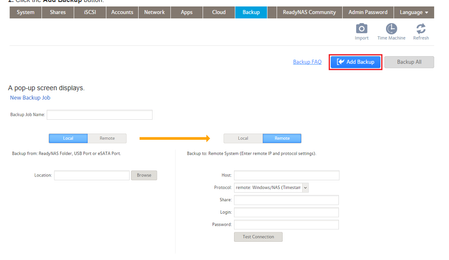
The page that is showing is not within the ReadyCloud app or portal. It is located under the Backup Tab of the Administration page.
The administration page can be accessed by using the hostname of the NAS or it's IP.
You can also install RAIDar to detect the NAS and also access the admin page. You can use a browser and access the Administration page (ttps://<ReadyNAS IP address>)
You can also use the ReadyCloud Desktop App to backup your PC folders.
Windows: http://readycloud.netgear.com/client/install/ReadyCloudSetup.exe
MacOS: http://readycloud.netgear.com/client/install/ReadyCLOUD.pkg
Hope this helps!
Regards
Related Content
NETGEAR Academy

Boost your skills with the Netgear Academy - Get trained, certified and stay ahead with the latest Netgear technology!
Join Us!
