NETGEAR is aware of a growing number of phone and online scams. To learn how to stay safe click here.
Forum Discussion

2startrk
Mar 13, 2019Follower
Help with Running Backups
Hello All,
I am new to the ReadyNAS world. I purchased the system primarily for a stable backup system however I am having a real issue trying to setup backups directly from my PC to the NAS 212. ...

StephenB
Mar 14, 2019Guru - Experienced User
2startrk wrote:
My problem is, I can't find where in the ReadyCloud online app this is located.
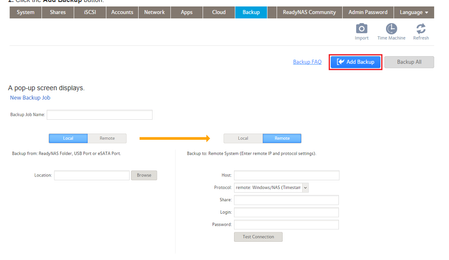
Your problem is more basic. The ReadyCloud app provides one way to back up a folder on the PC to the NAS. The backup jobs in the admin web UI provide a different (and unrelated) second way. The backup jobs in the web UI can be scheduled, though of course they will fail if the PC isn't turned on.
In my opinion the best way to back up the PC is to run a backup application on the PC - most of them can also be scheduled, and can be set up to turn on the PC if needed. This avoids the issue that the PC might not be on. And these applications generally provide better control over what is backed up, versioning, etc. Personally I use Acronis TrueImage for PC backups with the backup destination set to a NAS network share. But there are free alternatives - including FreeFileSync.
Related Content
NETGEAR Academy

Boost your skills with the Netgear Academy - Get trained, certified and stay ahead with the latest Netgear technology!
Join Us!
