NETGEAR is aware of a growing number of phone and online scams. To learn how to stay safe click here.
Forum Discussion

JBDragon1
Sep 17, 2016Virtuoso
How to Upgrade the CPU and RAM in a ReadyNAS 516
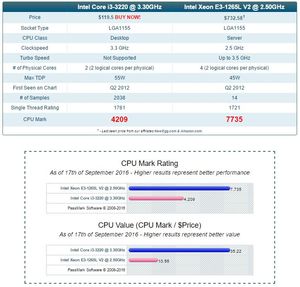
Well I have done it. It seems to be working great. I've ran a few basic tests and you really don't get a idea of the differance without accessing it. you can notice the speed Improvment. Accessin...
JBDragon1
Mar 02, 2017Virtuoso
I see no reason why someone can't buy you a NEW RN526 as a Gift. They give you the Recept for it and YOU Register it, then in reality you would be the orignal owner.
Now if they buy you a USED RN526, all bets are off.
Myself, I'd love to get a NETGEAR ReadyNAS 628X. The 8 disc version!!! Nice!!!! Maybe a used one someday.
aalexandrebeta
Mar 02, 2017Master
"I see no reason why someone can't buy you a NEW RN526 as a Gift. They give you the Recept for it and YOU Register it, then in reality you would be the orignal owner. " JBDragon1 When you purchase a used car still under warranty the warranty is transfered to you!! Why isn't it possible with electronic equipment?
"Myself, I'd love to get a NETGEAR ReadyNAS 628X. The 8 disc version" so do I!
 ramymounirMar 02, 2017Aspirant
what is the top processor i can use to upgrade the 516 with?
can i use the i7 7700K? and what extras is needed if so
- JBDragon1Mar 04, 2017Virtuoso
The CPU used in my 516 is the same one used in the faster 716. Which is why I used it. You have no access to the Firmware, and so supporting other faster CPU's may not work. Also that processor used normal DDR4 & DDR3L type Non-ECC memory, while the 516 is using ECC type memory (error-correcting code) and so the processor that comes with the 516 and 716 require ECC Memory. I think that's pretty important to be using EEC memory in this type of application.
I don't have a spare 516 laying around that I can try popping in any old CPU. I knew what should work trying to piece togeather what others have done, and went that route.
If you want to use a i7 7700K, build your own NAS setup to your own specs. There's a whole lot of flexability this way. Another thing to remember is in general it's running 24/7 and so eating up power. How high of a electrical bill every month do you want? So there are trade off's. Do you need such a fast CPU? How many PLEX streams do you really plan to do at once? Do you care about 4K? 4K eats up even more storage space. You have a power hungrey CPU, and Power supply, powering however many spinning HDD's. Are those drives lower power 5400RPM drives or 7200RPM or 10,000RPM. Faster the HDD's are the more heat they put out and more power they use.
I can only assume a i7 and installing Non EEC memory won't work. The motherboard wouldn't be designed for that. you have no access to the Firmware. These are again things you do have access and control over building your own NAS. I've thought abut doing just that a few times. Using a XEON processor with ECC memory. Maybe running FreeNAS
- aalexandrebetaMar 04, 2017Master
Always interesting those discussions!
Keep the good work!
Related Content
NETGEAR Academy

Boost your skills with the Netgear Academy - Get trained, certified and stay ahead with the latest Netgear technology!
Join Us!
