NETGEAR is aware of a growing number of phone and online scams. To learn how to stay safe click here.
Forum Discussion

BlackBomber
Aug 08, 2017Aspirant
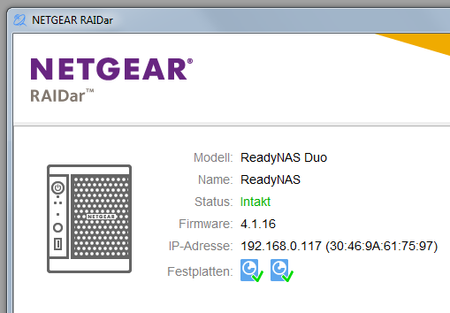
RAIDar 6.3 identify my ReadyNAS my network but administration is not possible
I try to administrate bei ReadyNAS with RAIDar or via https:\\...\admin but an error occurs. What shall I do?

Hopchen
Aug 08, 2017Prodigy
Hi,
Is your PC in the same IP network as the NAS? What is the IP of your PC?
Thanks
BlackBomber
Aug 08, 2017Aspirant
Hi Hopchen!
PC and ReadyNAS are connected via LAN to the same router.
I can see the files on my ReadyNAS but the administration is not possible.
Thanks, Gerald,
 StephenBAug 08, 2017Guru - Experienced User
Do you have ssh enabled on the NAS?
- BlackBomberAug 08, 2017AspirantHello Stephan!
I don't know and now I am not able to look in.
Just to explain again: I see the directories and files on my ReadyNAS but I am not able to administrate via .../admin.
Thanks, Gerald.- StephenBAug 09, 2017Guru - Experienced User
FWIW, You have a Duo v1 (running 4.1.x).
Often your symptoms are caused a by filling OS partition. This isn't your data volume, it's a different partition on your disks (and is 2 GB in size).
This can be confirmed and fixed with ssh access, but now is not the time to learn linux. There are two other options:
-contact paid Netgear support (my.netgear.com), and ask for per-incident support.
-back up the data on your NAS, and then do a factory reset. That will wipe your NAS. Then set it up again and restore the data.
I suggest doing the backup right away, even if you do want to use Netgear support. If it is a filling OS partition, it will get worse (and you will lose access to the data).
- BlackBomberSep 01, 2017Aspirant
Hello StephenB!
I asked my guys in the IT department. They tried to get in via ssh. But it seems not enabled.
- BlackBomberSep 01, 2017Aspirant
Hello StephenB!
I asked my guys in the IT department. They tried to get in via ssh. But it seems not enabled.
The Firmware I noted is RAIDator 4.1.16 [1.00a043]
- Marty_MSep 04, 2017NETGEAR Employee Retired
Hello BlackBomber,
Please check if you can still access and cycle to the boot menu option of the NAS. The NAS may need to be set to telnet/tech support mode and seek assistance from the engineers and/or higher tier who can remote in to the NAS and fix this from the backend.Unfortunately, It shows on your records that the support warranty of your product is already expired. You may try contacting support center and avail a support contract. That should allow you to extend the support for your product so they can escalate your issue to L3 or patiently wait for anyone in the community who has the knowledge in the SSH commands and fixing some issues from the backend. Or you could backup the content of the NAS then perform a factory reset and reconfigure the NAS from scratch and transfer back the data.
Regards,
Marty_M
NETGEAR Community Team
Related Content
- Nov 29, 2019Retired_Member
NETGEAR Academy

Boost your skills with the Netgear Academy - Get trained, certified and stay ahead with the latest Netgear technology!
Join Us!
