NETGEAR is aware of a growing number of phone and online scams. To learn how to stay safe click here.
Forum Discussion

Pierre57
Jul 20, 2016Aspirant
ReadyNAS 102 6.5.1 Upgrade Issues
My set up is a ReadyNAS 102 using a powered Seagate 2TB SRD00F2 USB drive for backup. Firmware was 6.4.2. This had worked flawlessly for many months, maybe a year. The ReadyNAS is less than 40% used ...

kohdee
Jul 25, 2016NETGEAR Expert
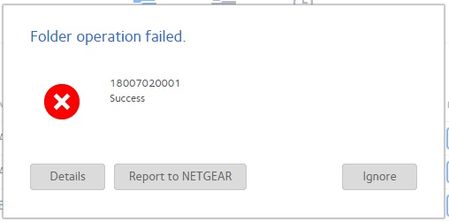
Are you using ReadyCLOUD at all? An error that starts with 18 is from the ReadyCLOUD sync functions (formerly ReadyDROP). I haven't dug deep into what the full error is but I sent you a PM and I can probably find it faster using your unit than scanning the code :P
- Pierre57Jul 27, 2016Aspirant
Thanks kohdee,
I did sign up for ReadyCloud a long time ago, but rarely used it. I recall there was an email about signing up again but didn't bother. Maybe that is the issue?
I only saw this error message for the first time after the upgrade to 6.5.1, and see it when looking at Shares. I know that it was not there before upgrading.
Thanks for the PM, I will respond.
Pierre
- kohdeeJul 27, 2016NETGEAR Expert
Thanks for the access.
18007020001 is "Cloud Owner for this device cannot be resolved"
You upgraded to 6.5.1 then went back to 6.4.2, which is not supported.
This is probably because we made a lot of changes to ReadyCLOUD server in 6.5, and as a result, you would be unable to use ReadyCLOUD in 6.4.2.
Since I turned off one of the processes, it seems to be okay now and not giving me that alert when navigating to the Cloud tab. You shouldn't have downgraded to 6.4.2 from 6.5.- Pierre57Jul 28, 2016Aspirant
Thanks Kohdee, really appreciated!
Sadly the error is still there.
The error appeared on the upgrade to 6.5.1, not on the downgrade. I agree it shouldn’t have been necessary to downgrade to 6.4.2.
However upgrading to 6.5.1 gave me the error in the first place, shouldn’t have made long established backups unusable, or made a previously stable device persistently unresponsive.
Reverting to a known stable state when an “upgrade” proves to be troublesome is standard practice.
I remember us having to do it a number of times when I worked at Netgear :smileyhappy:
Again, many thanks for trying.
Pierre
Related Content
NETGEAR Academy

Boost your skills with the Netgear Academy - Get trained, certified and stay ahead with the latest Netgear technology!
Join Us!
