NETGEAR is aware of a growing number of phone and online scams. To learn how to stay safe click here.
Forum Discussion

fabcou
Aug 20, 2015Aspirant
ReadyNAS 104 lost x-raid volume! how can I recover the volume from my intact 3 disks ?
ReadyNAS 104 lost x-raid volume! how can I recover the volume from my intact 3 disks ? The firmware is 6.2.5. Would you have a step by step procedure to restore the volume from the physical disks ? ...
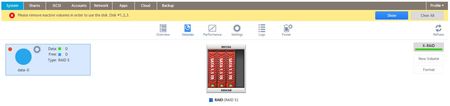
- Sep 06, 2015
Hello, I now have the full story that I can report to my original post.
First thx to mdgm for being my first contact, Netgear support was 1st class and they offered to investigate my case as it was my very first support call.
Cause: I was able to repeat the issue twice, so I am pretty sure this is what started the problem. I connected my Xbox One to any of the USB ports 3.0 and 2.0. I was able to play without any issue videos and music. The problem appeared during shutdown or reboot of the NAS.
Symptoms: I lost a disk (de-synchronised) and the admin page became unvailable. When I attempted to reboot/power off the NAS for clean start, the array may have lost another disk which resulted in losing the volume and data.
Resolution: No magic, best is to have a backup but after 2nd and 3rd level investigation via the Support Mode Menu, I was able to access my files directly from Windows explorer (as quick access) by typing \\IPAddress of the NAS. From there, I copied all my files to a spare USB drive. I did a Factory Default (in the boot menu) and let the NAS rebuild the array(volume), once basic configuration done, I copied my data back to the NAS, I had to re-install all the services/Apps and the security.
Lesson learned 1: Don't plug any USB cable between your Computer or Console ! access is via your LAN only. The USB ports are for USB disks only.
Lesson learned 2: Backup your NAS even if you have a fault tolerant array. I have purchased a 3TB HDD that I will put in the 4th slot of my NAS104. This single disk/volume will backup my raid5 volume on a regular basis.
Cheers
Fabcou

mdgm-ntgr
Aug 20, 2015NETGEAR Employee Retired
What happened for things to get to this point?
Do you have a backup?
fabcou
Aug 20, 2015Aspirant
No backup unfortunatelly. the NAS got stuck during a shutdown or boot which happened several times a while ago. I had to power off the NAS.
- mdgm-ntgrAug 20, 2015NETGEAR Employee Retired
So you had just three disks installed in a redundant volume when the problem happened?
Can you send me your logs (see the Sending a logs link in my sig)?
 steveM1Aug 21, 2015Aspirant
Dear
Sorry, I am a newcomer here, not sure, shoud I open a new thread for the same problem?
The same problem as for fabcou, just I have 4 disks (2 TB).
The NAS got stuck during a shutdown or boot which happened several times ago. I had to power off the NAS, after that, NAS was booting correctly. Now I lost volume. Is there any way to recover it?
Thank You
- mdgm-ntgrAug 21, 2015NETGEAR Employee Retired
fabcou two disks have dropped out of your data volume array. You could contact support and they would let you know what contract you would need to purchase for them to have a look. Be sure to provide support with your logs. Please let me know your case number.
steveM1 it would be best to have separate threads to limit confusion. You could send in your logs too. It does sound like your problem is probably similar but it may not be.
- mdgm-ntgrAug 23, 2015NETGEAR Employee Retired
steveM1 in your case it looks like three disks have dropped out. Furthermore I see you are using disks that are not on the compatibility list.
Related Content
NETGEAR Academy

Boost your skills with the Netgear Academy - Get trained, certified and stay ahead with the latest Netgear technology!
Join Us!
