NETGEAR is aware of a growing number of phone and online scams. To learn how to stay safe click here.
Forum Discussion

knorman5
Dec 13, 2021Aspirant
readynas 4360 how to replace a drive that was removed by the NAS
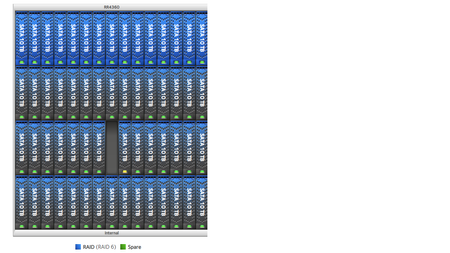
I have a redynas 4360. flly loaded. that apparently removed a drive from slot 39 of the 3rd raid volume so. I inserted a compatible drive from another system. when i insert the new drive the drive...

StephenB
Dec 15, 2021Guru - Experienced User
Its likely a problem with the drive.
I suggest pulling it, and testing it in a PC with seatools. The drive is being written to, so maybe run the full erase disk test.
knorman5
Dec 17, 2021Aspirant
I shut down the readynas, and replaced disk 39 with a new drive. unit 38 is not back and the volume is resyncing. The drive in slot 39 is not configured as a part of the volume yet, and the expand optin is grayed out . do i need to format the dirve then add it? or must i wait for the volume resync to finish first.
- StephenBDec 17, 2021Guru - Experienced User
knorman5 wrote:
I shut down the readynas, and replaced disk 39 with a new drive. unit 38 is not back and the volume is resyncing. The drive in slot 39 is not configured as a part of the volume yet, and the expand optin is grayed out . do i need to format the dirve then add it? or must i wait for the volume resync to finish first.
I am thinking that the NAS is in fact resyncing the new disk 39. You won't be able to change the volume until the resync completes.
Related Content
NETGEAR Academy

Boost your skills with the Netgear Academy - Get trained, certified and stay ahead with the latest Netgear technology!
Join Us!
