NETGEAR is aware of a growing number of phone and online scams. To learn how to stay safe click here.
Forum Discussion

Michale32086
May 06, 2017Aspirant
ReadyNAS Duo Raspberry Pi
Not really well versed in NAS operations. For all intents and purposes, all I want is to put a bunch of movies and TV shows on HDs in the ReadyNAS.. I have a 4TB and a 6TB HD ready to install.. ...
Michale32086
May 06, 2017Aspirant
Thanx for the reply....
Not being able to retain my data is disappointing but not wholly unexpected.. I'll have to do something I really don't like doing. Deleting data.. :D Oh well...
I don't see any BOOT menu.. On the HOME page of the ReadyNAS FRONTVIEW (RAIDiator 4.1.15 [1.00a043]) web access I have:
Printers Printer Queue Service
Status
Under VOLUMES/VOLUME SETTINGS it shows me the Test HD I put in, but nothing on how to configure it..
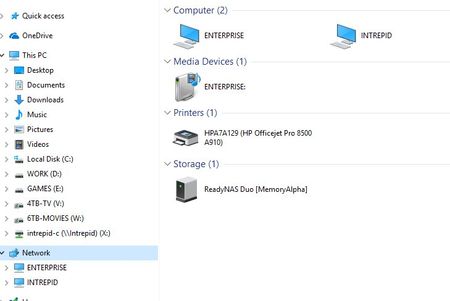
Let me follow up on this once the pics are allowed to be viewed.. Will make it easier..
Thanx again for the reply...

jak0lantash
May 06, 2017Mentor
That's the Boot Menu: https://kb.netgear.com/app/answers/detail/a_id/20898
You need to look at Duo (NOT Duo v2).
To create a share, look at page 46:
http://www.downloads.netgear.com/files/GDC/RND2110/RAIDiator4-1_SW_en_06Dec11.pdf
You also need to look at Flex-RAID. As X-RAID with a drive of 4TB and a drive of 6TB would give you a single RAID1 volume of about 4TB capacity (3.6TiB).
Switching between X-RAID and Flex-RAID requires a Factory Default.
Flex-RAID would allow you to create two separate volumes, therefore fully using your drives capacity (but without RAID redundancy).
If you don't want to wipe both drives, but are OK with wiping one, you can setup your NAS with only one drive (as Flex-RAID), transfer the data from the second (external) drive to your (internal) volume, then when finished, add the second drive to the NAS and create your second volume...
- jak0lantashMay 06, 2017Mentor
WAIT...
The ReadyNAS Duo v1 (and you do have a v1 as it's running the F/W 4.1.15) does NOT support drives bigger than 2TB: https://community.netgear.com/t5/ReadyNAS-Hardware-Compatibility/ReadyNAS-DUO-v-1-amp-4TB-is-that-possible/td-p/956138
- Michale32086May 06, 2017Aspirant
Awwww carp.... :(
- Michale32086May 06, 2017Aspirant
Not being able to use RAID redundancy is actually a plus for me, as I would prefer to use the drives separately.. But that 2TB ceiling shoots it down.. :(
Related Content
NETGEAR Academy

Boost your skills with the Netgear Academy - Get trained, certified and stay ahead with the latest Netgear technology!
Join Us!
