NETGEAR is aware of a growing number of phone and online scams. To learn how to stay safe click here.
Forum Discussion

lundjacob
May 03, 2025Aspirant
Readynas duo v2 cant access on windows 11
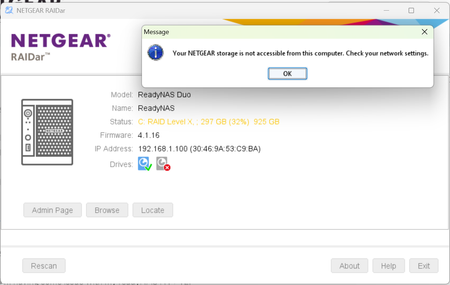
Hi I cant access my Ready Nas duo V2 from windows 11. I have Raidar 6.5.0 installed and can se the Server here but cant access the admin page nor the drive it self. I get the following messa...
lundjacob
May 07, 2025Aspirant
The IP Range in diffined as 192.168.0.2-192.168.0.250. I tried to change the upper range to 192.168.1.250seems I cant

StephenB
May 07, 2025Guru - Experienced User
lundjacob wrote: The IP Range in diffined as 192.168.0.2-192.168.0.250.
You can't change the upper value w/o also changing the subnet mask. But you can reset the range to 192.168.1.2-192.168.1.99, and then reconnect your devices to get IP addresses in the new range. (Addresses over 100 will still work, but will not be assigned by the router - eliminating the chance of two devices trying to use the same address)
Your other path is to do an OS reinstall from the Duo's boot menu. Instructions are on pages 15-16 here:
Be careful not to do a factory reset by mistake, as that will destroy your data.
The OS reinstall will
- reset the NAS admin password to netgear1
- reset the NAS IP address to use DHCP, so it will get an IP address from your router
It will not affect your data.
Once you have access, then look at your router web interface. Almost all routers have a way to reserve an IP address for the NAS. That is better than setting up a static IP address in the NAS web ui (as it avoids the problem you just ran into).
Related Content
NETGEAR Academy

Boost your skills with the Netgear Academy - Get trained, certified and stay ahead with the latest Netgear technology!
Join Us!
