NETGEAR is aware of a growing number of phone and online scams. To learn how to stay safe click here.
Forum Discussion

wb26
Feb 04, 2025Star
ReadyNAS NV rnv1-s2-0000 can’t connect
Hello everyone- my old ReadyNAS NV (Infrant Ready label) powers up, I can ping it successfully but cannot access the files on the drives. Tried remapping the drives in file manager but the connection...
wb26
Feb 06, 2025Star
Can’t get the chassis to acquire an IP address when all the drives are removed. Also can’t ping the NAS at 192.168.168.168 when the NAS is
directly connected to my pc which I made sure was connected on the same subnet.
Is it possible to reinstall the firmware when there are no drives installed?
directly connected to my pc which I made sure was connected on the same subnet.
Is it possible to reinstall the firmware when there are no drives installed?

StephenB
Feb 06, 2025Guru - Experienced User
wb26 wrote:
Can’t get the chassis to acquire an IP address when all the drives are removed. Also can’t ping the NAS at 192.168.168.168 when the NAS is
directly connected to my pc which I made sure was connected on the same subnet.
Does RAIDar give you any more info? It uses ethernet broadcast, so usually can get info even if the NAS is on the wrong subnet.
wb26 wrote:
Is it possible to reinstall the firmware when there are no drives installed?
There is a TFTP recovery process - the download (with instructions) is here:
This would install very old firmware (2009), so you would want to update it before putting your disks back in the NAS.
You could first install the scratch disk, then upgrade the firmware to 4.1.16 using this package:
Then try using your operational disks. If the NAS currently has older firmware installed, then this process would begin by upgrading the OS on the disks to 4.1.16.
It's not clear what is wrong, so this process might not help (and might have some risk).
- wb26Feb 06, 2025StarI’ll installing the scratch disk tonight as described above. If that doesn’t work I’ll try the TFTP recovery process.
Thanks for the help everyone! - wb26Feb 06, 2025StarRead in another post that the NV+ has an option to boot from a USB stick. Is this option available for the NV and are there any advantages to booting from USB in my situation compared to installing a scratch disk to reset the device back to factory defaults then upgrading to the latest firmware the reinstalling my original disks?
- wb26Feb 07, 2025StarI installed the scratch disk while pressing the reset button but the NAS powered itself off whenever the scratch disk was installed. But now when I reboot without any drives in the NAS, the status lights are different than before. Power button slow pulses while the green drive lights alternate between all green blinking and only the bay 2 LED blinking indicating no drives are detected which I think is progress.
However, as soon as I plugin the ethernet cable to connect the drive to my network, the status lights immediately change to the power LED blinking fast, then every 20 seconds all green drive lights turn on for a split second and this cycle repeats. The NAS never gets an ip assignment and RAIDar does not detect the NAS.
When I disconnect the Ethernet cable, the status lights revert back to the no drives detected LED condition.
I’ll try to find another scratch disk tomorrow since the one I have doesn’t seem to be compatible. The drive I used is a 2.5” SATA drive that I aligned in the drive caddy to connect to the NAS in slot 1.
Are there any special requirements for the drives the NV can accept? - SandsharkFeb 07, 2025Sensei
It sounds like it's trying to connect to something on the Internet once you connect the Ethernet cable, but I don't know why.
You should be able to use USB recovery to update to the latest firmware: RAIDiator-4-1-USB-Recovery-Tool
- wb26Feb 07, 2025StarI got a 2TB disk installed in the NAS in slot 1. I powered it up while holding the reset button down for about 30 seconds and released the reset when I saw all four green drive LED’s light up for the second time to reset the chassis back to factory defaults. It looks like it is setting up the new drive. The BBlue power LED is pulsing slowly while the Act light is blinking rapidly. Does this sound right?
I assume it will take a while to setup the 2TB drive. If setup completes normally then the Drive one LED should light up solid green, correct?
Then I can upgrade to the latest 4.1.16 firmware through the web interface, boot from the 2TB drive though all four slots to check the back plane, then put the original drives back in and hope for the best. Sound good? - StephenBFeb 07, 2025Guru - Experienced User
wb26 wrote:
I got a 2TB disk installed in the NAS in slot 1. I powered it up while holding the reset button down for about 30 seconds and released the reset when I saw all four green drive LED’s light up for the second time to reset the chassis back to factory defaults. It looks like it is setting up the new drive. The BBlue power LED is pulsing slowly while the Act light is blinking rapidly. Does this sound right?There's a timeout of about 10 minutes to give you a chance to switch from XRAID to FlexRAID with RAIDar. The NAS also does a short drive test. After that it will format the drive, install the OS and create a volume. There is no sync process, since this is only one drive.
wb26 wrote:
I assume it will take a while to setup the 2TB drive. If setup completes normally then the Drive one LED should light up solid green, correct?It should. The LED states are described here:
RAIDar should also give you the status.
You should log into frontview to make sure everything is ok. The default admin password should be netgear1. If that fails, try infrant1.
wb26 wrote:
Then I can upgrade to the latest 4.1.16 firmware through the web interface, boot from the 2TB drive though all four slots to check the back plane, then put the original drives back in and hope for the best. Sound good?yes
- wb26Feb 07, 2025StarCurrently it’s not plugged into the network. Can I plug in an ethernet cable while it’s setting up the new drive or should I just let it finish?
Also, a silly question, what is the correct way to power off the NV? I have always held the power button down for a few seconds until the drive light flashed, then the NAS powers itself down in about a minute. Came across some info online that a single tap or a double tap of the power button is sufficient but I recall that never worked on my NV. - StephenBFeb 07, 2025Guru - Experienced User
wb26 wrote:
Currently it’s not plugged into the network. Can I plug in an ethernet cable while it’s setting up the new drive or should I just let it finish?You can plug it in now.
wb26 wrote:
Also, a silly question, what is the correct way to power off the NV? I have always held the power button down for a few seconds until the drive light flashed, then the NAS powers itself down in about a minute.That is the correct way with the NV+, so I think it also applies to the NV. See page 22 here:
wb26 wrote:
Came across some info online that a single tap or a double tap of the power button is sufficient but I recall that never worked on my NV.There are other ReadyNAS models where you do use a double-tap (or even a triple-tap if the LCD display is off). But not the NV/NV+.
- wb26Feb 07, 2025StarI can ping the NAS at 192.168.168.168 but can’t load the admin interface at 192.168.168.168/admin. RAIDar also does not detect the NAS. I’ll let it run overnight and see if it finishes setting up the new drive and OS.
- wb26Feb 07, 2025StarGood news.
Very strange behavior but perhaps one of you has seen this before.
The NAS completed setting up the 2TB drive successfully. Took about 5 hours total. RAIDar finds the NAS successfully. The new drive boots up successfully from all four slots as long as there is no Ethernet cable attached to the NAS during power up on slots 3 and 4! Initially my heart sank because it failed to boot from slot 3. I was resigned to trying to find another chassis and had already started to put the hardware away but decided to push the power button one last time, walked away to get some coffee and was shocked when it had booted successfully! Reconnected the eth cable and RAIDar found the NAS, moved drive to slot four and it failed to boot. That’s when I realized that it might be the Ethernet cable. Disconnected it and it booted successfully. I tested the cable and it is a good cable plus I verified unsuccessful booting with two more known good cables. Likely this old factory default firmware has a bug or incompatibility with slots 3 and 4.
If an Ethernet cable is attached to slots 3 & 4 during boot, the blue power LED blinks quickly while all drive LED’s and the Act LED flash very quickly once about every five seconds. This sequence repeats indefinitely. NAS is not accessible in this state. I disconnect the Ethernet cable, pull the power cord because the power LED is unresponsive, power it back up without the Ethernet cable and it boots successfully. I reconnect the Ethernet cable and the drive is discoverable in RAIDar. I can map the drive in file explorer, read, and write to the share, no problem.
I’m going to update the NAS to the latest firmware then Install the original hard drives.
One last hurdle that I need some help with, I hope, lol.
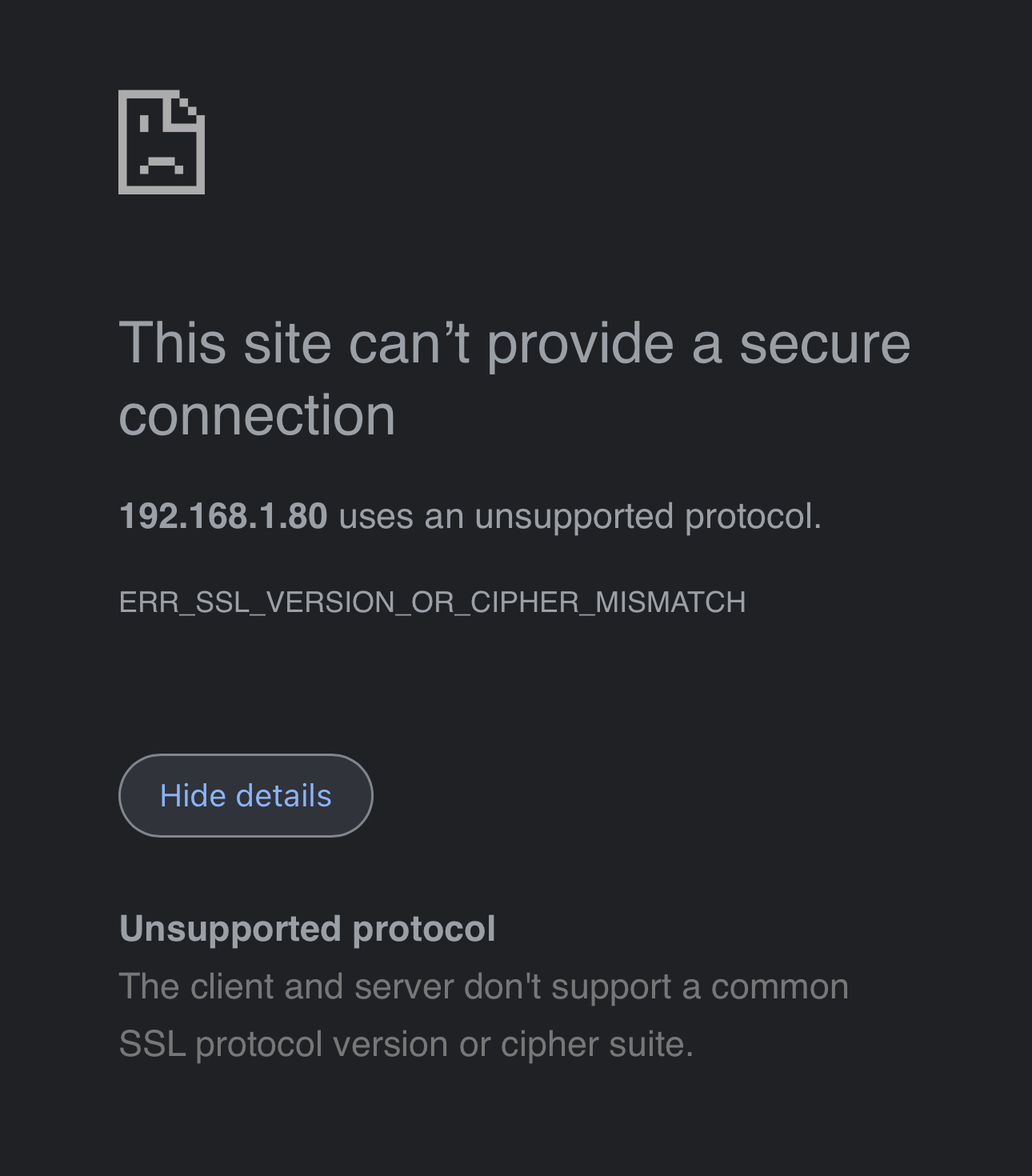
When I try to login to the admin interface I get an error, see attached pic. “This site can’t provide a secure connection. The client and server don’t support a common SSL protocol.
I tried forcing an http connection but all browsers that I have, including cell
phone browsers are redirecting to https no matter the settings I try changing in each browser settings pages to not use a secure connection. Any ideas on how to get past this hurdle? Thanks - StephenBFeb 08, 2025Guru - Experienced User
wb26 wrote:
I tried forcing an http connection but all browsers that I have, including cell
phone browsers are redirecting to https no matter the settings I try changing in each browser settings pages to not use a secure connection. Any ideas on how to get past this hurdle? ThanksIt must have been quite a while since you accessed Frontview, since this issue has been out there for about 2 years now.
Current browsers all require TLS 1.2, and your NAS only support TLS 1.0. You can access the NAS using Firefox, after you set security.tls.version.min to 1 (browse to about:config and search for the setting). You will still get a security warning you need to click through. (Note you cannot click through the warning you are seeing now).
Later on (after you are using your original disks), you can apply a mod that will allow you to access the NAS using http. That mod is in the first post of here:
- wb26Feb 08, 2025StarYes, it’s been at least two years, probably more, lol.
- wb26Feb 09, 2025StarUpgraded the NAS to 4.1.16 with the 2TB disk. I then installed the original disks and waited for the OS to upgrade. After about 10min the blue power LED changed from a slow pulse to solid. During the time that it was pulsing, the NAS was discoverable with RAIDar and was assigned an IP address and ping commands were successful. When it changed to solid blue, RAIDar could no longer detect the NAS and ping commands failed. The status in RAIDar was “Booting” during the time that RAIDar was detecting the NAS successfully, see attached pic. I could not map the shares in file manager at any time during this process. Problem seems to be with one of the drives or maybe a corrupt OS on the drives? Sometimes the blue power LED turns completely off at the end of an unsuccessful boot.
Any ideas on what I can try next? - wb26Feb 10, 2025StarYes, I have access to a linux box but I’m not familiar with tech support mode. Please forward any info you may have.
The original drives are Seagate part number 9bl13e-301 250GB. I’ll check what tools they offer. I also have a licensed copy of SpinRite by Gibson Research that may help check data integrity.
Thanks for your help, really appreciate it.

Related Content
NETGEAR Academy

Boost your skills with the Netgear Academy - Get trained, certified and stay ahead with the latest Netgear technology!
Join Us!