NETGEAR is aware of a growing number of phone and online scams. To learn how to stay safe click here.
Forum Discussion

snoofy
Feb 15, 2024Aspirant
ReadyNAS NV+ v2 - Cant access shares, failed f/w update etc
Haven't been using my NAS for a long time but that said, lots of photos and movies are stored on it. I booted it and it came up, noticed ths SSL issue with the browser but I got Opera and could get...
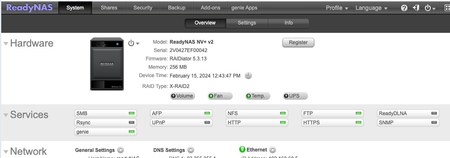

Sandshark
Feb 15, 2024Sensei
An OS re-install does not touch your data. A factory default does, so make sure you don't accidently do that.
I'm wondering if you have a full OS partition. I don't know of any specific things on a V2 that could cause that, but it can cause a lot of unusual symptoms.
snoofy
Feb 15, 2024Aspirant
ok started a reinstall ... how long does it normally take (as it still says )
regarding the partition, I think it is just a slice ... from the partition.log
WARNING: GPT (GUID Partition Table) detected on '/dev/sda'! The util fdisk doesn't support GPT. Use GNU Parted.
WARNING: GPT (GUID Partition Table) detected on '/dev/sdb'! The util fdisk doesn't support GPT. Use GNU Parted.
WARNING: GPT (GUID Partition Table) detected on '/dev/sdc'! The util fdisk doesn't support GPT. Use GNU Parted.
WARNING: GPT (GUID Partition Table) detected on '/dev/sdd'! The util fdisk doesn't support GPT. Use GNU Parted.
Disk /dev/md0 doesn't contain a valid partition table
Disk /dev/md1 doesn't contain a valid partition table
Disk /dev/sda: 3000.6 GB, 3000592982016 bytes
256 heads, 63 sectors/track, 363376 cylinders, total 5860533168 sectors
Units = sectors of 1 * 512 = 512 bytes
Sector size (logical/physical): 512 bytes / 512 bytes
I/O size (minimum/optimal): 512 bytes / 512 bytes
Disk identifier: 0x00000000
Device Boot Start End Blocks Id System
/dev/sda1 1 4294967295 2147483647+ ee GPT
Disk /dev/sdb: 3000.6 GB, 3000592982016 bytes
255 heads, 63 sectors/track, 364801 cylinders, total 5860533168 sectors
Units = sectors of 1 * 512 = 512 bytes
Sector size (logical/physical): 512 bytes / 512 bytes
I/O size (minimum/optimal): 512 bytes / 512 bytes
Disk identifier: 0x00000000
Device Boot Start End Blocks Id System
/dev/sdb1 1 4294967295 2147483647+ ee GPT
Disk /dev/sdc: 3000.6 GB, 3000592982016 bytes
255 heads, 63 sectors/track, 364801 cylinders, total 5860533168 sectors
Units = sectors of 1 * 512 = 512 bytes
Sector size (logical/physical): 512 bytes / 512 bytes
I/O size (minimum/optimal): 512 bytes / 512 bytes
Disk identifier: 0x00000000
Device Boot Start End Blocks Id System
/dev/sdc1 1 4294967295 2147483647+ ee GPT
Disk /dev/sdd: 3000.6 GB, 3000592982016 bytes
255 heads, 63 sectors/track, 364801 cylinders, total 5860533168 sectors
Units = sectors of 1 * 512 = 512 bytes
Sector size (logical/physical): 512 bytes / 512 bytes
I/O size (minimum/optimal): 512 bytes / 512 bytes
Disk identifier: 0x00000000
Device Boot Start End Blocks Id System
/dev/sdd1 1 4294967295 2147483647+ ee GPT
Disk /dev/md0: 4293 MB, 4293906432 bytes
2 heads, 4 sectors/track, 1048317 cylinders, total 8386536 sectors
Units = sectors of 1 * 512 = 512 bytes
Sector size (logical/physical): 512 bytes / 512 bytes
I/O size (minimum/optimal): 512 bytes / 512 bytes
Disk identifier: 0x00000000
Disk /dev/md1: 536 MB, 536858624 bytes
2 heads, 4 sectors/track, 131069 cylinders, total 1048552 sectors
Units = sectors of 1 * 512 = 512 bytes
Sector size (logical/physical): 512 bytes / 512 bytes
I/O size (minimum/optimal): 512 bytes / 512 bytes
Disk identifier: 0x00000000
 StephenBFeb 15, 2024Guru - Experienced User
snoofy wrote:
ok started a reinstall ... how long does it normally take (as it still says )
Your screenshot says "installing addon". I haven't seen that before. Does that show up when you boot normally?
The reinstall process I was suggesting is done via the boot menu. See pages 24-25 here:
- snoofyFeb 15, 2024Aspirant
Thanks for the tip wrt Seagate Ironwolf but I have another spare 3TB Barracuda that I will use, hopefully I can offload the data and get a more modern NAS / storage solution 😉
I did follow your doc ref and selected the OS install from the boot menu, and after a while this is what I got.
It has been like this now for 3h now, which is why I asked wrt how long time it takes.
This is also what it showed me this morning after the "stale (failed?)" firmware upgrade (I had 5.3.10 and now it says I have 5.3.13) ....
- StephenBFeb 15, 2024Guru - Experienced User
snoofy wrote:
I did follow your doc ref and selected the OS install from the boot menu, and after a while this is what I got.
It has been like this now for 3h now, which is why I asked wrt how long time it takes.
...
Generally it just takes a minute or two, so I am puzzled on why it is taking so long. It might be linked to whatever is blocking the firmware from completing.
- snoofyFeb 15, 2024Aspirant
Yes ... I guess I have to pull the cable and restart to see
Is there anything I can do from telnetting into the debug menu?
Can I reinstall OS or firmware from there or even mount the volumes/shares and scan it etc ?
- StephenBFeb 15, 2024Guru - Experienced User
snoofy wrote:
Is there anything I can do from telnetting into the debug menu?
Can I reinstall OS or firmware from there or even mount the volumes/shares and scan it etc ?
You certainly can take a closer look at what is wrong. The RAID array (md2) is assembled, so you could attempt to mount it.
Do you have ssh enabled?
- snoofyFeb 15, 2024Aspirant
I don't (have ssh) and when I try it fails to install 😞 It does however responds to ssh but fails once I have provided password with the port closed (suspect the user can't login due to non-existing / wrong home dir - is the homedir located in the RAID volume?).
So I was thinking using telnet and the debug mode ....
- snoofyFeb 16, 2024Aspirant
So, todays problems are
1) the webserver seem to produce a scrambled cert
2) ssh will not let me in due to what I think is a missing homedir (volume - /home/uffe)
ulf@raspi44:~ $ ssh -vvvv -oHostKeyAlgorithms=+ssh-rsa uffe@192.168.68.104
OpenSSH_9.2p1 Debian-2+deb12u2, OpenSSL 3.0.11 19 Sep 2023
debug1: Reading configuration data /etc/ssh/ssh_config
..
debug1: Connecting to 192.168.68.104 [192.168.68.104] port 22.
debug1: Connection established.
debug1: Remote protocol version 2.0, remote software version OpenSSH_5.5p1 Debian-6+squeeze1
debug1: compat_banner: match: OpenSSH_5.5p1 Debian-6+squeeze1 pat OpenSSH_5* compat 0x0c000002
debug3: remaining preferred: ,password
debug3: authmethod_is_enabled password
debug1: Next authentication method: password
uffe@192.168.68.104's password:
debug2: we sent a password packet, wait for reply
Authenticated to 192.168.68.104 ([192.168.68.104]:22) using "password".
debug1: channel 0: new session [client-session] (inactive timeout: 0)
debug3: ssh_session2_open: channel_new: 0
debug2: channel 0: send open
debug1: Requesting no-more-sessions@openssh.com
debug1: Entering interactive session.
debug1: pledge: filesystem
debug3: client_repledge: enter
debug3: receive packet: type 91
debug2: channel_input_open_confirmation: channel 0: callback start
debug2: fd 3 setting TCP_NODELAY
debug3: set_sock_tos: set socket 3 IP_TOS 0x10
debug2: client_session2_setup: id 0
debug2: channel 0: request pty-req confirm 1
debug3: send packet: type 98
debug1: Sending environment.
debug3: Ignored env SHELL
debug3: Ignored env NO_AT_BRIDGE
debug3: Ignored env PWD
debug3: Ignored env LOGNAME
debug3: Ignored env XDG_SESSION_TYPE
debug3: Ignored env MOTD_SHOWN
debug3: Ignored env HOME
debug1: channel 0: setting env LANG = "sv_SE.UTF-8"
debug2: channel 0: request env confirm 0
debug3: send packet: type 98
debug3: Ignored env LS_COLORS
debug1: channel 0: setting env LC_TERMINAL = "iTerm2"
debug2: channel 0: request env confirm 0
debug3: send packet: type 98
debug3: Ignored env SSH_CONNECTION
debug3: Ignored env XDG_SESSION_CLASS
debug3: Ignored env TERM
debug3: Ignored env USER
debug1: channel 0: setting env LC_TERMINAL_VERSION = "3.4.23"
debug2: channel 0: request env confirm 0
debug3: send packet: type 98
debug3: Ignored env SHLVL
debug3: Ignored env XDG_SESSION_ID
debug1: channel 0: setting env LC_CTYPE = "sv_SE.UTF-8"
debug2: channel 0: request env confirm 0
debug3: send packet: type 98
debug3: Ignored env XDG_RUNTIME_DIR
debug3: Ignored env SSH_CLIENT
debug1: channel 0: setting env LC_ALL = "sv_SE.UTF-8"
debug2: channel 0: request env confirm 0
debug3: send packet: type 98
debug3: Ignored env PATH
debug3: Ignored env DBUS_SESSION_BUS_ADDRESS
debug3: Ignored env SSH_TTY
debug3: Ignored env TEXTDOMAIN
debug3: Ignored env _
debug2: channel 0: request shell confirm 1
debug3: send packet: type 98
debug3: client_repledge: enter
debug2: channel_input_open_confirmation: channel 0: callback done
debug2: channel 0: open confirm rwindow 0 rmax 32768
debug3: receive packet: type 99
debug2: channel_input_status_confirm: type 99 id 0
debug2: PTY allocation request accepted on channel 0
debug2: channel 0: rcvd adjust 2097152
debug3: receive packet: type 99
debug2: channel_input_status_confirm: type 99 id 0
debug2: shell request accepted on channel 0
debug3: receive packet: type 98
debug1: client_input_channel_req: channel 0 rtype exit-status reply 0
debug3: receive packet: type 98
debug1: client_input_channel_req: channel 0 rtype eow@openssh.com reply 0
debug2: channel 0: rcvd eow
debug2: chan_shutdown_read: channel 0: (i0 o0 sock -1 wfd 4 efd 6 [write])
debug2: channel 0: input open -> closed
debug3: receive packet: type 96
debug2: channel 0: rcvd eof
debug2: channel 0: output open -> drain
debug3: receive packet: type 97
debug2: channel 0: rcvd close
debug3: channel 0: will not send data after close
Linux readyNAS 2.6.31.8.nv+v2 #1 Thu Apr 18 17:40:54 HKT 2013 armv5tel GNU/Linux
Last login: Fri Feb 16 11:18:03 2024 from 192.168.68.44
debug3: channel 0: will not send data after close
debug2: channel 0: obuf empty
debug2: chan_shutdown_write: channel 0: (i3 o1 sock -1 wfd 5 efd 6 [write])
debug2: channel 0: output drain -> closed
debug2: channel 0: almost dead
debug2: channel 0: gc: notify user
debug2: channel 0: gc: user detached
debug2: channel 0: send close
debug3: send packet: type 97
debug2: channel 0: is dead
debug2: channel 0: garbage collecting
debug1: channel 0: free: client-session, nchannels 1
debug3: channel 0: status: The following connections are open:
#0 client-session (t4 [session] r0 i3/0 o3/0 e[write]/0 fd -1/-1/6 sock -1 cc -1 io 0x00/0x00)debug3: send packet: type 1
Connection to 192.168.68.104 closed.
Transferred: sent 2864, received 2384 bytes, in 0.0 seconds
Bytes per second: sent 113186.6, received 94216.8
debug1: Exit status 1 - snoofyFeb 16, 2024Aspirant
... hmmm, seems like I can't even login using debug mode & telnet 😳😱 admin/password is the default, correct ?
- schumakuFeb 16, 2024Guru - Experienced User
snoofy wrote:
So, todays problems are
1) the webserver seem to produce a scrambled cert
No, your browser does no longer accept the self-signed certificate.
Next obstacle on your already bumpy road will be the outdated SSL on the more-than-legacy ReadyNAS. Not an Opera geek, it's well possible the only way around this might be using Firefox, lower the minimum accepted ssl to 1, and accept the self-signed certificate.
snoofy wrote:
2) ssh will not let me in due to what I think is a missing homedir (volume - /home/uffe)
ulf@raspi44:~ $ ssh -vvvv -oHostKeyAlgorithms=+ssh-rsa uffe@192.168.68.104
OpenSSH_9.2p1 Debian-2+deb12u2, OpenSSL 3.0.11 19 Sep 2023You must use root for the login username to access the NAS over ssh.
- StephenBFeb 16, 2024Guru - Experienced User
snoofy wrote:
I don't (have ssh) and when I try it fails to install 😞 It does however responds to ssh but fails once I have provided password with the port closed (suspect the user can't login due to non-existing / wrong home dir - is the homedir located in the RAID volume?).
Normally you log into SSH as "root", and use the NAS admin password. That opens in the root of the OS partition, so that will work even if the data volume isn't mounted. But if you didn't enable it with the add-on, then likely it won't respond.
- StephenBFeb 16, 2024Guru - Experienced User
snoofy wrote:
So, todays problems are
1) the webserver seem to produce a scrambled cert
Try Firefox, and first set security.tls.version.min to 1 (browse to about:config and search for the setting). You'll still get a security warning because the NAS cert is self-signed - but you can click through that.
snoofy wrote:
2) ssh will not let me in due to what I think is a missing homedir (volume - /home/uffe)
ulf@raspi44:~ $ ssh -vvvv -oHostKeyAlgorithms=+ssh-rsa uffe@192.168.68.104
Try using simply ssh root@192.168.68.104 and enter the NAS admin password when prompted.
- StephenBFeb 16, 2024Guru - Experienced User
snoofy wrote:
... hmmm, seems like I can't even login using debug mode & telnet 😳😱 admin/password is the default, correct ?
After booting in tech support mode (what you apparently call debug mode), the username has to be root, and the password is infr8ntdebug. You are running out of flash, not the normal OS on the disk. This limits the commands you can use (note the instructions for chroot below).
There are other commands that then need to be entered. In the case of the NV+ v2, you'd normally start with
# start_raid.sh
# mount /dev/md0 /sysroot
to mount the OS partition.
You can then chroot
# mount --bind /proc /sysroot/proc
# mount --bind /dev /sysroot/dev
# mount --bind /dev/pts /sysroot/dev/pts
# mount --bind /sys /sysroot/sys
# chroot /sysroot /bin/bash
You can mount the data volume with these commands:
# vgscan # vgchange -a y # mount /dev/c/c /c - snoofyFeb 17, 2024Aspirant
So ... a new day and some more steps ... after long wait etc I am now able to login to the NAS using ssh!
In there I can see 2 (md0 and md1) volumes as per
root@readyNAS:/# mdadm --detail /dev/md0
/dev/md0:
Version : 1.2
Creation Time : Thu Sep 27 02:48:57 2012
Raid Level : raid1
Array Size : 4193268 (4.00 GiB 4.29 GB)
Used Dev Size : 4193268 (4.00 GiB 4.29 GB)
Raid Devices : 3
Total Devices : 2
Persistence : Superblock is persistentUpdate Time : Sat Feb 17 16:56:03 2024
State : clean, degraded
Active Devices : 2
Working Devices : 2
Failed Devices : 0
Spare Devices : 0Name : 2CB05DBE921B:0
UUID : 77fa2807:dc04bc85:fab231ec:ac644bb4
Events : 11447890Number Major Minor RaidDevice State
2 8 49 0 active sync /dev/sdd1
1 0 0 1 removed
3 8 33 2 active sync /dev/sdc1and
root@readyNAS:/# mdadm --detail /dev/md1
/dev/md1:
Version : 1.2
Creation Time : Thu Sep 27 02:48:58 2012
Raid Level : raid1
Array Size : 524276 (512.07 MiB 536.86 MB)
Used Dev Size : 524276 (512.07 MiB 536.86 MB)
Raid Devices : 4
Total Devices : 4
Persistence : Superblock is persistentUpdate Time : Sat Feb 17 16:50:53 2024
State : clean
Active Devices : 4
Working Devices : 4
Failed Devices : 0
Spare Devices : 0Name : 2CB05DBE921B:1
UUID : b93a9ced:5cd9d404:246b1816:82fa1864
Events : 2666321Number Major Minor RaidDevice State
5 8 18 0 active sync /dev/sdb2
1 8 2 1 active sync /dev/sda2
2 8 50 2 active sync /dev/sdd2
4 8 34 3 active sync /dev/sdc2I have also seen some problems (as I said earlier that disk #2 complained about errors and recommended me to replace this which I have done) On the LED display it now says "TESTING DISK 2" and has said so for 24h+ ...
Does that explains the md0 and line
1 0 0 1 removed
What worries me more is when I run vgscan I don't have any volumes 😬
root@readyNAS:/# vgscan
Reading all physical volumes. This may take a while...
No volume groups found
root@readyNAS:/#root@readyNAS:/# vgchange -a y
No volume groups foundTIA
- StephenBFeb 17, 2024Guru - Experienced User
what happens if you run this?
mdadm --assemble /dev/md2 /dev/sda3 /dev/sdb3 /dev/sdc3 /dev/sdd3md2 is the RAID group for the data volume. (If you are using XRAID and vertically expanded the volume in the past, then there would also be other mdX RAID groups as well).
- snoofyFeb 18, 2024Aspirant
Morning,
So when I first run this (with a new disk2 in the system - still saying "Testing disk2" I get
root@readyNAS:~# mdadm --assemble /dev/md2 /dev/sda3 /dev/sdb3 /dev/sdc3 /dev/sdd3
mdadm: no RAID superblock on /dev/sdb3
mdadm: /dev/sdb3 has no superblock - assembly abortedI changes disk 2 back to the old disk and rerun the mdadm command I get
root@readyNAS:~# mdadm --assemble /dev/md2 /dev/sda3 /dev/sdb3 /dev/sdc3 /dev/sdd3
mdadm: cannot open device /dev/sda3: Device or resource busy
mdadm: /dev/sda3 has no superblock - assembly abortedI know I shouldn't have to format or otherwise manipulate a replacement disk but is there anything I can do to check it / "help"?
Also disk /dev/sdb is that disk 2 (second slot from the left) ?
What can make this, as in the superblock, move (from sdb to sda) ?
TiA
- StephenBFeb 18, 2024Guru - Experienced User
snoofy wrote:
I changes disk 2 back to the old disk and rerun the mdadm command I get
root@readyNAS:~# mdadm --assemble /dev/md2 /dev/sda3 /dev/sdb3 /dev/sdc3 /dev/sdd3
mdadm: cannot open device /dev/sda3: Device or resource busy
mdadm: /dev/sda3 has no superblock - assembly abortedtry running
cat /proc/mdstatand see if /dev/md2 is listed.
If it isn't, then try
root@readyNAS:~# mdadm --assemble --force /dev/md2 /dev/sdb3 /dev/sdc3 /dev/sdd3and if that appears to work, try running the cat command again.
If md2 is listed, then try the vgscan bit again.
- snoofyFeb 18, 2024Aspirant
ok so
root@readyNAS:~# cat /proc/mdstat
Personalities : [linear] [raid0] [raid1] [raid10] [raid6] [raid5] [raid4]
md2 : inactive sda3[1](S) sdc3[4](S) sdd3[2](S) sdb3[0](S)
      11702179554 blocks super 1.2

md1 : active raid1 sdb2[5] sda2[1] sdc2[4] sdd2[2]
      524276 blocks super 1.2 [4/4] [UUUU]

md0 : active raid1 sdb1[4] sda1[1] sdd1[2] sdc1[3]
      4193268 blocks super 1.2 [4/4] [UUUU]

unused devices: <none>
but vgscan wont give me anything but "No volume groups found"
What's interesting though... if I run vgscan with a couple of "-vvv" I see md2 only mentioned once in there (in comparison to md0 and md1)
root@readyNAS:~# vgscan -vv
      Setting global/locking_type to 1
      Setting global/wait_for_locks to 1
      File-based locking selected.
      Setting global/locking_dir to /var/lock/lvm
      Locking /var/lock/lvm/P_global WB
    Wiping cache of LVM-capable devices
      /dev/core: stat failed: No such file or directory
    Wiping internal VG cache
  Reading all physical volumes.  This may take a while...
    Finding all volume groups
      /dev/loop0: size is 0 sectors
      /dev/sda: size is 5860533168 sectors
      /dev/md0: size is 8386536 sectors
      /dev/md0: size is 8386536 sectors
      /dev/md0: No label detected
      /dev/loop1: size is 0 sectors
      /dev/sda1: size is 8388608 sectors
      /dev/sda1: size is 8388608 sectors
      /dev/md1: size is 1048552 sectors
      /dev/md1: size is 1048552 sectors
      /dev/md1: No label detected
      /dev/loop2: size is 0 sectors
      /dev/sda2: size is 1048576 sectors
      /dev/sda2: size is 1048576 sectors
      /dev/md2: size is 0 sectors
      /dev/loop3: size is 0 sectors
      /dev/sda3: size is 5851091825 sectors
      /dev/sda3: size is 5851091825 sectors
      /dev/loop4: size is 0 sectors
      /dev/loop5: size is 0 sectors
      /dev/loop6: size is 0 sectors
      /dev/loop7: size is 0 sectors
      /dev/sdb: size is 5860533168 sectors
      /dev/sdb1: size is 8388608 sectors
      /dev/sdb1: size is 8388608 sectors
      /dev/sdb2: size is 1048576 sectors
      /dev/sdb2: size is 1048576 sectors
      /dev/sdb3: size is 5851091825 sectors
      /dev/sdb3: size is 5851091825 sectors
      /dev/sdc: size is 5860533168 sectors
      /dev/sdc1: size is 8388608 sectors
      /dev/sdc1: size is 8388608 sectors
      /dev/sdc2: size is 1048576 sectors
      /dev/sdc2: size is 1048576 sectors
      /dev/sdc3: size is 5851091825 sectors
      /dev/sdc3: size is 5851091825 sectors
      /dev/sdd: size is 5860533168 sectors
      /dev/sdd1: size is 8388608 sectors
      /dev/sdd1: size is 8388608 sectors
      /dev/sdd2: size is 1048576 sectors
      /dev/sdd2: size is 1048576 sectors
      /dev/sdd3: size is 5851091825 sectors
      /dev/sdd3: size is 5851091825 sectors
  No volume groups found
      Unlocking /var/lock/lvm/P_global
For example, md0 is listed three times
/dev/md0: size is 8386536 sectors
/dev/md0: size is 8386536 sectors
/dev/md0: No label detectedwhile md2 is only listed once ...
/dev/md2: size is 0 sectors
and
root@readyNAS:~# lvmdiskscan
  /dev/md0 [       4,00 GiB]
  /dev/md1 [     511,99 MiB]
  0 disks
  2 partitions
  0 LVM physical volume whole disks
  0 LVM physical volumes
and
root@readyNAS:~# vgscan --mknodes -vv Setting global/locking_type to 1 Setting global/wait_for_locks to 1 File-based locking selected. Setting global/locking_dir to /var/lock/lvm Locking /var/lock/lvm/P_global WB Wiping cache of LVM-capable devices /dev/core: stat failed: No such file or directory Wiping internal VG cache Reading all physical volumes. This may take a while... Finding all volume groups /dev/loop0: size is 0 sectors /dev/sda: size is 5860533168 sectors /dev/md0: size is 8386536 sectors /dev/md0: size is 8386536 sectors /dev/md0: No label detected /dev/loop1: size is 0 sectors /dev/sda1: size is 8388608 sectors /dev/sda1: size is 8388608 sectors /dev/md1: size is 1048552 sectors /dev/md1: size is 1048552 sectors /dev/md1: No label detected /dev/loop2: size is 0 sectors /dev/sda2: size is 1048576 sectors /dev/sda2: size is 1048576 sectors /dev/md2: size is 0 sectors /dev/loop3: size is 0 sectors /dev/sda3: size is 5851091825 sectors /dev/sda3: size is 5851091825 sectors /dev/loop4: size is 0 sectors /dev/loop5: size is 0 sectors /dev/loop6: size is 0 sectors /dev/loop7: size is 0 sectors /dev/sdb: size is 5860533168 sectors /dev/sdb1: size is 8388608 sectors /dev/sdb1: size is 8388608 sectors /dev/sdb2: size is 1048576 sectors /dev/sdb2: size is 1048576 sectors /dev/sdb3: size is 5851091825 sectors /dev/sdb3: size is 5851091825 sectors /dev/sdc: size is 5860533168 sectors /dev/sdc1: size is 8388608 sectors /dev/sdc1: size is 8388608 sectors /dev/sdc2: size is 1048576 sectors /dev/sdc2: size is 1048576 sectors /dev/sdc3: size is 5851091825 sectors /dev/sdc3: size is 5851091825 sectors /dev/sdd: size is 5860533168 sectors /dev/sdd1: size is 8388608 sectors /dev/sdd1: size is 8388608 sectors /dev/sdd2: size is 1048576 sectors /dev/sdd2: size is 1048576 sectors /dev/sdd3: size is 5851091825 sectors /dev/sdd3: size is 5851091825 sectors No volume groups found Finding all logical volumes No volume groups found Unlocking /var/lock/lvm/P_global🤔🙄
- StephenBFeb 18, 2024Guru - Experienced User
Sounds like something has corrupted the LVM structures. I guess you could try recovery software - perhaps R-Studio

Related Content
NETGEAR Academy

Boost your skills with the Netgear Academy - Get trained, certified and stay ahead with the latest Netgear technology!
Join Us!
