NETGEAR is aware of a growing number of phone and online scams. To learn how to stay safe click here.
Forum Discussion

FlaviaS
May 16, 2021Star
ReadyNAS Pro 6 USB recovery issue
Hi ! I have a Pro 6 currently running 6.10.4 I would like to downgrade it to 4.2.x to flash the latest Bios. I know it would be possible to run flashrom directly in OS6 (tough some users said flash...

FlaviaS
May 16, 2021Star
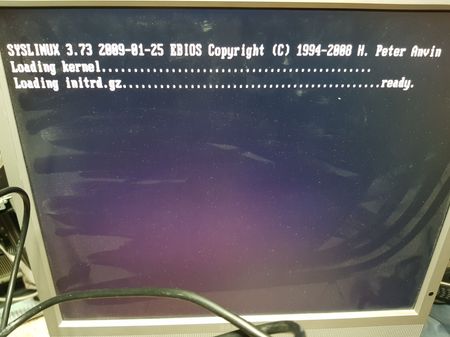
Thank you for suggestions. I used Run as Administrator when I ran usbrecovery.exe. I am aware the system is picky regarding the boot stick and prepared 3 sticks, the old 1GB Imation works to boot (and get to the status shown in the attached foto). The other 2 sticks, both 16GB (a Sandisk Cruzer and a no-name) would not boot (I get a message "media is not bootable" when I start Pro6 with them plugged in front USB). In the past I was using Rufus or rawwrite to create bootable sticks but I am not sure how to put together the syslinux image and the fimware so that the system is not only booting but also proceeds to write the content of the Raidiator 4.2.31 to the internal flash, if I remember correctly in both Rufus and rawwrite I had an .iso file that was selected as input and writtent to usb stick.
I find strange that the firmware 4.2.31 from the .zip file does not have any extension (I was expecting a .bin or .img or similar). File explorer in Windows 10 was configured Not to hide extensions of known filetypes and the file I get is called "Raidiator-x86-4.2.31" without any extension.
I will look into the option to downgrade from within OS6 altough would be great to understand what I am doing wrong.
There are a number of messages on the forum form people having issues with USB recovery but none applies to my situation (usually they have problems running usbrecovery because of incompatibility with their workstation) so the instructions are working for most people otherwise there would be more posts about it.

mdgm
May 16, 2021Virtuoso
Did you make sure to use the MBR partitioning scheme and e.g. the FAT32 filesystem? Note that the USB key needs to have a partition table with a single partition. The boot recovery files need to be on that partition. Another common mistake is not to have any partition table or partition which will mean that when the boot recovery script looks for that partition it won't be able to find it.
The firmware image has no extension. Their are arguments both ways. OS6 firmware images have an extension .img, but that extension is also used in other settings for disk image files, which the firmware image is not.
The downgrade image is here: https://community.netgear.com/t5/ReadyNAS-Storage-Apps-Current/Downgrade-to-RAIDiator-x86-from-ReadyNAS-OS-notsupported/td-p/859412
- FlaviaSMay 17, 2021Star
Yes, the sticks are formatted FAT32 with a single, active partition (99.9% of the sticks report to Windows as "Removable Media" and unlike "Fixed Disk" it only supports 1 partition. I did one more try with the stick which was booting plugged in one of the 2 USB ports in the back (instead of the front). This time I noticed on the lan card a green led blinking (did not see it before) and now Raidar reports still 6.10.4 but with the EEPROM corruption "To be filled by O.E.M" and serial NONE00000000"
- SandsharkMay 17, 2021Sensei
While it's too late now, USB recovery is not the best way to switch back to OS4.2.x. You just do an "update" with a 4.2.x image doctored to look like an OS6 update (like V8.0).
When you go backwards, just as going forward from 4.2.x to 6.x, a factory default is required. For that reason, it's best to do the whole process with a scratch drive if it's only temporary. Then, you can just put back in the original drives when it's back to 6.x.
Unfortunately, OS4.2.x doesn't show all the information on the display as 6.0 does. In fact, you typically only see what you are seeing. So all you need may be the factory default. Of course, that will wipe the contents of the drives, so use a spare one if you need what's on the normal ones.

Related Content
NETGEAR Academy

Boost your skills with the Netgear Academy - Get trained, certified and stay ahead with the latest Netgear technology!
Join Us!
