NETGEAR is aware of a growing number of phone and online scams. To learn how to stay safe click here.
Forum Discussion

robnrie
Jan 27, 2019Tutor
ReadyNAS RN104 Remove Inactive Volumes
I need help as last night my nas rebooted and left me with the following, and bay 4 has only been added since to see if it would complete a sync. No drives have reported failures and my volume was o...
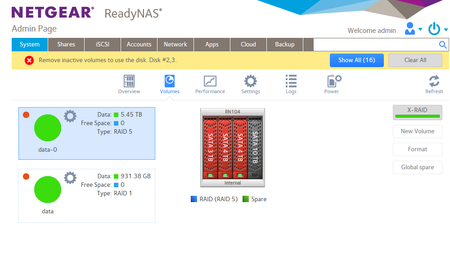
- Jan 29, 2019
Gearhead allso states for Network storage.
I could not wait any longer so i purchased the Gearhead and i am over the moon to say that the techs there got me up and running into read only mode in 40 mins so i could save my data and now start clean...:smileylol:

Laserbait
Jan 28, 2019Luminary
Try booting up to "read only mode". I had this happen on my 316, and I was able to copy my data off and then I reset the 316 back to factory defaults, and rebuilt the RAID.
- robnrieJan 28, 2019Tutor
Hi Laserbait,
I did boot up to read only but still could not see my data.- robnrieJan 28, 2019Tutor
One more thing that i can add is that the power supply is supose to produce 12v on 2 rails and i am thinking that 1 of those is for the HDD.
On the night that it happened drive 2 and 3 dropped out and remounted several times, and the system shut down due to failure but when i noticed it and tried to restart it a message came up saying no drives found.
Then shortly after the system had no power at all so i swapped the power supply and sure enough the old power supply had failed.
since then i have tested the drives and noerrors at all so i am thinking that it is just in the boot sector and did not complete a resync..
Related Content
NETGEAR Academy

Boost your skills with the Netgear Academy - Get trained, certified and stay ahead with the latest Netgear technology!
Join Us!
