NETGEAR is aware of a growing number of phone and online scams. To learn how to stay safe click here.
Forum Discussion

Retired_Member
Nov 25, 2018RN 10200 Serialnumber shown is: N0NE000200000 correct is 3ERB49EM00A83; MAC-Address is not correct
I bought the RN10200 over ebay some days ago
On the bottom i see
Produkt: RN10200
Seriennummer 3ERB49EM00A83
MAC 28:C6:8E:36:FD:45
FW: V 6.1.8
It was bought
2014-12-07
and registered ...
- Nov 26, 2018I’m no longer at NETGEAR.
This is a problem most commonly seen on RN100/RN2120 when updating from pre-6.4.x firmware to 6.4.x or later but it could happen on other updates too.
This is an easy problem for level 3 to attempt to fix, however as it’s a second hand unit purchasing support wouldn’t be an option.
It does need to be fixed for you to be able to use ReadyCLOUD.

Retired_Member
Nov 26, 2018Excuse my bad english
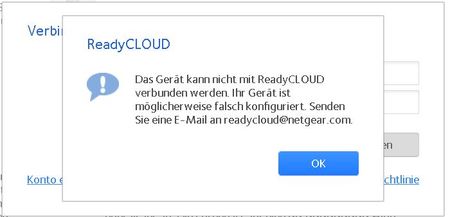
When i try to connect to READYCLOUD i get the following answer
i use a static IP address
with IP v6
and
for IP v4
Jochen

StephenB
Nov 26, 2018Guru - Experienced User
Does anything change if you disable ipv6 in the NAS?
Also, can you confirm that the NAS is reaching the internet? Turning NTP off and on again is one easy way to check.
- Retired_MemberNov 26, 2018
I disabled IPv6 but nothing changed
I don't know if the NAS is reaching the internet. It is sending normal things per email for example the server goes down etc.
I do not find NTP
I have now installad all possible services but nothing changes.
Jochen
- StephenBNov 26, 2018Guru - Experienced User
NTP: Network Time Protocol. That is used by the NAS to set its clock.
If you navigate to the system tab of the web UI, and then click on the settings wheel next to the time, you will see a checkbox labeled "Synchronize clock with an Internet server". If it is checked, try uncheck it, and then click apply. Wait a few seconds, check it, and then click apply.
Then go to the log page - you should see an entry saying that the NTP service was successfully enabled.
Finally download the log zip file from the log page. Look in connman.log. You should see recent time adjustments - stuff like
Nov 26 00:15:33 NAS connmand[5625]: ntp: adjust (slew): -0.001492 sec
Nov 26 00:32:37 NAS connmand[5625]: ntp: adjust (slew): +0.002414 sec
Nov 26 00:49:41 NAS connmand[5625]: ntp: adjust (slew): +0.000483 sec
Nov 26 01:06:45 NAS connmand[5625]: ntp: adjust (slew): -0.001189 sec
Nov 26 01:23:49 NAS connmand[5625]: ntp: adjust (slew): +0.001039 sec
Nov 26 01:40:53 NAS connmand[5625]: ntp: adjust (slew): -0.002253 sec
Nov 26 01:57:57 NAS connmand[5625]: ntp: adjust (slew): +0.003737 sec
If the service is successfully enabled, and you are seeing these adjustments, then the NAS is reaching the internet time servers.
- Retired_MemberNov 26, 2018
Hallo Stephen
The NAS is in contact with the internet.
Thankyou for your help
I hope you can help me to solve the other problem.
Jochen
- JohnCM_SNov 27, 2018NETGEAR Employee Retired
Hi Jochen_Dohse,
Can you enable the SDM (Secure Diagnostic Mode) on the NAS? We will check if we can apply the fix. You can enable it by going to System > Settings >Support then check the Secure Diagnostic mode. Please PM me the 5-digit code after enabling it.
Regards,
- Retired_MemberNov 27, 2018
John solved the problem
Many ThanksJochen Dohse

Related Content
NETGEAR Academy

Boost your skills with the Netgear Academy - Get trained, certified and stay ahead with the latest Netgear technology!
Join Us!
