NETGEAR is aware of a growing number of phone and online scams. To learn how to stay safe click here.
Forum Discussion

shedemand
Feb 09, 2022Guide
RN102 disk1 Degrading after adding new disk for raid1
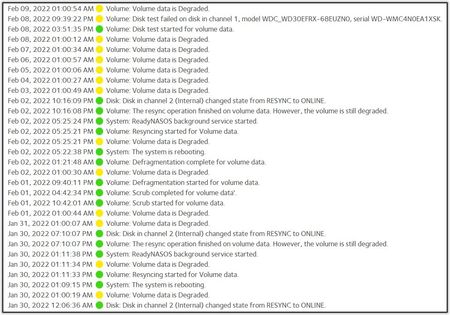
RN102 fw:6.10.6 with WD-Red 3TB, working 6yrs with spotless logs. Installed another WD-Red 3TB in slot 2, and changed X-RAID to FLEXRAID = Raid1. Immediately I got a yellow warning that disk1 was d...

Marc_V
Feb 09, 2022NETGEAR Employee Retired
Since you are using RAID1, Disk 2 is an exact copy of the 1st. You have to make sure to make a backup of your data before doing anything else. It's good that the resync was completed before Disk 1 failed.
We need to check if Disk 1 has errors by going to diskinfo.log or smart_history.log. You can do that by downloading the zip log file from the NAS.
If you will move the disk bay location, make sure your NAS is off.
You cannot go back to the previous configuration you have to destroy the volume then set it up again.
It would be better to check Disk 1 first if it failed. You can take it out and check it on a PC using vendor tools like Seatools to check the drive and request for RMA if it is eligible.
If there's no issue with the disk or if you have a replacement or it has been replaced, then doing a factory reset is an option to start fresh with both disks inserted. It will be on X-raid RAID1.
Replacing disk1 with a new 3TB disk is also an option. Otherwise, you will have to set up the healthy drive again to use it as a single drive.
HTH
Related Content
NETGEAR Academy

Boost your skills with the Netgear Academy - Get trained, certified and stay ahead with the latest Netgear technology!
Join Us!
