NETGEAR is aware of a growing number of phone and online scams. To learn how to stay safe click here.
Forum Discussion

shedemand
Feb 09, 2022Guide
RN102 disk1 Degrading after adding new disk for raid1
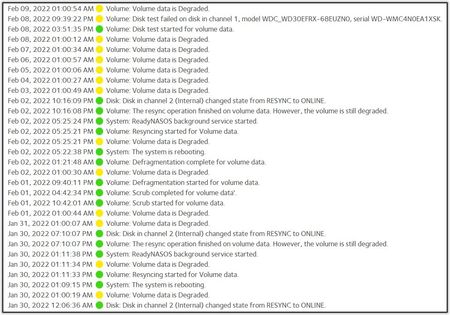
RN102 fw:6.10.6 with WD-Red 3TB, working 6yrs with spotless logs. Installed another WD-Red 3TB in slot 2, and changed X-RAID to FLEXRAID = Raid1. Immediately I got a yellow warning that disk1 was d...
shedemand
Feb 12, 2022Guide
Marc_V
Tks Marc
I'll try various solutions and report back.
It may take a couple of weeks, - I'm quite busy at the moment
Rgds
Søren
shedemand
Feb 12, 2022Guide
I have gone through the extended logs, but allthough I haved worked in IT right up to my pension, I do not know exactly what I should be looking for in the logs.
So I take the liberty to forward extracts from some of the log-postings on my OneDrive:
https://1drv.ms/u/s!Anw_yRjl5NKvisNoMkkgLZ_v59a3Tw?e=2EU0kP
If you wonder why the NAS name is "Cody", the reason is that my first NAS many years ago was a Buffalo-NAS :-)
Re backup: I have a continuous backup of Cody on another RN102 placed at a different physical location on my LAN for security reasons (fire, theft), since Cody holds all kinds of personal documents, videos and photos for me and my wife.
Thanks in advance for your help
Søren
- shedemandFeb 12, 2022Guide
Sry wrong link! This is the correct link:
https://1drv.ms/u/s!Anw_yRjl5NKvisNyXVZV93Ldyn1y3A?e=UpUM4i
Søren StephenBFeb 12, 2022Guru - Experienced User
sda (the first disk) failed the most recent self test, and is showing read errors in the kernel log (perhaps other places).
One thing you could try is powering down the NAS, and removing that disk. Then boot the system up in read-only mode, and verify that you can access the data. If you can, the step after that would be to make sure you have a current backup.
- shedemandFeb 20, 2022Guide
@Marc_V
Hello again
No matter what I tried, I could not get rid of the "Degraded" msg on the original disc 1.
I finally DESTROY'ed it, made it a new volume, formatted and ran a Disk Test, that stopped and flagged the Degraded msg again!
On top of that the new Raid1 disc was empty although I had a msg saying Resync complete.
Result: I have dumped the old disc1, and using the new as single disc in slot 1, and are reestablishing shares and transfering the approx. 2TB data from my other NAS, estimated to take 3 days.
Meanwhile I have ordered yet another similar WD30 red, and will install this as disc2 in a new raid1.
I think the problem was, that the disc had run for 9 yrs in 24/7/365-mode,
But thanks for both your replies anyway!
Rgds
Søren /Denmark
Related Content
NETGEAR Academy

Boost your skills with the Netgear Academy - Get trained, certified and stay ahead with the latest Netgear technology!
Join Us!
