NETGEAR is aware of a growing number of phone and online scams. To learn how to stay safe click here.
Forum Discussion

Hakuna
Jan 02, 2021Aspirant
RN102: Password reset not available (greyed out)
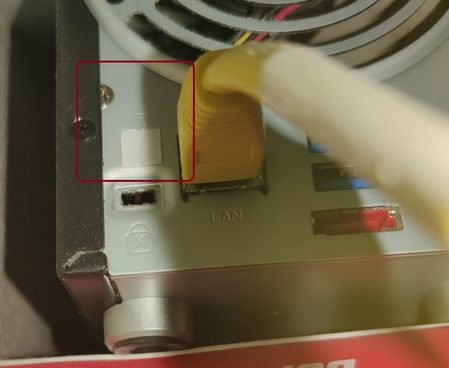
Hello. I follow these articles to set up password recovery, but the setting is greyed out (not available) in my Password page. It looks like the password reset button has a tape over it on the back o...
 Jan 02, 2021
If you enter the current password (w/o clicking apply) you should find that the enable password recovery checkbox will be enabled.
Also, the taped-over slot on back is not covering a password reset button.
BTW, several folks have found the password recovery feature to be hit-or-miss. There is another way to reset the admin password, which is to do an OS reinstall from the front panel. That will
- change the admin password back to password
- reset the network setting to default (using DHCP)
- disable volume quota (which can be reset on the volume settings wheel).
Documentation for your NAS can be found here: https://www.netgear.com/support/product/RN102.aspx#docs The OS reinstall procedure is on page 20 of the hardware manual.
StephenB
Jan 02, 2021Guru - Experienced User
If you enter the current password (w/o clicking apply) you should find that the enable password recovery checkbox will be enabled.
Also, the taped-over slot on back is not covering a password reset button.
BTW, several folks have found the password recovery feature to be hit-or-miss. There is another way to reset the admin password, which is to do an OS reinstall from the front panel. That will
- change the admin password back to password
- reset the network setting to default (using DHCP)
- disable volume quota (which can be reset on the volume settings wheel).
Documentation for your NAS can be found here: https://www.netgear.com/support/product/RN102.aspx#docs The OS reinstall procedure is on page 20 of the hardware manual.
Related Content
NETGEAR Academy

Boost your skills with the Netgear Academy - Get trained, certified and stay ahead with the latest Netgear technology!
Join Us!

