NETGEAR is aware of a growing number of phone and online scams. To learn how to stay safe click here.
Forum Discussion

djtaylor
May 06, 2016Guide
RN204 resync after successful resync, any idea what's going on?
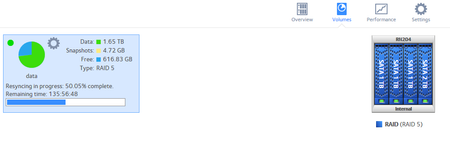
Ok, i'm confused. Original set up of disks was 3x1TB and 1x500GB. One of the 1TB was not on the HCL, neither was the 500GB so to play fair, I have swapped these, one at a time of course, waiting fo...
djtaylor
May 07, 2016Guide
Ok, I think i'm going to answer my own question here after scouring through the logs.
I began with 3 x 1TB, 1x 0.5GB and the unit created:-
1 RAID 5 volume: 4 x 0.5GB = 1.5TB
1 RAID 5 volume: 3 x 0.5GB = 1.0TB
Total 2.5TB
Next I replaced one of the 1TB so all that had to happen was to create matching partitions and resync.
Then I swapped the 0.5 for a 2TB drive so in the first instance it created a 0.5TB partition and sync'd the volume that spanned 4 disks and completed. Then, it found the option of introducing an extra 0.5TB in order to reshape the array and it's the addition of an extra 0.5GB and reshape/resize that's the second resync that i'm seeing bourne out from the volume log below.
btrfs is new to me (as is the RN204) so i'm just trying to understand its processes. A better message in the log on the console would be reshaping array rather than throw in another resync but that's just my opinion, it would at least have been more readily understandable that it wasn't the exact same degraded to redundant resync!
My other question here though is the resync speed, "Sync speed: 2168 KB/sec", that seems ridiculously low? I'm not using the box for any other read/writes so I would have thought it could be going a lot faster. I have decuded that it's throttled from other log detail but still, this seems way under what it could do when not otherwise loaded. Comments?
Mount point: /data
Size: 2425866240KB (2313 GB)
Available: 646797924KB (616 GB)
Snapshot: 4947484KB (4831 MB)
RAID Level: 5
State: redundant
Action: reshaping (adding RAID disks, changing RAID level)
Percentage: 50.0%
Sync speed: 2168 KB/sec
Time to completion: 3735.2 minutes
Flags 0xC8
Type: btrfs
RAIDs:
md126
Size: 2901208704
Level: 5
Action: idle
Members: 4
md127
Size: 1952987648
Level: 5
Action: reshaping (adding RAID disks, changing RAID level)
Members: 4
- djtaylorMay 07, 2016Guide
Now looking at it via cat /proc/mdstat, 2MB/sec was a good one, it's usually nearer 930KB to 1MB/sec.
Ok, it's slow and i'm impatient but I understand what's going on so i'll just let it chunter away until it's a happy bunny again.
- mdgm-ntgrMay 07, 2016NETGEAR Employee Retired
Regarding the speed. There is a known issue that is fixed in ReadyNASOS 6.5.0 Beta
The services you are running and also the apps you are running and how heavily you are using the NAS are factors too.- djtaylorMay 08, 2016GuideYes, i'd noticed that in one of your other posts to someone else. After my near total data loss scare, the unit is currently backing up to a cloud provider (the only other task running) I think the X-RAID notion is neat but i've since ordered 3 more WD Red drives to swap out my 3 old drives, that'll bring all 4 drives up to new WD Reds. I don't see myself doing another storage space upgrade in any time in the future, it'll be faster to flatten the config and start again as I already have a local backup anyway. I realise that the reshape time shouldn't really matter but I kinda like completed processes and to swap out 3 more drives at the present rate would look like around 3 weeks. On the basis that firmware 6.5.0 is just around the corner and that i'd rather wait for my cloud backup to complete (that'll be a few days), i'll just schedule a flatten NAS day and clear it all, fresh firmware and start again. So basically, my original idea to buy a diskless unit and just throw some old spare drives at it as a cheap storage thing has totally turned on its head and become a chunky investment!

Related Content
NETGEAR Academy

Boost your skills with the Netgear Academy - Get trained, certified and stay ahead with the latest Netgear technology!
Join Us!
