NETGEAR is aware of a growing number of phone and online scams. To learn how to stay safe click here.
Forum Discussion

ritamac25
Jun 30, 2021Aspirant
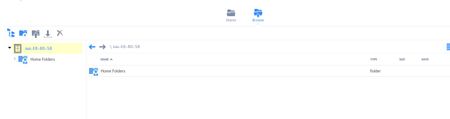
Shares Gone in Netgear Browser Interface, but I can still map in Windows 10
I have access through Windows 10 to the shares, but they do not appear in the Netgear ReadyNAS Admin page. Instead, I see only the Home Folders, and cannot browse back to "Data". I have no idea wha...

Sandshark
Jun 30, 2021Sensei
Have you confirmed your OS partition isn't full? Are you comfortable with SSH? There is a script that you can run via SSH that is the usual fix, but it should not be run if you have a full or nearly full OS partition: share_lun_ui_fix.sh .
- ritamac25Jun 30, 2021Aspirant
I have 7TB available....less than 5 used. I'm not practiced with SSH. I saw a similar thread that mentioned SSH, but it was the opposite of my situation....could see shares, but could not map in Windows. I will take a look at that in the morning. Thank you for the suggestion.
 StephenBJul 01, 2021Guru - Experienced User
ritamac25 wrote:
I have 7TB available....less than 5 used.
That is your data volume, not the OS partition (which is only 4 GB).
Are you seeing any messages indicating that the root is full in the logs?
- ritamac25Jul 01, 2021Aspirant
No messages indicating OS volume is full or nearing max. I have never used SSH.
I was manipulating account permissions yesterday because I have not been able to access the NAS remotely. Could I have changed something there that would have restricted my view to only the Home folders? All of my users have admin privileges, so it doesn't seem consistent that an admin user would not have access to the other shares, but I've seen similar confusing situations occur, where I've changed a password, and then cannot log into the system with the new password.
Related Content
NETGEAR Academy

Boost your skills with the Netgear Academy - Get trained, certified and stay ahead with the latest Netgear technology!
Join Us!
