NETGEAR is aware of a growing number of phone and online scams. To learn how to stay safe click here.
Forum Discussion

littomalt
Jan 08, 2021Aspirant
Space warning, less than 20%. But more than 50% is inaccessible...
Hi I get warning that space is less than 20%. When i take a look into total NAS i see Unaccessible space more than 50%. Total Capasity is 10,8 Tbyte Total visible "used" is 4,5 Tbyte Unacc...

rn_enthusiast
Jan 09, 2021Virtuoso
From Googling around it looks like the application is called SpaceSniffer. The "Unaccesible" space might be due to permissions issues or the application simply not being able to properly determine the space usage.
The NAS gets the information directly from the filesystem. This will always be more accurate than any 3rd party app. Trust the NAS here. StephenB is absolutely correct here that a tool trying estimate space usage over SMB where it will not have knowledge of the underlying NAS filesystem - that is never going to work properly :)
rn_enthusiast
Jan 09, 2021Virtuoso
I will add that the BTRFS quotas module can in rare circumstances cause issues for space estimation on the NAS and you have quotas enabled. But other than that, the NAS is always the more accurate.
Is there any reason you might think the NAS space estimation is too high?
- SandsharkJan 09, 2021Sensei
The unaccessable space could be seeing /data as a share, which, of course, isn't actually separate space. I'm not sure how it sees it without using admin credentials, which I would then expect to have access, but it is a "sniffer".
What drives are in the NAS? Do you think you should have more room based on the drive sizes?
 littomaltJan 09, 2021Aspirant
Hi
Thanks for good answers. I will try to answer all your questions, and add a few new.
Second screenshot from yesteday is as one of you wrote: SpaceSniffer, a free tool that I use to get a overview over my disks.
How accurate it is regarding NAS/win10 I don’t know, but obvious it is not reliable according to
What I did yesterday was to list all shares with command (SSH): btrfs subvolume list -s /data
From this command I got listed about 34 snapshots
Then I did this command for all snapshots: btrfs subvolume delete -c /data/XX/.snapshots/95/snapshot
Later I did from NAS UI a disk Balance + Scrub + Defrag
Today’s status is:
When I today do btrfs subvolume list -s /data I get 77 snapshots. Why is this doubled?
Is there a way to list snapshot sizes?
Q from rn_enthusiast: Is there any reason you might think the NAS space estimation is too high?
My only reason to be concerned was that the program SpaceSniffer did report strange
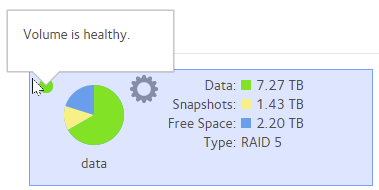
Status from NAS is today (did not check yesterday):
On Win10 computer I get this regarding volume reported as 1.9 TB on above printscreen marked red:
From Sandshark
: The unaccessable space could be seeing /data as a share, which, of course, isn't actually separate space. I'm not sure how it sees it without using admin credentials, which I would then expect to have access, but it is a "sniffer".
What drives are in the NAS? Do you think you should have more room based on the drive sizes?
I have admin credentials, but I don’t understand what you suggests I do to make a control regading volume /data. Can you point me in correct direction?
Disks I have:
3 pcs:
2 pcs:
I don’t run any SW/app on NAS
For info, I do run File Search, how much space it uses I don’t know.
I hoped I gave all the answers, and you may look into my case one more time. Is there something I can do to get certainty that space usage is reported correct?
Can you recommend me a disk explorer I can run on my NAS, an explorer that correctly reports all files stored on it?
Maybe some commands in SSH can do same job?
Thanks up front
- littomaltJan 10, 2021Aspirant
Some more info
btrfs filesystem show: (i have no idea how to understand this split in root and data)
Label: '33ea851f:root' uuid: 06db5289-411e-4ed8-88dd-f8db336d9085
Total devices 1 FS bytes used 862.52MiB
devid 1 size 4.00GiB used 2.05GiB path /dev/md0Label: '33ea851f:data' uuid: 13562dc5-4c5e-479e-b09d-5e07a2154623
Total devices 2 FS bytes used 8.64TiB
devid 1 size 7.26TiB used 6.41TiB path /dev/md126
devid 2 size 3.64TiB used 2.80TiB path /dev/md127========
Root=used 2 GiB
data=used 8,64 GiB
total 10,64 = about total insatlled drive volume (reported as 10.90 GiB in NAS UI)

Related Content
NETGEAR Academy

Boost your skills with the Netgear Academy - Get trained, certified and stay ahead with the latest Netgear technology!
Join Us!
