NETGEAR is aware of a growing number of phone and online scams. To learn how to stay safe click here.
Forum Discussion

dtsui
Jun 30, 2012Aspirant
Stuck Disk Tray on ReadyNAS Duo
I need to upgrade my hard disks on my ReadyNAS Duo but the disk tray latch could not be released by pressing the button possibly due to accumulation of much dust and fluff, the button simply could not...

PapaBear1
Jul 01, 2012Apprentice
The small paperclip will just bend, the bigger heavy duty paper clip might work, but I use a very tiny screwdriver.
Here is the image I believe you were looking for:
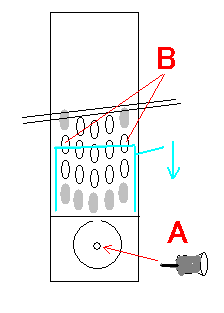
If you look through the holes marked B on the image (you may need a flashlight) you can just see the top of the release block. I insert a small screwdriver in the hole and lift on the back of the screwdriver which puts downward pressure on the tip (the top of the hole acts as the fulcrum). Pushing the top of the release block down, releases the latch.
Here is the image I believe you were looking for:
If you look through the holes marked B on the image (you may need a flashlight) you can just see the top of the release block. I insert a small screwdriver in the hole and lift on the back of the screwdriver which puts downward pressure on the tip (the top of the hole acts as the fulcrum). Pushing the top of the release block down, releases the latch.
Related Content
NETGEAR Academy

Boost your skills with the Netgear Academy - Get trained, certified and stay ahead with the latest Netgear technology!
Join Us!
