NETGEAR is aware of a growing number of phone and online scams. To learn how to stay safe click here.
Forum Discussion

Stultis
Dec 01, 2018Aspirant
Trouble setting up FTP on ReadyNAS 102 with Linksys router EA6900
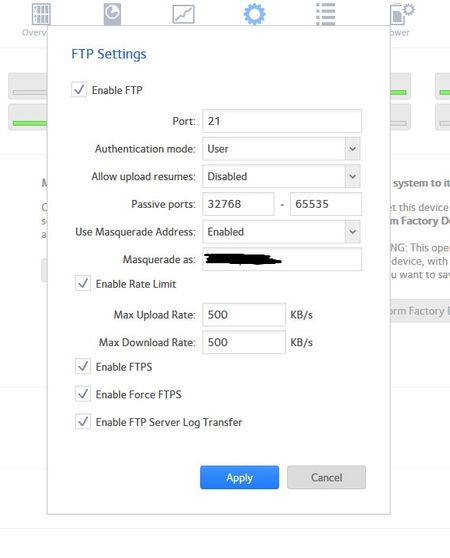
Hello, I am having trouble setting up my ReadyNAS for FTP. I have a Linksys router (EA6900) I am using for WIFI. I have the FTP enabled on the ReadyNAS and can see and use the FTP settings around my ...
Stultis
Dec 06, 2018Aspirant
Hello,
Thanks for the suggestions. I went with the AC1750. I don't have a big place and it was in my price range.
I have not been able to try setting up the ftp protocals yet. I am having trouble with my ReadyNAS backing up. It keeps encountering a failure that freezes the system up. I am wondering if it is the way I found the system after I installed the new router and cable modem. I found the system by copying the ip address from the router's webpage and pasteing it into the search bar. Do I need to go back and try to discover it from by another method? When I installed the new modem and router I received a new ip address for my computer and readynas. I updated this ip address in all of my backups. While doing this I noticed that the browse option for my computer files would not work. Testing the connection said everything was fine, so I continued on. The ReadyNAS did perform most of the backup jobs. It just keeps hanging up on this one backup job and tells me "failure." The system then freezes up and will not respond.
I should mention that the ReadyNAS is connected to the router by an ethernet cable in a different room than my computer. I have my computer using wifi. They are both on the same network, just not physically connected. I do not use the readycloud app on the computer to backup my system. I connect across the internet from the admin page.
I'm wondering if I should have used the RAIDar program to discover my ReadyNAS system after installing the new modem and router. Should I go back and try finding it using the RAIDar program?

StephenB
Dec 06, 2018Guru - Experienced User
Stultis wrote:
I am having trouble with my ReadyNAS backing up. It keeps encountering a failure that freezes the system up.
Are you trying to back up a device to the ReadyNAS, or are you trying to back up the ReadyNAS to another device?
How exactly are you doing this?
What firmware are you running on the ReadyNAS?
- StultisDec 06, 2018Aspirant
I am trying to back up a share folder on my computer to the ReadyNAS from the admin page’s backup section. This is how I have always backed up the system since I got it back in 2014. The computer uses the wifi to connect to the ReadyNAS system. The ReadyNAS system is connected to the wifi router using an ethernet cable. They are in different rooms of the house. I have my PS3, ReadyNAS, and home entertainment system hooked into the router using ethernet cables. My smart tv, computer, ipad, and iphone use the wifi around the house. I shut the ReadyNAS down using the shutdown feature on the admin page this morning, I’ll turn it back on when I get home tonight. I’ll then try backing up the share folder again tomorrow morning.
- StephenBDec 06, 2018Guru - Experienced User
Did the IP address of the PC change when you switched to the new router?
- StultisDec 06, 2018Aspirant
Yes. I went through all of the backups and changed them to the new ip address.
The funny thing is it ran most of the backups until that one. It keeps saying “unable to make folder #.” I have a folder named # in that folder, but I have a folder # in the other folders that successfully backed up. These folders are in a share like My Comics/Small Industry( or Marvel or Dark Horse... etc)/(# or A-Z) the # is for comics with a title starting with a number or symbol the other folders are for titles of comcis beginning with A-Z. I scan the comics I buy into my computer so I can read them on the go, or just reread them without having to get the physical copy out of storage. I have the harddrive the comics are on named My Comics and have multiple folders of the different companies. Inside of the individual company folders are folders named #, A-Z. This hard drive is set as a share and set to show up in my library like the pictures, documents, videos,... etc. I have another hard drive with my family photos on it that backs up to the NAS , set up the same way as the comics hd, and it worked. I have not tried to backup my itunes folder on the main hd.
I guess I should go back and check the small companies folder and make sure the share permission did not change. I might do that tonight, to rule that out as the problem.
Related Content
NETGEAR Academy

Boost your skills with the Netgear Academy - Get trained, certified and stay ahead with the latest Netgear technology!
Join Us!
