NETGEAR is aware of a growing number of phone and online scams. To learn how to stay safe click here.
Forum Discussion

MattWall1
Jun 05, 2021Aspirant
ReadyNAS RN204 files not working after degraded disk recovery
Hi Everyone, I recently noticed that my ReadyNAS had the status DEGRADED and when I googled I found out that this is typically due to a disk failure. I only had 2 disks in a RAID1 configuratio...

StephenB
Jun 05, 2021Guru - Experienced User
MattWall1 wrote:
I changed the failed one first. I let it re-sync and it later said that it had finished the task, but that the disk was still DEGRADED.
It should have been redundant at that point.
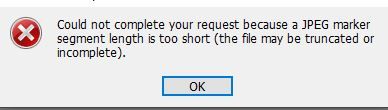
One thing you could try: power down and remove both of the current disks (labeling them by slot as you remove them). Then insert the original (failed) disk 1 and see if the system boots. If it does, then see if you can download the jpg sucessfully.
Assuming that all works, then immediately copy off your data.
- SandsharkJun 05, 2021Sensei
StephenB wrote:
MattWall1 wrote:I changed the failed one first. I let it re-sync and it later said that it had finished the task, but that the disk was still DEGRADED.
It should have been redundant at that point.
Unless you had two layers to the volume. Did you at one time have smaller drives that you upgraded? If so, there were two layers that needed to sync. Unfortunately, the ReadyNAS reports a sync has completed when it finishes the first one, then goes on with the second.
But I'd expect it would be saying your volume is dead in that case. So maybe the first new drive was just bad.
What happens if you remove both new drives and put in just the good one from the first set? Don't try mixing that one and one of the new ones right now, as they won't be in sync and that could further confuse the NAS.
- MattWall1Jun 07, 2021Aspirant
Thanks for the tip.
I will try to only insert the bad drive and see if it boots up. If it works I'll copy the files to my computer temporarily, before
I then try to sync with one of the good drives. I will let you know how I go.
Cheers, Matt
- SandsharkJun 07, 2021Sensei
You can try that, but I was recommending you try just the original good drive.

Related Content
NETGEAR Academy

Boost your skills with the Netgear Academy - Get trained, certified and stay ahead with the latest Netgear technology!
Join Us!
