NETGEAR is aware of a growing number of phone and online scams. To learn how to stay safe click here.
Forum Discussion

_frantic_
Nov 20, 2015Aspirant
Admin page does not load after factory reset RN312 6.4.0
I did a factory reset on my RN312.
After loggin in as as admin/password, a directory listing appears:
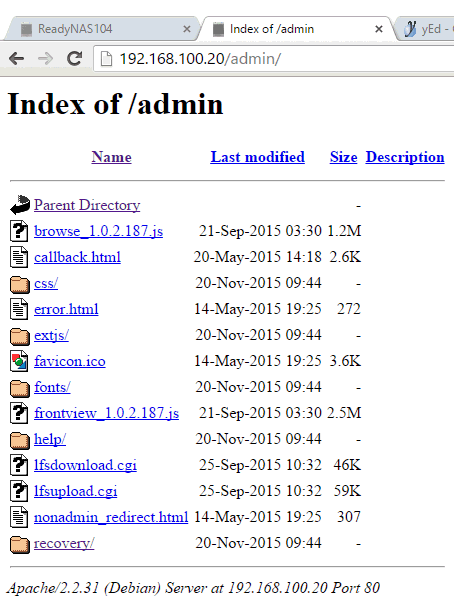
In comparison to my RN104, it looks like some files are missing, i. e. no index.html etc.
Reboot did not help, OS reinstall had no effect.
In Windows Explorer, when I go to \\192.168.100.20, it is totally empty.
Got it: I have put one of the old disks into the RN312, then bootet 6.4.0.
Then I did a manual update from 6.4.0 to 6.4.0.
This must have fixed the devices flash storage, I guess.
After that I was able to do the factory default with a new harddisk.
4 Replies
Replies have been turned off for this discussion
- mdgm-ntgrNETGEAR Employee Retired
It could be that the firmware on the flash is corrupt. That would explain the missing files and incomplete installation.
You could try USB Boot Recovery: http://kb.netgear.com/app/answers/detail/a_id/29952/%7E/readynas-os-6%3A-usb-recovery-tool
Then do another factory reset.
 _frantic_Aspirant
I have conneced monitor and keyboard to the RN312.
But I had no luck with USB root recovery so far.
I tried 4 different USB sticks and 1 USB hard drive. All of them with one partition only, FAT32, 8 or 32 GB.
The disk and 2 of the sticks have not been rocognized at boot time.
From the other ones I got "Missing operating system" resp. "Boot error".
Is there anything else I could do other than trying to find more USB sticks?
(I still have the two old hard disks which have been in the 312 before.)
This is the content of initrd.log:
[2015/11/21 04:08:13] Factory default initiated by button!
[2015/11/21 04:08:19] Defaulting to X-RAID2 mode, RAID level 1
[2015/11/21 04:08:36] Could not properly extract root image!
[2015/11/21 04:08:36] Factory default initiated on ReadyNASOS 6.4.0 (ReadyNASOS).
- _frantic_Aspirant
Got it: I have put one of the old disks into the RN312, then bootet 6.4.0.
Then I did a manual update from 6.4.0 to 6.4.0.
This must have fixed the devices flash storage, I guess.
After that I was able to do the factory default with a new harddisk.

Related Content
NETGEAR Academy

Boost your skills with the Netgear Academy - Get trained, certified and stay ahead with the latest Netgear technology!
Join Us!
