NETGEAR is aware of a growing number of phone and online scams. To learn how to stay safe click here.
Forum Discussion

littomalt
May 14, 2019Aspirant
All disks DEAD - Everything works .... ReadyNAS Ultra 6 Plus
Hi
yesterday all was good, today all 5 disks dead...
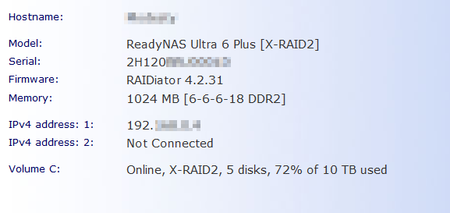
Raidar report Helaty
I dont think is is the disks that makes this issue, can it be the NAS box HW?
What are my options?
...

Sandshark
May 14, 2019Sensei
While I never had them all do it at once, I had a Pro6 with a mix of 7200 and 5900 RPM drives running OD4.2.something that would occasionally have one or more go "dead" even though all were actually fine. I would remove each, renisert, let it re-sync, and all was fine for a while; then it would happen again. I turned off drive spin-down, and it fixed the problem. I later upgraded to OS6.0, and had no problems, even with spin-down enabled.
I came to the conclusion that differing spin-up times were confusing the NAS; but I dont have hard evidence, just circumstantial.
 littomaltMay 14, 2019Aspirant
Hi Sandshark, thanks for reply
I will try to remove on HDD at a time, see whats happening. This shall be done with power on?
You write "running OD4.2" is that the firmware?
I run the latest RAIDiator 4.2.31. I dont think i can upgrade it to OS6?
I have had this running for years, with spin down enabled, no problem at all.
Disk 1-3 is WDC WD40EFRX-68WT0N0 3726 GB - 5400 rpm
Disk 4-5 is WDC WD2002FAEX-007BA0 1863 GB - 7200 rpm
4-5 is older than 1-3
- SandsharkMay 15, 2019Sensei
Yes, I meant OS4.2, not OD. That's the firmware family for legacy Intel NASes. I switched to OS6 well before the version you are on. I noticed the drive speed difference from the screen capture you provided, which is why I offered my experience of something perhaps similar.
Yes, you should remove and replace the drives one at a time with power on. Give the NAS time to report the removal before re-inserting. Each will need to re-sync, so total time is going to be a lot.
Actually, you can switch to OS6 on an Ultra6. You have to re-format the drives and you lose any Netgear support (including paid support), but not forum support. There are a lot of positives about switching to OS6. It's more modern and kept up to date and has fewer expansion limitations. A big one is if your NAS dies, or you just want to upgrade to something faster, you can move the drives right into a new OS6 based NAS and just keep trucking. No having to transfer the data because of the different file system (you already had to do that to upgrade to OS6).
It's a good idea to bump the memory up to at least 2GB before switching to OS6, but memory for an Ultra 6 is quite inexpensive these days.
- littomaltMay 15, 2019Aspirant
Hi again, thanks for helping me with valuable info!
This evening I will try to resync disk 1 (i try the newest disks first) then 2-3-4-5
I have all data backed up on Jottacloud, so I may manage a restore, but jottacloud makes a zip file to download, and that may cause problem since zip + extracted is bigger than the NAS capasity.
Is there a setup page how to install OS6 on my nas?
 StephenBMay 15, 2019Guru - Experienced User
littomalt wrote:I will try to remove on HDD at a time, see whats happening. This shall be done with power on?
Not 100% sure if Sandshark's answer is right for you.
If your goal is just to diagnose the status, then you could power down the NAS, remove drive 1, and reboot. Then power down again, replace drive 1, remove drive 2 and power up. If you don't write anything to the NAS, then that process will avoid the resyncs.
If you do this with the NAS powered up, then it will have to resync.
As far as mixed drive speeds go, I also had them running on my Pro-6 for some years. The only time had an issue with a drive being declared dead was when a drive actually failed. Hot-insertion of the replacement didn't work, as the disk drivers had shut down the SATA port when the first drive failed. Rebooting the NAS solved that particular problem. So I didn't see the issue that Sandshark had.
- littomaltMay 27, 2019Aspirant
Well, today the volumes cant be accessed, v4.x can now be upgraded.
I googled to find OS but i cant find it...
Can sombody give me a linkt to the files?
PREP4TOR6_0.1-x86.bin
and
R4toR6_6.9.3.bin
Related Content
NETGEAR Academy

Boost your skills with the Netgear Academy - Get trained, certified and stay ahead with the latest Netgear technology!
Join Us!
