NETGEAR is aware of a growing number of phone and online scams. To learn how to stay safe click here.
Forum Discussion

littomalt
May 14, 2019Aspirant
All disks DEAD - Everything works .... ReadyNAS Ultra 6 Plus
Hi
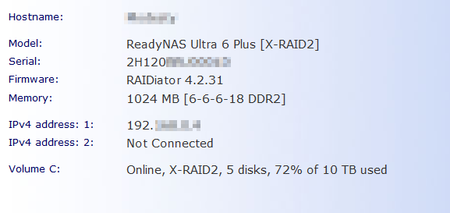
yesterday all was good, today all 5 disks dead...
Raidar report Helaty
I dont think is is the disks that makes this issue, can it be the NAS box HW?
What are my options?
...

littomalt
May 28, 2019Aspirant
:-)
I did a manual factory reset, now im up and running.
I can log in to web admin.
One problem i found is that in Win 7 file explorer Network dont show the NAS. Is there some tuning i have missed?

StephenB
May 28, 2019Guru - Experienced User
littomalt wrote:
One problem i found is that in Win 7 file explorer Network dont show the NAS. Is there some tuning i have missed?
That's a common problem (both with 4.2.x and 6.x), and I haven't seen a sure fire solution for it.
You should be able to access the NAS shares anyway by entering \\nas-host-name or \\nas-ip-address in the file explorer address bar (using the real hostname or ip address of course).
So try that, and let us know if that works or not.
- littomaltMay 28, 2019Aspirant
Thanks again.
When i write in explorer \\Modesty i dont get access
When i write \\192.168.x.xx i get a view of shares, but when i click on Modesty i get login and my credentials dont kick in.
I have to say, are this possible, to not be able to connect via explorer to NAS, i thougth that was the sole purpose....
- StephenBMay 28, 2019Guru - Experienced User
littomalt wrote:
When i write in explorer \\Modesty i dont get access
Try opening the windows credential manager. Delete any credential that might be in there for Modesty. Then add a new credential (using a NAS username and it's password).
If you want to test this first, run CMD (from the windows search bar). Then enter
net use * /delete
net use t: \\Modesty\sharename /user:username userpassword
The first command terminates any open SMB sessions. If it prompts, let it proceed. The second attempts to mount the share as drive letter T.
Be careful on the typing - particularly spaces and slash direction.
- littomaltMay 28, 2019Aspirant
StephenB wrote:
littomalt wrote:When i write in explorer \\Modesty i dont get access
"Try opening the windows credential manager. Delete any credential that might be in there for Modesty. Then add a new credential (using a NAS username and it's password).
If you want to test this first, run CMD (from the windows search bar). Then enter
net use * /delete
net use t: \\Modesty\sharename /user:username userpassword
The first command terminates any open SMB sessions. If it prompts, let it proceed. The second attempts to mount the share as drive letter T.
Be careful on the typing - particularly spaces and slash direction."
Thanks
I changed \\Modesty to \\NASip, then it mounted
In WIN7 should i use switch /persistent for the net use command.
Is it posible to reach share from WAN side like a remote mounted drive?
(NAT in router is configured with open ports/forward)
- StephenBMay 29, 2019Guru - Experienced User
littomalt wrote:
If you want to test this first, run CMD (from the windows search bar). Then enter
net use * /delete
net use t: \\Modesty\sharename /user:username userpassword
The first command terminates any open SMB sessions. If it prompts, let it proceed. The second attempts to mount the share as drive letter T.
Be careful on the typing - particularly spaces and slash direction."
Thanks
I changed \\Modesty to \\NASip, then it mounted
Do you mean with the net use commands, or in file explorer? The net use commands were suggested as a test - to check if CMD also had a problem resolving the NAS name. Though of course you can use them routinely if you like.
There's no sure-fire method I know of to get name resolution to always work. You can just use the IP address, or add an entry to the hosts file on the PC. Those of course are just workarounds.
littomalt wrote:I changed \\Modesty to \\NASip, then it mounted
In WIN7 should i use switch /persistent for the net use command.
You can if you want it to be remounted automatically when you reboot. Sometimes that doesn't quite take, and you still need to remount it manually.
littomalt wrote:
Is it posible to reach share from WAN side like a remote mounted drive?
(NAT in router is configured with open ports/forward)
It's not safe to forward the ports for SMB (or worse to put the NAS in the DMZ), so don't do those things. I replied to your other post on this.
Related Content
NETGEAR Academy

Boost your skills with the Netgear Academy - Get trained, certified and stay ahead with the latest Netgear technology!
Join Us!

