NETGEAR is aware of a growing number of phone and online scams. To learn how to stay safe click here.
Forum Discussion

schlaraffen
Dec 17, 2024Aspirant
All my datas are lost for unknwon reason.
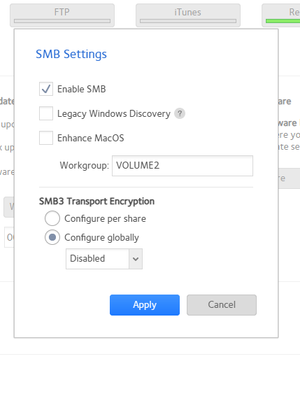
Hello dear Netgear community, two days ago, I changed some SMB settings. If I remember right I believe I disabled "Legacy Windows Discovery" and changed SMB3 Transport Encryption to "configure gl...

StephenB
Dec 17, 2024Guru - Experienced User
schlaraffen wrote:
Do you have an idea, why "btrfs fi df //" did`t work for me?
I was thinking you had an x86 ReadyNAS. The RN104 uses ext formatting for the OS partition.
Your OS partition is not the issue - it is 23% full, which is normal. I haven't had a chance to review anything else yet.
schlaraffen
Dec 17, 2024Aspirant
Year, sounds correct ext formatting for the OS partition + 23% free space!
Let me know if you have any dificulties by accessing the logs from my dropbox. I would be suprised if it would works easy like that. I never granted any permissions for example....
- schlaraffenDec 17, 2024Aspirant
By the way, back to my problem. What I do currently is to copy selected important data via winscp by using the root account to my local pc and from there directly back to newly created folder/shares to the admin-page of my NAS box:
So it works and I can access and copy my "old" data to new NAS-folders....but I will need months for it. It is not really a wroking soltion for mw.....
- StephenBDec 17, 2024Guru - Experienced User
I can see the logs. I can't see what triggered the issue, but I am seeing that shares are not being mounted as SMB.
I do see some changes that don't seem related to the SMB settings that you described. That includes these lines:
[24/12/17 14:33:55 CET] info:share:LOGMSG_DELETE_SHARE Share Video was deleted.
[24/12/17 14:42:26 CET] info:share:LOGMSG_ADD_SHARE Share Shares was added.


[24/12/17 15:32:10 CET] info:share:LOGMSG_ADD_SHARE Share data was added.
[24/12/17 16:00:17 CET] info:share:LOGMSG_DELETE_SHARE Share data was deleted.
I'm not understanding exactly what you are doing with WinSCP. But it doesn't sound like the correct path, so I suggest you pause it. You don't have enough free space in the volume to make another copy of the files on the volume. Also I don't think that creating new shares on the volume was a good idea.
It would make sense to copy the files to another device (for example a USB drive) so you have a backup of the files.
There is a repair script you could try, but ideally you'd back up the data as the next step. We'd also want to make sure that your new shares don't have the same names as the original ones did before you run it.
- schlaraffenDec 17, 2024Aspirant
Thanks for your investigation and that you are spending time for helping me. That’s really great!
The root cause of the issue as explain at the very beginning of my post happen around 14.12. Yesterday evening I realized, that something is wrong. Today I´ve started my investigations and figured out that I lost all my Shares and folders.
So the logs what you are mentioned belong to investigations from my side from today. Today I`ve tried a lot of things. I`ve created several folders and removed them again. But at the end the only possibility to access my old datas is by using via SSH --> Putty --> as root. In there I do see my old datas:
(you can see my old datas here. everything except the "shares" folder are old datas, the shares folder was created by me today)
Inside in the WebGUI I only see my Shares folder. All other original folders are missing and are gone.
Is it possible to logon as root inside of the GUI?
Therefore I am using winscp and root account to access and copy my original data back to my pc. But I am talking about 8TB of data......so I will need several weeks for it 😞
- schlaraffenDec 17, 2024Aspirant
Haha...I just realized that I can use CP and even better mv within my putty session. These operations are running box internally, without copying the data over lan from source to dest and back to source. MV is saving me 99% of time and this will be the final solution for me.
So now I am moving all ld data from old folders direcetly into the new Shares-folder.
I am a windows guy....but at the end of the day I am starting to become a junior unix guy.... 😉
- StephenBDec 18, 2024Guru - Experienced User
schlaraffen wrote:
Haha...I just realized that I can use CP and even better mv within my putty session. These operations are running box internally, without copying the data over lan from source to dest and back to source. MV is saving me 99% of time and this will be the final solution for me.
So now I am moving all ld data from old folders direcetly into the new Shares-folder.
I am a windows guy....but at the end of the day I am starting to become a junior unix guy.... 😉
You will end up with only one share (with multiple folders) when you are done.
adding --reflink to the CP command is another path. That uses the Copy-on-Write features of the BTRFS file system. The copy takes no disk space because the new file is sharing the same datablocks as the old. After the cp completes, you can then delete the original. This is faster than MV because no data is actually being copied.
But here is the issue - the old subvolumes (e.g., shares) are still there, along with any snapshots. The snapshot space won't go away when you delete the original files. So what you are doing is not a complete repair.
- SandsharkDec 18, 2024Sensei
There is a script that most likely would fix your problem. See Share_lun_ui_fix.sh . Just in case it doesn't, a backup is recommended before executing.

Related Content
NETGEAR Academy

Boost your skills with the Netgear Academy - Get trained, certified and stay ahead with the latest Netgear technology!
Join Us!
