NETGEAR is aware of a growing number of phone and online scams. To learn how to stay safe click here.
Forum Discussion

jc2010
Jan 28, 2011Aspirant
Backup Connection Error
I'm trying to backup my PC (Windows Vista, 64-bit) using Frontview. The PC and ReadyNAS are both on my local home network, and I don't have a login/password on my computer. I've selected "Remote: Windows/NAS (Timestamp)" as the backup type, the PC's IP address (192.168.1.64) as the host, and "C$" as the path. But when I select "Test Connection", I get "Error connecting to //192.168.1.64/C$" I've also tried using "C:\Users\John\Documents" as my path, but I get the same type of error - "Error connecting to //192.168.1.64/C:\Users\John\Documents". Please help!
55 Replies
Replies have been turned off for this discussion
 lockvkfAspirant@ewok, in reply to Mar14 3:19pm post...
I connected to my Win7 laptop from a XP Pro machine fine over my home Lan wirelessly (supplying my Win7 user/pwd).
When I run the job as suggested, it runs successfully! I then test the connection (of the successfully completely job) and again it errors with the same error message I have posted here.
It seems the test connection doesn't work. It did use to work, at least under XP and Vista. Old_Man1AspirantHello,
This is the Old Man that knows just enough to be **VERY**VERY** dangerous.
I just got my ReadyNAS Ultra 4 yesterday and equiped it with 4 2TB drives setup in Raid 5 configuration. I can connect via Windows Explorer and Internet Explorer and am successfully adding Shares and Users to transfer files from all local PCs to the NAS via Windows Explorer.
However, I only get the "Connection Failed" message when testing connections while setting up a backup job. I have two Windows Vista Home systems and even added a 'non-primary' account for the NAS as recommended in previous posts. I changed each PC to share the C: drive with no difference. I can access the C: drive from each PC to the other PC without error upon primary account login and they appear in the local network landscape automatically.
Where else can I look???
Chuck ewokNETGEAR ExpertTry running the backup job and see if you get a more informative error message.
 westysonAspirantI am having the same problems with connection. Here isa copy of the error log
LL Backup started. Wed Mar 30 23:27:16 WEST 2011
Job: 001
Protocol: cifs
Source: //192.168.0.7/C$
Destination: [backup]/
Backup failed. Wed Mar 30 23:27:18 WEST 2011.
Reason for failure:
Unable to access remote path //192.168.0.7/C$.
The host being the IP address and my C drive being the path. This is using Windows 7.
User name and password filled in, but no luck.
Any help very much appreciated.
Thanks sansmithAspirantI also am having a similar issue. I have 3 PC notebooks that the NAS can communicate with and the backups work.
They are Vista upgrades to Win7. The one that cannot connect is a Toshiba Satellite A665 32 bit OEM Win 7 Home Premium.
I am using v4.1.6 for the NV+ nas and v4.30 for the RAIDar config utility. I have tried using the hostname,a static IP, and setting the NAS as the WINS server, both do not solve the issue with being able to see that notebook.
Is there a computer name restriction? This workstation has 11 letters with no spaces.
Seems there is an issue with Win7 and backup for this particular workstation. Any ideas would be appreciated.- Old_Man1AspirantI ran the job - the error message does not help much. Any other idea's?
FULL Backup started. Fri Mar 25 00:05:02 EDT 2011
Job: 001
Protocol: cifs
Source: //chuckadmin-pc/c:users/chuckadmin/documents
Destination: [Chuck_Backup]/
Backup failed. Fri Mar 25 00:05:05 EDT 2011.
Reason for failure:
Unable to access remote path //chuckadmin-pc/c:users/chuckadmin/documents.  PapaBear1ApprenticeOld Man - I looked at your setting and it does not match the choices available on my NV+. I don't know how you selected CIFS as that is not one of the choices.
Here is a screenshot of a test job I set up for another discussion: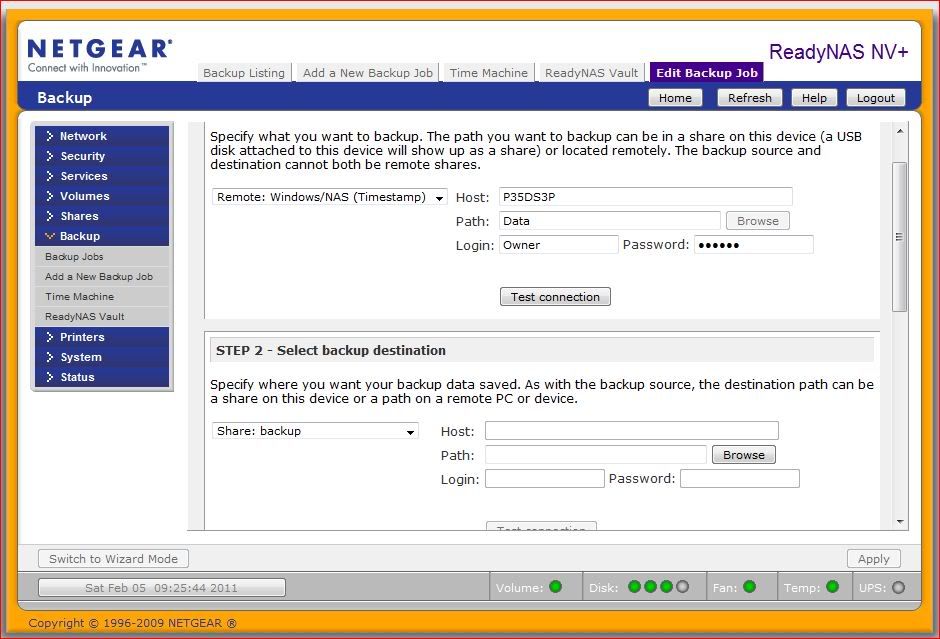
In the host blank P35DS3P is the computer name, but the IP could be used as well. I generally use the name for the computers, but eh IP addresses for the NASes on the network. The path does not include C: which is the root in Windows. That is not stated in Linux but understood. In my example Data is a first level directory. Lower level directories would be separated by a forward slash. An example could be: Data/Documents/Legal.
The above example was set up as a test, P35DS3P is my main desktop and primarily runs Windows 7 Home Premium (64 bit), however, it still has Vista Home Premium (32 bit) on another drive and I ran the test on it as well. The test connection was successful and I copies about 3 GB of data into the directory Data (set up only for the test) and the backup ran and completed successfully. I always do better with examples, and thought you could use one.- Old_Man1AspirantThanks for the fast reply. I'll try it and post the results. BTW - CIFS was somehow put as a default as I never explicitly selected it.
Old Man - Old_Man1AspirantTried again - confirmed your configuration - same error
FULL Backup started. Sat Apr 2 07:23:19 EDT 2011
Job: 001
Protocol: cifs
Source: //chuckadmin-pc/users/chuckadmin/documents
Destination: [Chuck_Backup]/Documents
Backup failed. Sat Apr 2 07:23:22 EDT 2011.
Reason for failure:
Unable to access remote path //chuckadmin-pc/users/chuckadmin/documents. - ewokNETGEAR ExpertDo you have a shared folder called "users" on the PC?
Related Content
NETGEAR Academy

Boost your skills with the Netgear Academy - Get trained, certified and stay ahead with the latest Netgear technology!
Join Us!
