NETGEAR is aware of a growing number of phone and online scams. To learn how to stay safe click here.
Forum Discussion

NASguru
Aug 15, 2016Apprentice
Backup from Ultra 4 Plus to Windows 10 PC - Path Syntax
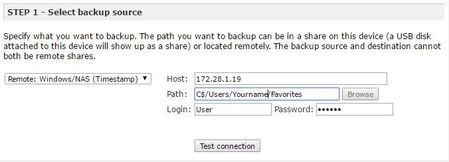
So I ran out of room on my USB connected hard drive for backups and unable to upgrade that USB at this time. However, I have a 4 TB drive on my Window 10 machine formated and ready to go that I like...
 Aug 15, 2016
c$ is an "administrative share", it is better to create a share on the PC and set the rights so the NAS has access.
This article might help: http://kb.netgear.com/app/answers/detail/a_id/29763/~/how-do-i-back-up-data-from-my-readynas-os-6-system-to-a-windows-(smb)-share%3F?cid=wmt_netgear_organic
StephenB
Aug 15, 2016Guru - Experienced User
You are confusing me a bit, since your step-1 and step-2 screenshots aren't aligned with your goal (they are backing up from the PC to the NAS).
If you want to copy from the NAS to the PC E drive, the first step is to create a folder on the E drive and share it. Set the share permissions so the NAS has full access to the folder.
NASguru
Aug 15, 2016Apprentice
Sorry for the confusion as the first two steps are simply an example of how I use to backup from my PC to the NAS and the syntax used for the path. I need to know what syntax I can use to backup from the NAS to the PC as I suspect it has changed. I'll check the sharing permissions as I didn't even consider that piece but it makes sense.
- StephenBAug 15, 2016Guru - Experienced User
c$ is an "administrative share", it is better to create a share on the PC and set the rights so the NAS has access.
This article might help: http://kb.netgear.com/app/answers/detail/a_id/29763/~/how-do-i-back-up-data-from-my-readynas-os-6-system-to-a-windows-(smb)-share%3F?cid=wmt_netgear_organic
- NASguruAug 15, 2016Apprentice
That worked like a champ. Too bad I can't do a Rsync scenario though like I could to a USB drive. It looks like I would have to delete the entire destination folder every X weeks to capture what was deleted.
- mdgm-ntgrAug 15, 2016NETGEAR Employee Retired
You can use Rsync.
I've used Deltacopy in the past (replacing the Rsync binary and some other files with the latest from Cygwin). Haven't tried it with Windows 10 but presumably it still works.

Related Content
NETGEAR Academy

Boost your skills with the Netgear Academy - Get trained, certified and stay ahead with the latest Netgear technology!
Join Us!
