NETGEAR is aware of a growing number of phone and online scams. To learn how to stay safe click here.
Forum Discussion

NASguru
Aug 15, 2016Apprentice
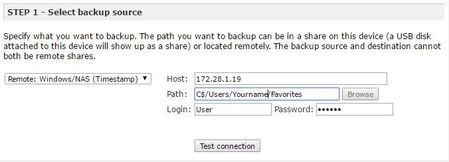
Backup from Ultra 4 Plus to Windows 10 PC - Path Syntax
So I ran out of room on my USB connected hard drive for backups and unable to upgrade that USB at this time. However, I have a 4 TB drive on my Window 10 machine formated and ready to go that I like...
 Aug 15, 2016
c$ is an "administrative share", it is better to create a share on the PC and set the rights so the NAS has access.
This article might help: http://kb.netgear.com/app/answers/detail/a_id/29763/~/how-do-i-back-up-data-from-my-readynas-os-6-system-to-a-windows-(smb)-share%3F?cid=wmt_netgear_organic
StephenB
Aug 16, 2016Guru - Experienced User
NASguru wrote:
Options are nice, but unfortuantely Robocopy is a CLI only program. It may work though but I'd have to look a bit deeper.
There are some GUI front-ends, though I've never used them.
Robocopy certainly does work with the NAS, I have some scripts that use it to copy data to my pro-6 (and vice versa).
NASguru
Aug 16, 2016Apprentice
Is that on a Win10 machine though? Your skills are obviously better than mine. I need the GUI to help me visualize what I'm doing. :smileytongue:
- StephenBAug 16, 2016Guru - Experienced User
NASguru wrote:
Is that on a Win10 machine though?
Yes.
For instance, these command lines will incrementally backup the media share on my pro to s:\pro\Media, logging the results in ProSync.txt:
set LogFile="s:\ProSync.txt"
...
robocopy /S /Z "\\Pro\media" "s:\pro\Media" /LOG+:%LogFile% /TEE /NP /MT
If you want to delete files in the destination that are no longer on the source, then add /MIR after the /Z.
A script like that runs as a post-process in my scheduled Acronis backups - so after the PC's C drive is backed up to the NAS, the media share (among others) is backed up to the S drive on the PC.
FWIW, these scripts aren't an essential part of my backup plan anymore (I use NAS->NAS backup now). But they are already set up, and there's no reason not to keep running them (until the S disk fails).
- NASguruAug 17, 2016Apprentice
StephenB wrote:
NASguru wrote:Is that on a Win10 machine though?
Yes.
For instance, these command lines will incrementally backup the media share on my pro to s:\pro\Media, logging the results in ProSync.txt:
set LogFile="s:\ProSync.txt"
...
robocopy /S /Z "\\Pro\media" "s:\pro\Media" /LOG+:%LogFile% /TEE /NP /MT
If you want to delete files in the destination that are no longer on the source, then add /MIR after the /Z.
A script like that runs as a post-process in my scheduled Acronis backups - so after the PC's C drive is backed up to the NAS, the media share (among others) is backed up to the S drive on the PC.
FWIW, these scripts aren't an essential part of my backup plan anymore (I use NAS->NAS backup now). But they are already set up, and there's no reason not to keep running them (until the S disk fails).
Perfect, I'll give it a whirl and see how it works with a smaller amount of files/data. I'm in the same boat and was thinking about picking up the 516 as my primary NAS and retiring my Ultra Plus 4 to backup duty. This would also eliminate my backup USB drives/etc. Out of curiousity, what's your primary NAS now? Any experience with the 516?
- StephenBAug 17, 2016Guru - Experienced User
NASguru wrote:
Out of curiousity, what's your primary NAS now? Any experience with the 516?My primary NAS is a pro-6 (still running 4.2.28), which has a 6x3TB xraid volume (15 TB storage). Crashplan is installed for disaster recovery. My primary backups are an RN102 and an RN202, each equipped with a WD80EFZX+WD60EFRX jbod volumes (14 TB storage). That gives three local copies of everything (including the primary), plus CrashPlan.
Parts of my older backup system are still running - and I plan to keep them going until they fail (under the "why not" theory). This a duo v1 and an NV+, plus that one internal drive on the Win10 desktop. None of these have the capacity to back up the entire Pro by themselves, but the combination does.
I'm not sure yet what I'll do when it's time to replace the pro. One option is to deploy an application server instead of running apps on the NAS itself. I think that might give me more flexibility, and using the NAS purely for storage means that I likely can use a less expensive NAS. But I could just go with the equivalent of the RN516 (whatever that is at the time).
The RN516 is clearly a solid choice, and a 6-bay NAS is cheaper to expand (esp. if you leave slots open in the beginning).
- NASguruAug 17, 2016Apprentice
StephenB wrote:
NASguru wrote:Is that on a Win10 machine though?
Yes.
For instance, these command lines will incrementally backup the media share on my pro to s:\pro\Media, logging the results in ProSync.txt:
set LogFile="s:\ProSync.txt"
...
robocopy /S /Z "\\Pro\media" "s:\pro\Media" /LOG+:%LogFile% /TEE /NP /MT
If you want to delete files in the destination that are no longer on the source, then add /MIR after the /Z.
A script like that runs as a post-process in my scheduled Acronis backups - so after the PC's C drive is backed up to the NAS, the media share (among others) is backed up to the S drive on the PC.
FWIW, these scripts aren't an essential part of my backup plan anymore (I use NAS->NAS backup now). But they are already set up, and there's no reason not to keep running them (until the S disk fails).
I manually tried out your scripting and it worked great. I should note adding /MIR even to the end of the command after /MT option still works. However, I'll follow your advise and keep it after the /Z option. I also ran the robocopy /? so I could understand all the options you used in the script:
/S ==> copy Subdirectories, but not empty ones
/Z ==> copy files in restartable mode
/TEE ==> output to console window, as well as the log file.
/NP ==> No Progress - don't display percentage copied
/MT ==> Do multi-threaded copies with n threads (default 8). n must be at least 1 and not greater than 128. This option is incompatible with the /IPG and /EFSRAW options. Redirect output using the /LOG option for better performance.I presume a MT of 8 is ideal and that going more wouldn't necessarily improve performance over a GigEthernet network? For example, it took 3 minutes to move about 800MB of data. I may have been living under a rock but why wouldn't MS set up a GUI interface for this option? It's a hidden gem if you ask me and something that should be listed under Administrative tools.
FYI, a reference guide to robocopy if anyone is interested: http://theether.net/download/Microsoft/Utilities/robocopy.pdf
And here is the command syntax and options from MS's page: https://technet.microsoft.com/en-us/library/cc733145(WS.10).aspx
- NASguruAug 17, 2016Apprentice
StephenB wrote:
NASguru wrote:
Out of curiousity, what's your primary NAS now? Any experience with the 516?My primary NAS is a pro-6 (still running 4.2.28), which has a 6x3TB xraid volume (15 TB storage). Crashplan is installed for disaster recovery. My primary backups are an RN102 and an RN202, each equipped with a WD80EFZX+WD60EFRX jbod volumes (14 TB storage). That gives three local copies of everything (including the primary), plus CrashPlan.
Parts of my older backup system are still running - and I plan to keep them going until they fail (under the "why not" theory). This a duo v1 and an NV+, plus that one internal drive on the Win10 desktop. None of these have the capacity to back up the entire Pro by themselves, but the combination does.
I'm not sure yet what I'll do when it's time to replace the pro. One option is to deploy an application server instead of running apps on the NAS itself. I think that might give me more flexibility, and using the NAS purely for storage means that I likely can use a less expensive NAS. But I could just go with the equivalent of the RN516 (whatever that is at the time).
The RN516 is clearly a solid choice, and a 6-bay NAS is cheaper to expand (esp. if you leave slots open in the beginning).
Very nice. The 516 as my primary and the Ultra 4 Plus as a backup should be plenty for my needs in the near future. It's just the initial cost of drives and the 516 unit that are challenging to justify. That said, my intention is to max out the 516 with 6x4TB drives from the start rather than worrying about expanding the volume down the line.
- NASguruAug 17, 2016Apprentice
StephenB wrote:
NASguru wrote:Is that on a Win10 machine though?
Yes.
For instance, these command lines will incrementally backup the media share on my pro to s:\pro\Media, logging the results in ProSync.txt:
set LogFile="s:\ProSync.txt"
...
robocopy /S /Z "\\Pro\media" "s:\pro\Media" /LOG+:%LogFile% /TEE /NP /MT
If you want to delete files in the destination that are no longer on the source, then add /MIR after the /Z.
A script like that runs as a post-process in my scheduled Acronis backups - so after the PC's C drive is backed up to the NAS, the media share (among others) is backed up to the S drive on the PC.
FWIW, these scripts aren't an essential part of my backup plan anymore (I use NAS->NAS backup now). But they are already set up, and there's no reason not to keep running them (until the S disk fails).
I didn't realize you use Acronis. I have an older version (2012) but elected not to install it on my Win10 machine due to a lot of controversary associated with how it seizes your PC/etc. Maybe they worked throught the bugs but either way I elected to use the baked in option by MS. I'm uncertain if all versions of Win10 come with this option but on my version of Win 10 Pro you can use File History to backup all your documents/folders/etc and then use Windows 7 Backup/Restore to image the entire hard drive. Both of those are currently set on my PC and backuped up to the NAS with no issues. That said, Acronis certainly gave more options on your backup strategy but the MS option gets it done as well. I'm just disappointed that today's PCs don't come with a copy of Windows or even the key (obtainable with a key grabber) needed to re-install it. PC manufactures have gotten cheap these days but even with those options I'd still be making a system image of my PC as hard drives fail and my time is worth more than re-installing everything from scratch.
- StephenBAug 17, 2016Guru - Experienced User
NASguru wrote:
I didn't realize you use Acronis.
I like having image backups, since getting the PC set up and the applications back is often harder than getting the data restored.
A long time ago I used "Norton Ghost", but switched to Acronis after that. I'm not using their cloud backup, I just do incremental weekly image backups, with a full image backup every 8 weeks or so. Crashplan puts them into the cloud (and the de-duplication keeps the bandwidth for that down).
The older versions work fine on the PCs that got the win10 upgrade, but I have one new win10 system that needed TrueImage 2016 (I don't recall exactly what the issue was).
- NASguruAug 17, 2016Apprentice
StephenB wrote:
NASguru wrote:I didn't realize you use Acronis.
I like having image backups, since getting the PC set up and the applications back is often harder than getting the data restored.
A long time ago I used "Norton Ghost", but switched to Acronis after that. I'm not using their cloud backup, I just do incremental weekly image backups, with a full image backup every 8 weeks or so. Crashplan puts them into the cloud (and the de-duplication keeps the bandwidth for that down).
The older versions work fine on the PCs that got the win10 upgrade, but I have one new win10 system that needed TrueImage 2016 (I don't recall exactly what the issue was).
Agree on having image backups for the same reason. Right, my PC was a new Win10 machine and not an upgrade which is why I didn't go with Acronis. I probably should have an off-site backup but currently don't.
Related Content
NETGEAR Academy

Boost your skills with the Netgear Academy - Get trained, certified and stay ahead with the latest Netgear technology!
Join Us!
