NETGEAR is aware of a growing number of phone and online scams. To learn how to stay safe click here.
Forum Discussion

hsoverma
May 09, 2019Aspirant
Bonding LACP and VLAN Issues with static IP address assignment, Running 6.10
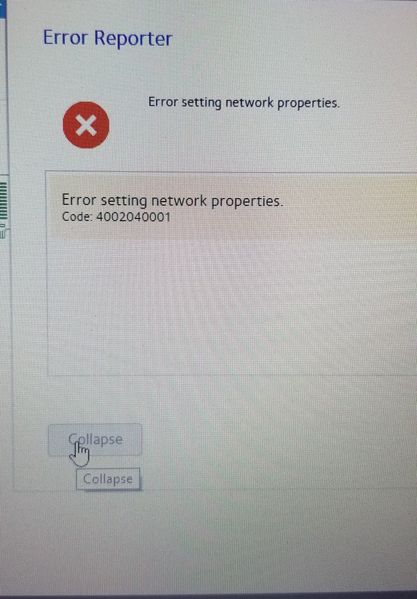
So, this is an issue I have been having since I got the 6.x firmware, and I was depserately hoping 6.10 would fix this but not so lucky. So I decided to post after over a year of this issue.
...
hsoverma
May 27, 2019Aspirant
OK I sort of got somewhere. I found this ancient post here:
So I shut the ReadyNAS down all the way and unplugged ETH0 (Labeled ETH1) on the back. Booted it up, and guess what, I can change all the settings with no errors, BOND0 and BOND0.100 works great after I plug in the second cable. Change the settings to IPV4 static and IPV6 disabled on the BOND0.100. It save the settings, and all is well.
Shut all the way down, boot up with both cables plugged in, problem comes back again, and both interfaces on the bond go to DHCP and my settings are not there. If I try to change things back to my settings, error comes back. Its also like those posts where people say that when the thing first boots up, it goes to DHCP, then switches over to the specified settings, but in my case DHCP wont go away on the VLAN.
Also tried this doing a soft restart. Same issue occurs. I wish I could just disable DHCP completely.
Definitely a bug that Netgear has not fixed for a very long time. I also upgraded to 6.10.1. This has been plaguing me since I fist got my readyNas several years ago.
Related Content
NETGEAR Academy

Boost your skills with the Netgear Academy - Get trained, certified and stay ahead with the latest Netgear technology!
Join Us!
