NETGEAR is aware of a growing number of phone and online scams. To learn how to stay safe click here.
Forum Discussion

ilneill
May 21, 2016Apprentice
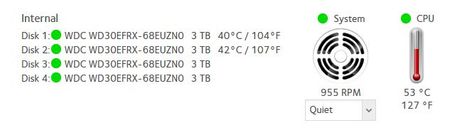
Do I have a hard drive problem here?
Just upgraded to OS6.5.0. I have noticed that the information about my installed drives is incomplete. Not sure if this is a problem or a cosmetic issue. I have tried doing a <ctrl>F5 to refresh ...
 May 22, 2016
ilneill wrote:
I suspect a ReadyNAS bug.
All drives have the same firmware. I have just checked again - now not getting temps from any of the drives.It could be a ReadyNAS bug. I've seen similar behavior in the past, but only with WD30EFRX. Currently I'm using larger drives (WD60EFRX and WD80EZRX), and they aren't showing that symptom.
The good news is that the WD30EFRX runs cool, so you shouldn't have thermal issues even if the temps aren't detected. I agree it would be nice if it were taken care of.
StephenB
May 21, 2016Guru - Experienced User
Sometimes the temps aren't reported - not sure if there's a bug in the ReadyNAS firmware or if its in the drive firmware. Perhaps take another look later.
- ilneillMay 21, 2016Apprentice
I suspect a ReadyNAS bug.
All drives have the same firmware. I have just checked again - now not getting temps from any of the drives. Lol, go figure :smileyvery-happy:Ian
- StephenBMay 22, 2016Guru - Experienced User
ilneill wrote:
I suspect a ReadyNAS bug.
All drives have the same firmware. I have just checked again - now not getting temps from any of the drives.It could be a ReadyNAS bug. I've seen similar behavior in the past, but only with WD30EFRX. Currently I'm using larger drives (WD60EFRX and WD80EZRX), and they aren't showing that symptom.
The good news is that the WD30EFRX runs cool, so you shouldn't have thermal issues even if the temps aren't detected. I agree it would be nice if it were taken care of.
Related Content
NETGEAR Academy

Boost your skills with the Netgear Academy - Get trained, certified and stay ahead with the latest Netgear technology!
Join Us!
