NETGEAR is aware of a growing number of phone and online scams. To learn how to stay safe click here.
Forum Discussion

Juzer
Aug 05, 2016Aspirant
Does drive scrubbing results in degradation of hard disks health? Model : Ready NAS RN102
Hi Guys, I have purchased ReadyNAS RN102 with 2 * 2 TB WESTERN DIGITAL NASWARE RED HARDDISKS. I USE IT VERY SPARINGLY. The initial configuration was x-raid but re-converted to JOBD to get the...

StephenB
Aug 05, 2016Guru - Experienced User
The degraded status of the volume is because it is syncing - it doesn't necessarily mean disk 1 is failing. If your shutdown wasn't clean, then the system could resync on power up. It would be good to download the logs and look at the SMART stats for both drives though (smart_history.log and disk_info.log).
Also, you should see if your data is still accessible.
If the data appears to be there, you shouldn't panic yet - though I will repeat my usual manta: "RAID is not enough to keep your data safe, you also need backups". It sounds like you have one.
To answer your question: anything that reads or writes everything in the volume can uncover a latent disk failure. A scrub does that (and that is the main reason I run them). But it shouldn't create a failure, just uncover issues.
Juzer
Aug 05, 2016Aspirant
Hi,
After the resync process was completed the drive status was raised to 100%. However, when restarted, the NAS had freezed and power led was continuously flashing.
I pressed the power button to shutdown manually but was not responding and log event as"System will be shut down in 30 minutes because of disk failure.".
I pulled out the power connector to avoid data loss as 2nd drive was working.
When I powered it on again, the same issue re-occured "Volume MIRROR is Degraded"
Then the disk1 was appearing offline. Only Disk2 was appearing online.
Then re-powered it off assuming the physical failure of the drive.
Removed the drive from the bay and connected it to my workstation.
In the BIOS setup utility the drive was appearing perfectly fine with all the SMART result showing OK.
Then Rebooted into my workstation and through diskmanagemt tool, i observed that all the partitions were intact but not accessible due to incompatible file system with Windows 7 OS.
I downloaded and executed Western Digital's Proprietary tool "Data Lifeguard Diagnostic for Windows" and re-confirmed the SMART Results in details and also executed a quick test which completed successfully.
I reconnected the drive to NAS but still it was not detecting the HDD or was showing offline.
I tried re-starting the NAS a couple of times but no effect.
But this time i removed the drive When the NAS was online and then reconnected to the system and deleted the partitions.
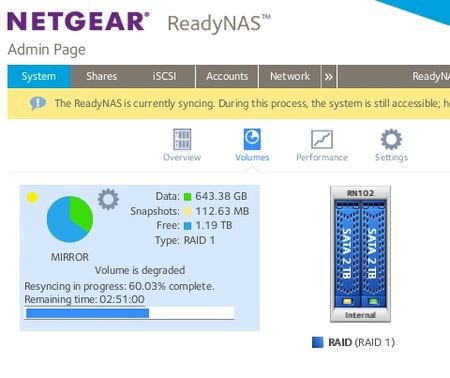
And then re-connected it to the NAS when it was online and now the re-sync process is on.
- StephenBAug 05, 2016Guru - Experienced User
Wow. If it continues to misbehave you might need to contact support.
 cpu8088Aug 05, 2016Virtuoso
i think the order is to defrag then scrub. after that u do balancing.
- StephenBAug 06, 2016Guru - Experienced User
cpu8088 wrote:
i think the order is to defrag then scrub. after that u do balancing.
They do quite different things.
Scrub verifies all the data and metadata and recomputes parity blocks,
Defrag eliminates fragmentation
Balance makes the btrfs block usage more compact.
I don't see a natural order. I schedule them out over time via the maintenance schedule, so there really is no order in my case anyway (it just depends on where you start the cycle).
It shouldn't misbehave no matter what order.
Related Content
NETGEAR Academy

Boost your skills with the Netgear Academy - Get trained, certified and stay ahead with the latest Netgear technology!
Join Us!
