NETGEAR is aware of a growing number of phone and online scams. To learn how to stay safe click here.
Forum Discussion

f2f
Oct 04, 2026Aspirant
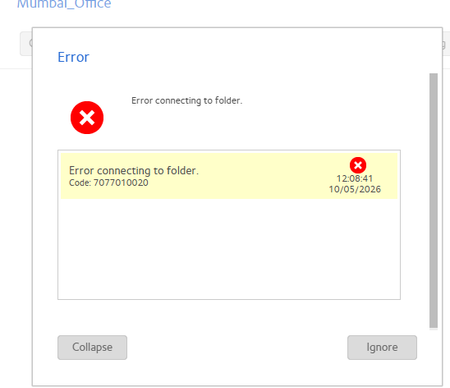
Erro connecting to folder
I am using connected my remote office with site to site vpn and truing to add folder in NAs but getting error. in my local PC i am able to open this salred ip folder but in nas getting error

Sandshark
Oct 06, 2026Sensei
I do not understand this:
f2f wrote:i am able to open this salred ip folder but in nas getting error
Do you mean you are able to open and view the contents of the folder in which you are trying to create the new folder but not do the creation? That sounds like a permissions issue, but it's hard to say without more detail. Have you previously been able to do that?
In addition to StephenB 's question, which NAS model and firmware version? Are you using admin credentials, or individual user credentials? What VPN?
f2f
Oct 08, 2026Aspirant
Site to site VPn with remote location ,Admin credintial i am using .i am able to access remote ip locally in my PC but in NAs not able to connect this folder
 StephenBOct 08, 2026Guru - Experienced User
f2f wrote:
Site to site VPn with remote location ,Admin credintial i am using .i am able to access remote ip locally in my PC but in NAs not able to connect this folder
So this is an existing folder? (you said "add folder" in the first post).
And you cannot access it either with SMB or with the NAS web ui?
When you use your browser, are you logging into the NAS web ui (https://nas-ip-address/admin) or are you going directly to the share (https://nas-ip-address/sharename).
- f2fOct 09, 2026Aspirant
i am able to open NAS in web browser but while adding user floder its getting error
- StephenBOct 09, 2026Guru - Experienced User
f2f wrote:
i am able to open NAS in web browser but while adding user floder its getting error
I'm still not fully understanding, and the details here matter. I don't know if you are talking about a public share, a user's "private" share or subfolder within an existing share.
When you say "user folder", do you mean you are trying to manually create the private "home" share for that user? That cannot be done (instead you would need to create a user account, and the system would create the private share ).
Are you are trying to add a folder to a user's private "home" share? That can only be done if you are using that user's credentials.
Are you trying to add a public share?
Or are you trying to add a folder to a specific public share? If so, have you checked both the file and network permissions in the shrae settings?
Related Content
NETGEAR Academy

Boost your skills with the Netgear Academy - Get trained, certified and stay ahead with the latest Netgear technology!
Join Us!
