NETGEAR is aware of a growing number of phone and online scams. To learn how to stay safe click here.
Forum Discussion

f2f
Oct 04, 2026Aspirant
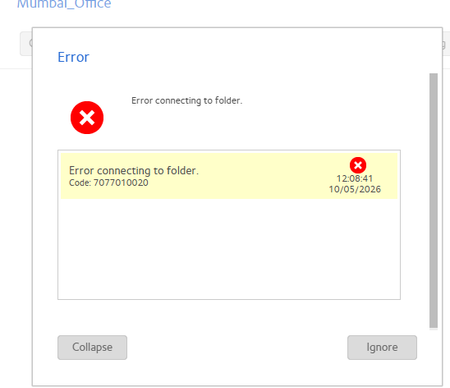
Erro connecting to folder
I am using connected my remote office with site to site vpn and truing to add folder in NAs but getting error. in my local PC i am able to open this salred ip folder but in nas getting error

StephenB
Oct 13, 2026Guru - Experienced User
f2f wrote:yes but problem while adding this folder to NAS
To be clear, you are NOT adding the folder to the NAS. You are telling the NAS to access the folder in a backup job.
If this folder is on your own PC, then check that the network connection is classified as "Private" by the PC.
Are you getting this error when you use "Test Connection"? If you are, then also try running the backup job and see if that works. I have sometimes seen cases where "Test Connection" fails for some reason, but the backup job works.
As Sandshark says, the VPN policies might be getting in the way.
Personally, I put backup software on the PCs, and have the PCs initiate the backup to the NAS instead of using a backup job. Desktops are set up to run on a schedule (waking up the PC if is not running). Laptops are backed up manually. There are several free backup utilities you can use (FreeFileSync being one of several).
I do use the backup jobs for NAS->NAS backup (using rsync, not SMB).

Sandshark
Oct 13, 2026Sensei
While a backup job can create a folder in a share, it cannot create a share. The share must already exist so you can select it in the destination portion of the backup parameters. The error message obscures the destination portion of the backup job parameters, so I cannot see where you are trying to put the backup. Post another screen grab after you've cleared the error message.
BUT, I don't believe you are even getting to the point of it trying to access the destination folder. As StephenB says, the error appears to be in accessing the source computer/folder, not the NAS. It definitely is if it's happening when you use the "Test Connection" button.
Start from the very beginning: What are you trying to accomplish? If all you are trying to do is create a new folder on the NAS, you are going about it all wrong.
Related Content
NETGEAR Academy

Boost your skills with the Netgear Academy - Get trained, certified and stay ahead with the latest Netgear technology!
Join Us!
