NETGEAR is aware of a growing number of phone and online scams. To learn how to stay safe click here.
Forum Discussion

okulo
Aug 03, 2015Aspirant
External USB backup failed, deleted, replaced, still there. #25539498
I'm a bit lost on this new site and I can't log in with my ReadyNAS ID so I only seem to have the option of using an ID I created when I registered my DGND3300 years ago.
I'm sure there used to be an appropriate section for backup jobs but I can't find it.
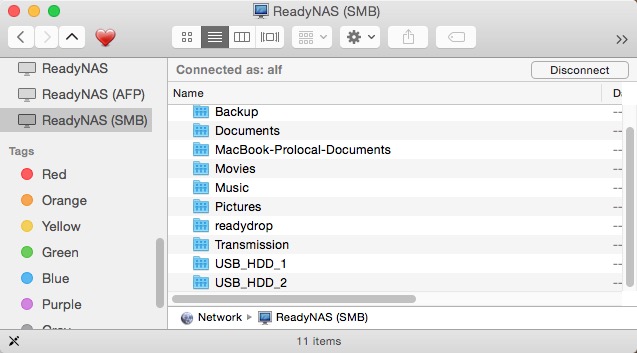
Anyway, after I updated to OS 6.2.5, I got an error e-mail saying that my USB backup had failed because the destination could not be accessed. I attempted to start it again manually but it failed again. I knew that this update addressed the USB backup job creation problem so I thought I should create a new backup job and delete the old one, which I did and it worked fine except that the new ID USB_HDD_2 was the only option available and the old USB share (USB_HDD_1) still appears in the Mac Finder when I connect via SMB (the only way I can access my USB device).
If I try to open it, I get the error, 'The operation can’t be completed because the original item for “USB_HDD_1” can’t be found.'
I can't seem to find any way of deleting the USB_HDD_1 share as it isn't listed anywhere.
I have tried restarting the ReadyNAS and my Mac but it made no difference. How can I remove it?
14 Replies
Replies have been turned off for this discussion
- BrianL2NETGEAR Employee Retired
Hi okulo,
Probably a cached network share in your computer. Either you ignore it, restart your computer or clear recent servers under "Connect to Server".
Hope this helps!
Kind regards,
BrianL
NETGEAR Community okuloAspirant
Hello.
Thanks for the reply.
I had already restarted my Mac but I have tried it again this morning without any change. I have found in the past that if there is a connection problem with my ReadyNAS, I can clear it by restarting the Finder which is a lot quicker and saves closing anything I might be working on but that hadn't helped so I rebooted.
I tried 'clear recent servers' under Connect to Server but that seemed to cause the Finder to crash and it would not restart so I rebooted again after which USB_HDD_1 is still there.
- JennCNETGEAR Employee Retired
Hi okulo,
Do you see the the USB under System - Overview? Have you tried ejecting from there then reboot NAS, then plug the USB back to the NAS before it boots up?
Please also check on another computer if it sees the USB_HDD_1 it when you map the NAS' IP.
Hope it helps.
Regards,


Related Content
NETGEAR Academy

Boost your skills with the Netgear Academy - Get trained, certified and stay ahead with the latest Netgear technology!
Join Us!
