NETGEAR is aware of a growing number of phone and online scams. To learn how to stay safe click here.
Forum Discussion

herbie747
May 01, 2016Aspirant
Firmware Upgrade not working
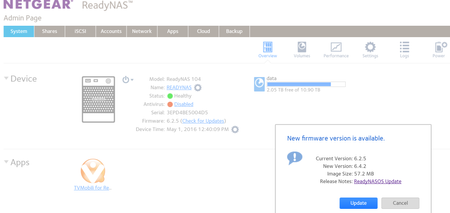
Hi all, Every time I log into my ReadyNAS Admin Page, I get this message. I press 'Update', it downloads the new firmware, and says it needs ot reboot to install. Then it boots back up to the exa...
 May 01, 2016
This is a known problem for some ARM based NAS. See this workaround: http://kb.netgear.com/app/answers/detail/a_id/29974
If that doesn't solve it, you likely will need help from support.

cpu8088
May 01, 2016Virtuoso
can u try download the firmware file and do a manual upgrade?
- StephenBMay 01, 2016Guru - Experienced User
This is a known problem for some ARM based NAS. See this workaround: http://kb.netgear.com/app/answers/detail/a_id/29974
If that doesn't solve it, you likely will need help from support.

Related Content
NETGEAR Academy

Boost your skills with the Netgear Academy - Get trained, certified and stay ahead with the latest Netgear technology!
Join Us!
