NETGEAR is aware of a growing number of phone and online scams. To learn how to stay safe click here.
Forum Discussion

metulmark
Aug 21, 2011Aspirant
frontview?
hi i have just bought an ultra 2 i cant set it up, i have no frontview? i can access raidar but it wont let me find frontview? i have another problem but thats in a different post.
where is it hidden?
mark
where is it hidden?
mark
16 Replies
Replies have been turned off for this discussion
 dbott67GuideWhat does RAIDar report for the IP address of the NAS?
You should be able to access Frontview by opening your browser to https://ip.address.of.nas/admin
If that fails to work, are you otherwise able to access the NAS (for example, accessing your shares over CIFS/SMB, AFP, FTP, etc.) or via SSH? If you can still access you data one of the aforementioned methods, it's possible that the HTTP process that runs Frontview has died. A simple reboot may cure it. metulmarkAspiranthi that didnt work, i cant set up my ultra 2 it is aking to change the ip address but i cant because i can not get into frontview?
mark- dbott67GuideIf it's a brand new setup (no data or anything), I would just try factory defaulting the unit. This will test, initialize, format and install the base OS and allow you to configure from RAIDar.
http://www.readynas.com/kb/faq/boot/how ... ry_default - metulmarkAspiranthi it is i will try that thank you
- metulmarkAspiranthi i did that it is asking for a proxy server? there is a small box comes up and it says internat connection available or password etc for proxy server?
i dont understand this part?
mark - dbott67Guide
metulmark wrote: hi i did that it is asking for a proxy server? there is a small box comes up and it says internat connection available or password etc for proxy server?
i dont understand this part?
mark
I've never seen anything like that before. What program is asking this? - metulmarkAspirantit is windows?
i cant access anything? no software nothing i have rebooted/reset the nas but still nothing?
i am sick of it!
can i ask if iam doing things right, i have the nas connected to my pc? should it be connected to the wireless box directly then move it to my pc when it is set up?
thanks
mark - dbott67GuideThe NAS should be connected to your router or switch via ethernet cable, not directly to the PC. Similar to this:
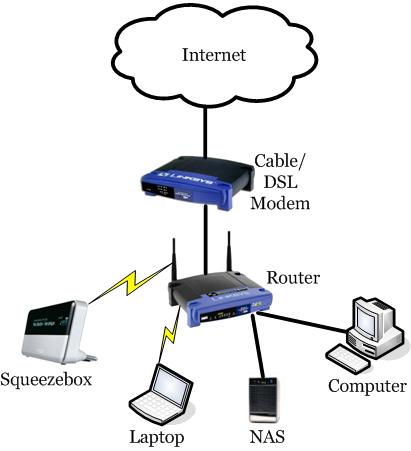
- metulmarkAspirantthanks for that, ok so can i use it wireless once it is set up? i have my pc upstairs and my router downstairs so could i move the nas upstairs or will i have to leave it next to the router connected via ethernet cable?
thanks
mark
ps my pc uses the router wireless - You could try a direct connection but a NAS really shines when connected to the network, thus letting all PC's, phones, mobile devices, etc... on the network have access to the NAS goodness :lol: .
Related Content
NETGEAR Academy

Boost your skills with the Netgear Academy - Get trained, certified and stay ahead with the latest Netgear technology!
Join Us!
